


DELL
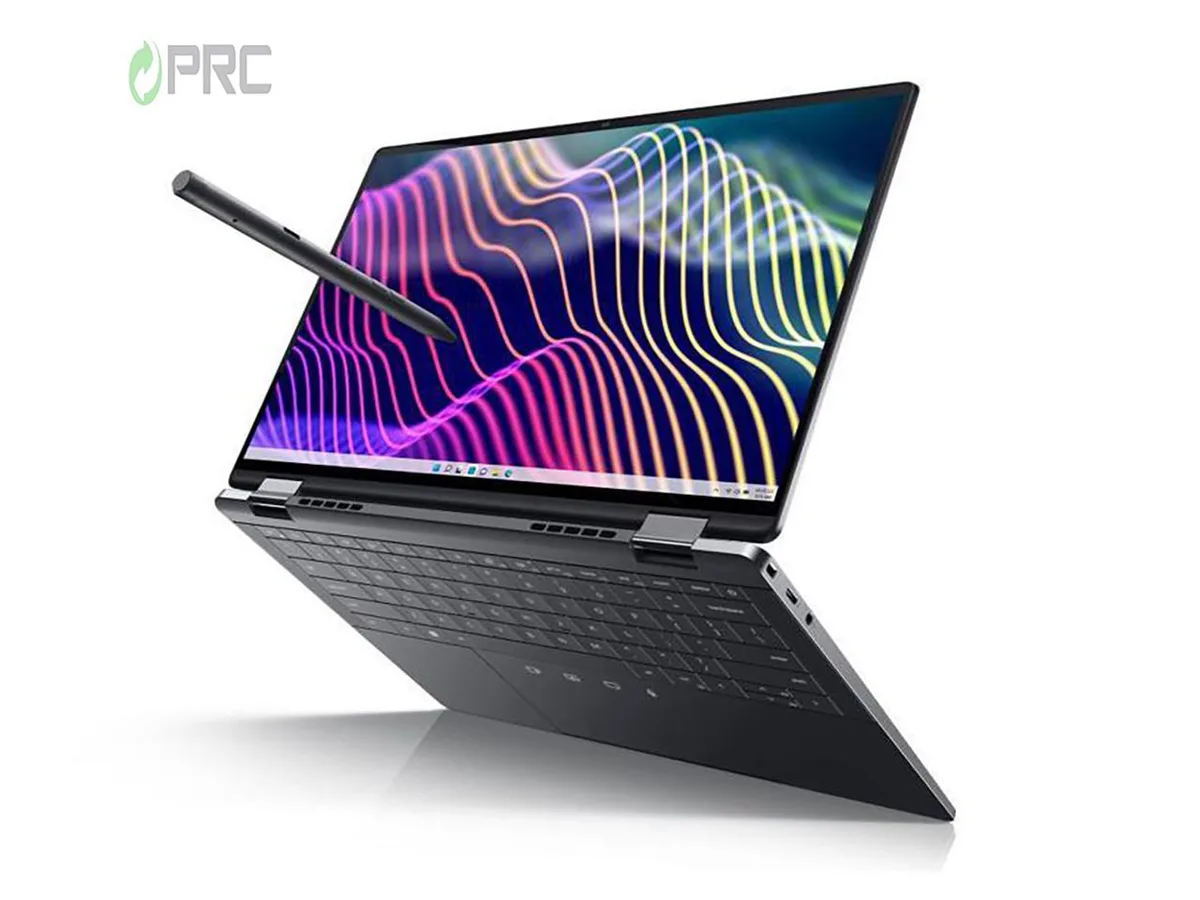
DELL Latitude 9440 2-in-1 14" QHD+ i5-1345U 16GB LPDDR5 1TB
A 14-inch convertible 2-in-1 with a QHD+ touchscreen, Intel Core i5-1345U processor, 16 GB LPDDR5 memory and a 1 TB PCIe NVMe SSD
- ColorBlack
- Operating SystemWindows 11 Pro
- CPU TypeIntel Core i5 13th Gen
- Processor NameIntel Core i5-1345U
- CPU L2 Cache6MB
- Screen Size14.0"
- 13th Gen Intel Core i5-1345U with 10 cores up to 4.70 GHz Turbo
- 16 GB LPDDR5 memory and 1 TB PCIe NVMe SSD storage
- 14" QHD+ 2560 x 1600 IPS touchscreen with anti-smudge and anti-reflective coating
- Three Thunderbolt 4 USB-C ports with Power Delivery and DisplayPort
- Windows 11 Pro pre-installed with 65 W USB-C power adapter included
Convertible 14-inch QHD+ Notebook
The Dell Latitude 9440 is a 14-inch 2-in-1 convertible notebook running Windows 11 Pro. It uses a 13th Generation Intel Core i5-1345U processor with 10 cores and 12 threads. The system includes 16 GB of LPDDR5 memory and a 1 TB PCIe NVMe SSD. A QHD+ IPS touchscreen with 2560 x 1600 resolution supports pen input.
Mobile professionals needing touch and pen input
This device suits users who want a convertible form factor with a high-resolution touch display and active pen support for annotation or sketching. Integrated Intel Iris Xe graphics handle general productivity and media playback. Buyers who require a discrete GPU for rendering or gaming should consider other options. The fixed 16 GB LPDDR5 memory cannot be upgraded after purchase.
1 TB PCIe NVMe SSD capacity
The laptop provides 1 TB of solid-state storage on a PCIe NVMe interface for fast boot and application load times. Manufacturer highlights also reference a 128 GB SSD configuration, but this unit ships with the 1 TB drive. Verify that this capacity meets your local storage requirements before buying.
Puncte forte
- 13th Gen Intel Core i5-1345U with 10 cores up to 4.70 GHz Turbo
- 16 GB LPDDR5 memory and 1 TB PCIe NVMe SSD storage
- 14" QHD+ 2560 x 1600 IPS touchscreen with anti-smudge and anti-reflective coating
- Three Thunderbolt 4 USB-C ports with Power Delivery and DisplayPort
- Windows 11 Pro pre-installed with 65 W USB-C power adapter included
Specificații
| Brand | DELL |
|---|---|
| Series | 9000 |
| Model | Latitude |
| Part Number | 9440 |
| Color | Black |
| Operating System | Windows 11 Pro |
| CPU Type | Intel Core i5 13th Gen |
| Processor Name | Intel Core i5-1345U |
| CPU L2 Cache | 6MB |
| Screen Size | 14.0" |
| Touchscreen | Non-Touch Screen |
| Display Type | QHD |
| Resolution | 2560 x 1600 |
| Panel | IPS |
| GPU/VPU | Intel Iris Xe Graphics |
| Graphic Type | Integrated Card |
| SSD | 1TB |
| HDD | No |
| Storage Spec | 1 TB |
| Memory | 16GB |
| Memory Speed | DDR4 |
| Memory Spec | 16 GB onboard |
| Memory Slot (Total) | 0 |
| Memory Slot (Available) | 0 |
| Max Memory Supported | 64 GB |
| Optical Drive Type | No |
| LAN | 10/100/1000Mbps |
| WiFi Generation | Wi-Fi 6 |
| Bluetooth | Yes |
| USB | 3 Thunderbolt 4 |
| Thunderbolt | 3 x Thunderbolt 4 |
| Video Port | 3 x Thunderbolts |
| Audio Ports | 1 x Microphone Jack, 1 x Headphone Jack |
| Audio | Integrated Sound card |
| Touchpad | Yes |
| Keyboard | Standard |
| Webcam | Yes |
| Style | Convertible |
| Type | Work / Business |
| Usage | Consumer |
| AC Adapter/Charger | 65-watt AC Adapter |
| Weight | 3 - 3.9 lbs. |
Întrebări despre acest articol
Does the 14.0" QHD+ 2-in-1 chassis require a specific VESA mount or dock for external monitors?
The laptop uses two Thunderbolt 4 USB-C ports and one Thunderbolt 4 USB-C port with Power Delivery and DisplayPort for video output; no VESA mount is built into the chassis.
What is the correct order to seat the 65 W USB-C adapter so the 13th Gen Intel Core i5-1345U negotiates full power?
Connect the USB-C cable to either Thunderbolt 4 port on the left side first, then plug the AC adapter into mains power; reversing the order can limit the CPU to 1.60 GHz base clock.
When should the 16 GB LPDDR5 memory be upgraded, and what capacity does the board support?
The 16 GB LPDDR5 is soldered and not upgradeable; storage expansion uses the M.2 slot that currently holds a 128 GB PCIe NVMe drive.
Tot din acest raion
Clienții au comparat și acestea.
Același raion, aceeași finalizare a comenzii — opt monede și un curs blocat 30 de minute.


Microsoft
Microsoft Surface 3 1657 128GB CRB 2-in-1 laptop
- Silver
- Windows 10 Pro
244,99 USD
0.00318177BTC
În stoc
Microsoft
Microsoft Surface Pro FGG-2D-00001-RFB 2-in-1 laptop 16 GB 512 GB 12.0" touchscreen 2736 x 1824 refurbished
- 12.0"
- Touch Screen
687,99 USD
0.00893517BTC
În stoc
Lenovo
Lenovo Chromebook 500e Gen 5 M89 83TA0004US 12.2" MediaTek 8GB 64GB
- 12.2"
392,99 USD420,99 USD−7%
0.0051039BTC
În stoc