


Lenovo
Lenovo Thinkpad T14 Gen 2 laptop i5-1135G7 40GB DDR4 1TB PCIe SSD 14.0" FHD Linux Mint dual boot
A 14.0" Full HD business laptop with an 11th Gen Intel Core i5-1135G7, 40GB DDR4 memory, 1TB PCIe SSD and dual-boot Windows 10 Pro and Linux Mint 20
- Memory40GB
- Memory SpeedDDR4
- TypeWork / Business
- Resolution1920 x 1080
- Screen Size14.0"
- Display TypeFull HD
- 11th Gen Intel Core i5-1135G7 up to 4.2 GHz for responsive multitasking
- 40GB DDR4 memory and 1TB PCIe SSD for large workloads
- 0 inch Full HD IPS display with 720p webcam for clear visuals
- Dual boot Windows 11 Pro and Linux Mint selectable at startup
- Wi-Fi 6 Bluetooth 5.2 Thunderbolt 4 HDMI Ethernet for versatile connectivity
ThinkPad T14 Gen 2 Business Laptop
The Lenovo ThinkPad T14 Gen 2 is a new business laptop powered by an 11th Gen Intel Core i5-1135G7 processor with four cores and a maximum turbo frequency of 4.2 GHz. It ships with 40GB of DDR4 memory and a 1TB PCIe SSD for fast storage. The 14.0 inch Full HD IPS display offers a 1920 x 1080 resolution. Windows 11 Pro and Linux Mint are configured in a dual-boot arrangement.
Professionals needing dual OS flexibility
This laptop suits professionals who need to switch between Windows 11 Pro and Linux Mint by rebooting, as both operating systems cannot run simultaneously. The Intel Iris Xe integrated graphics handle typical office workloads and video playback. Buyers who require dedicated graphics performance for 3D rendering or modern gaming should look at a different system. The 720p webcam supports standard video conferencing.
Verify port and power requirements
Before ordering, confirm that your peripherals match the available ports: two USB-A 3.2 Gen 1, two Thunderbolt 4 USB-C, one HDMI, a microSD reader, RJ-45 Ethernet and a combo audio jack. The unit includes a 65W power supply and a 50Wh integrated battery. Wireless connectivity uses Wi-Fi 6 and Bluetooth 5.2. Ensure your docking station or monitors are compatible with the Thunderbolt 4 and HDMI outputs.
Puncte forte
- 11th Gen Intel Core i5-1135G7 up to 4.2 GHz for responsive multitasking
- 40GB DDR4 memory and 1TB PCIe SSD for large workloads
- 0 inch Full HD IPS display with 720p webcam for clear visuals
- Dual boot Windows 11 Pro and Linux Mint selectable at startup
- Wi-Fi 6 Bluetooth 5.2 Thunderbolt 4 HDMI Ethernet for versatile connectivity
Specificații
| Memory | 40GB |
|---|---|
| Memory Speed | DDR4 |
| Type | Work / Business |
| Resolution | 1920 x 1080 |
| Screen Size | 14.0" |
| Display Type | Full HD |
| Touchscreen | No |
| SSD | 1 TB |
| HDD | No |
| Storage Spec | 1TB PCIe SSD |
| Brand | Lenovo |
| Series | Thinkpad T14 Gen 2 |
| Part Number | T14 |
| Model | Thinkpad |
| Color | Black |
| GPU/VPU | Intel Iris Xe Graphics |
| Operating System | Linux |
| WiFi Generation | Wi-Fi 6 |
| LAN | 10/100/1000Mbps |
| WLAN | Wi-Fi 6 |
| Bluetooth | Bluetooth 5.2 |
| CPU Type | Intel Core i5 11th Gen |
| Optical Drive Type | No |
| Webcam | Yes |
| Touchpad | ThinkPad UltraNav |
| Keyboard | Standard |
| Card Reader | Micro SD |
| Battery | Lithium Polymer |
| USB | 2 x USB 3.2 Gen 1 |
| Thunderbolt | 2 x Thunderbolt 4 |
| Video Port | 1 x HDMI |
| Ethernet | 1 x RJ-45 |
| Audio Ports | 1 x Headphone/Microphone Combo Jack |
| Audio | Integrated Sound card |
| Speaker | Integrated Stereo Speakers |
Alte versiuni ale acestui model
5 în plus din aceeași gamă
Aceeași familie, memorie, radiator sau frecvență diferite — comparați înainte de a vă decide.


Lenovo
Lenovo Thinkpad T14 Gen 2 i5-1135G7 16GB 4TB SSD 14.0" FHD Dual Boot
- 16GB
- DDR4
1.032,99 USD
0.01338573BTC
În stoc
Lenovo
Lenovo Thinkpad T14 Gen 2 laptop i5-1135G7 32GB 2TB 14.0" FHD 11th Gen
- 32GB
- DDR4
1.064,99 USD
0.01380039BTC
În stoc
Lenovo
Lenovo Thinkpad T14 Gen 2 laptop i5-1135G7 48GB 500GB 14.0" FHD
- 48GB
- DDR4
1.101,99 USD
0.01427985BTC
În stoc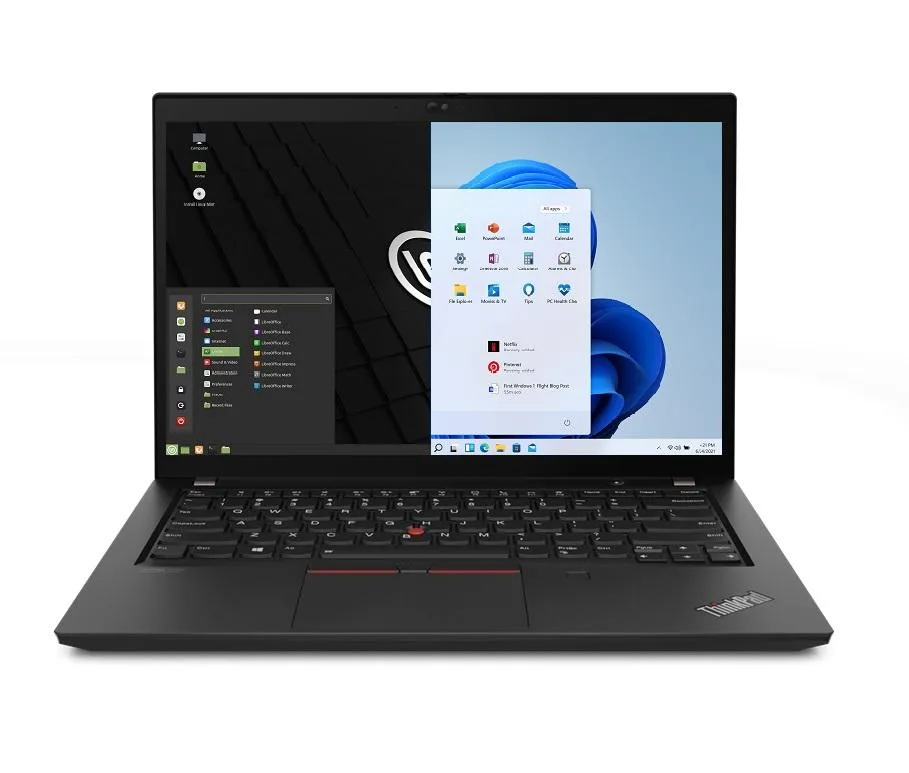
Lenovo
Lenovo Thinkpad T14 Gen 2 laptop i5-1135G7 48GB 2TB SSD 14.0" FHD Linux Mint dual boot
- 48GB
- DDR4
1.111,99 USD
0.01440943BTC
În stocÎntrebări despre acest articol
What power supply does the Thinkpad T14 Gen 2 require?
It ships with a 65W power supply that connects via one of the two USB-C Thunderbolt 4 ports.
Will my existing USB-A peripherals work with the two USB-C Thunderbolt 4 ports?
You will need a USB-C to USB-A adapter or hub; the laptop provides two USB-A 3.2 Gen1 ports natively for direct connection.
How can I verify both Windows 10 Pro and Linux Mint 20 are booting correctly after first power-on?
Reboot and choose each OS from the boot menu; confirm the desktop loads, the 1920x1080 IPS display shows native resolution, and Wi-Fi 6 connects.
Tot din acest raion
Clienții au comparat și acestea.
Același raion, aceeași finalizare a comenzii — opt monede și un curs blocat 30 de minute.


Microsoft
Microsoft Surface 3 1657 128GB CRB 2-in-1 laptop
- Silver
- Windows 10 Pro
244,99 USD
0.00317464BTC
În stoc
Microsoft
Microsoft Surface Pro FGG-2D-00001-RFB 2-in-1 laptop 16 GB 512 GB 12.0" touchscreen 2736 x 1824 refurbished
- 12.0"
- Touch Screen
687,99 USD
0.00891514BTC
În stoc
Lenovo
Lenovo Chromebook 500e Gen 5 M89 83TA0004US 12.2" MediaTek 8GB 64GB
- 12.2"
392,99 USD420,99 USD−7%
0.00509246BTC
În stoc