

STARTECH
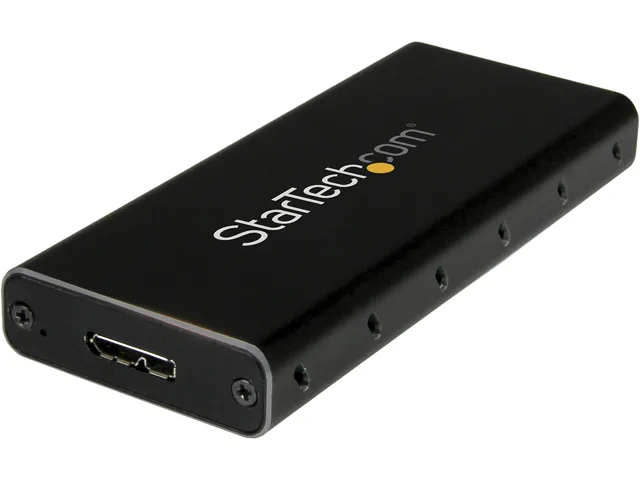
STARTECH SM2NGFFMBU33 M.2 SATA drive enclosure USB 3.0 UASP aluminum
- Black
- See Details
27,99 USD
0.00035035BTC
În stocAcceptăm criptomonede — astfel, criptomonedele pe care le dețineți pot cumpăra echipamente reale.Plătiți în cripto, cheltuiți-o pe echipamente reale. Livrare asigurată gratuită oriunde în lume peste 399 $. Cartoane neutre, fără marcă, expediate din Germania.Livrare asigurată gratuită peste 399 $. Cursul dumneavoastră este blocat timp de 30 de minute de la deschiderea paginii de plată.Curs blocat 30 de minute. Fiecare articol este sigilat, numărul de serie este verificat, iar produsul este acoperit de o garanție de 24 de luni.Sigilat, garantat 24 de luni.


STARTECH
An aluminum enclosure that turns an M.2 SATA drive into a 10Gbps USB-C portable storage device for Thunderbolt 3 hosts
Color Black / Silver
External Interface USB 3.1 Type-C
The STARTECH SM21BMU31C3 converts a 2280 M.2 SATA solid-state drive into a portable USB 3.1 Gen 2 device. It targets users who want to reuse an internal SATA stick as external storage for a USB-C laptop such as a MacBook Pro or Dell XPS.
The black and silver aluminium shell acts as a heatsink, so the drive runs silently with no fan and draws power solely from the host port. At .5 by 1.6 by 3.9 inches and 1.90 oz it adds negligible bulk while keeping surface temperatures low during sustained transfers.
This unit replaces older 5 Gbps enclosures and doubles the interface ceiling to 10 Gbps, making the jump worthwhile when the source SSD can saturate SATA III. It does not support NVMe or PCIe AHCI drives, so buyers needing those protocols must choose a different model.
| Brand | StarTech.com |
|---|---|
| Model | SM21BMU31C3 |
| Color | Black / Silver |
| Type | See Details |
| Internal Interface | SATA I/II/III |
| External Interface | USB 3.1 Type-C |
| Features | Turn your M.2 NGFF SATA drive into an ultra-fast and portable storage solution for USB C enabled host including MacBook or Chromebook Pixel or Dell XPS M.2 NGFF SATA enclosure USB 3.1 Gen 2 (10Gbps) external enclosure with USB C Portable M.2 SSD drive enclosure for USB Type-C enabled host USB-C hard disk box for M.2 SATA SSDs Compatible with Thunderbolt 3 USB C port Aluminum M.2 SSD enclosure with ventilation Supports SATA III (6Gbps) |
| Dimensions | Height:0.5" x Width:1.6" x Depth:3.9" |
| Weight | 1.90 oz |
| Package Contents | M.2 NGFF SATA Enclosure - USB 3.1 1 x USB C To Micro B Cable 1 x M.2 Screw Kit 1 x Screwdriver 1 x Quick Install Guide |
| Greutate la expediere | 0.14 kg |
| Dimensiunile coletului | 157 × 130 × 30 mm |
Alte versiuni ale acestui model
Aceeași familie, memorie, radiator sau frecvență diferite — comparați înainte de a vă decide.
Open the aluminum case, insert the M.2 SATA drive at an angle into the internal SATA connector, secure it with the supplied M.2 screw, then close the case and connect the USB-C cable; the step most often missed is using the included screw to lock the drive down, which prevents disconnects when the enclosure is moved.
The enclosure itself has no moving parts and requires no scheduled maintenance; only the installed M.2 SATA SSD may eventually wear out and need replacement, while the supplied USB-C to Micro-B cable can be swapped if the connector becomes loose.
The internal SATA III interface caps sustained throughput at roughly 6 Gbps, so even though the external USB 3.1 Gen 2 link supports 10 Gbps, the drive’s own SATA speed becomes the bottleneck during long transfers.
Tot din acest raion
Același raion, aceeași finalizare a comenzii — opt monede și un curs blocat 30 de minute.
În ce monedă plătiți și în ce monedă citiți prețurile.
Trimis din portofelul dumneavoastră la finalizarea comenzii
Doar pentru afișare — catalogul este exprimat în dolari
Nicio monedă nu corespunde.
Alegeți limba în care vă vorbește site-ul.
Prima vizită?
Aveți deja un cont?
Nu există o resetare automată: acest magazin nu trimite niciun e-mail, deci nu există niciun link de unică folosință de solicitat. Lăsați adresa în cont. Va fi tratată manual.
Cerere înregistrată
Nu veți primi nimic în căsuța de e-mail — acest magazin nu trimite niciun e-mail. Cineva se ocupă de asta manual.
V-ați amintit-o?




