

SanDisk
SanDisk Cruzer Blade 8 GB USB 2.0 USB flash drive Black SDCZ50-008G-B35
391,99 $
0.00497153BTC
Na zalogiSprejemamo kriptovalute — tako lahko sredstva, ki jih imate, kupijo pravo strojno opremo.Plačajte v kriptovaluti, zapravite jo za pravo strojno opremo. Brezplačna zavarovana dostava po vsem svetu nad 399 $. Nevtralni kartoni brez znamke, poslani iz Nemčije.Brezplačna zavarovana dostava nad 399 $. Vaš tečaj je zaklenjen za 30 minut, takoj ko se odpre blagajna.Tečaj zaklenjen 30 minut. Vsak izdelek je zapečaten, njegova serijska številka preverjena, in krit z 24-mesečno garancijo.Zapečateno, 24-mesečna garancija.


ASUS
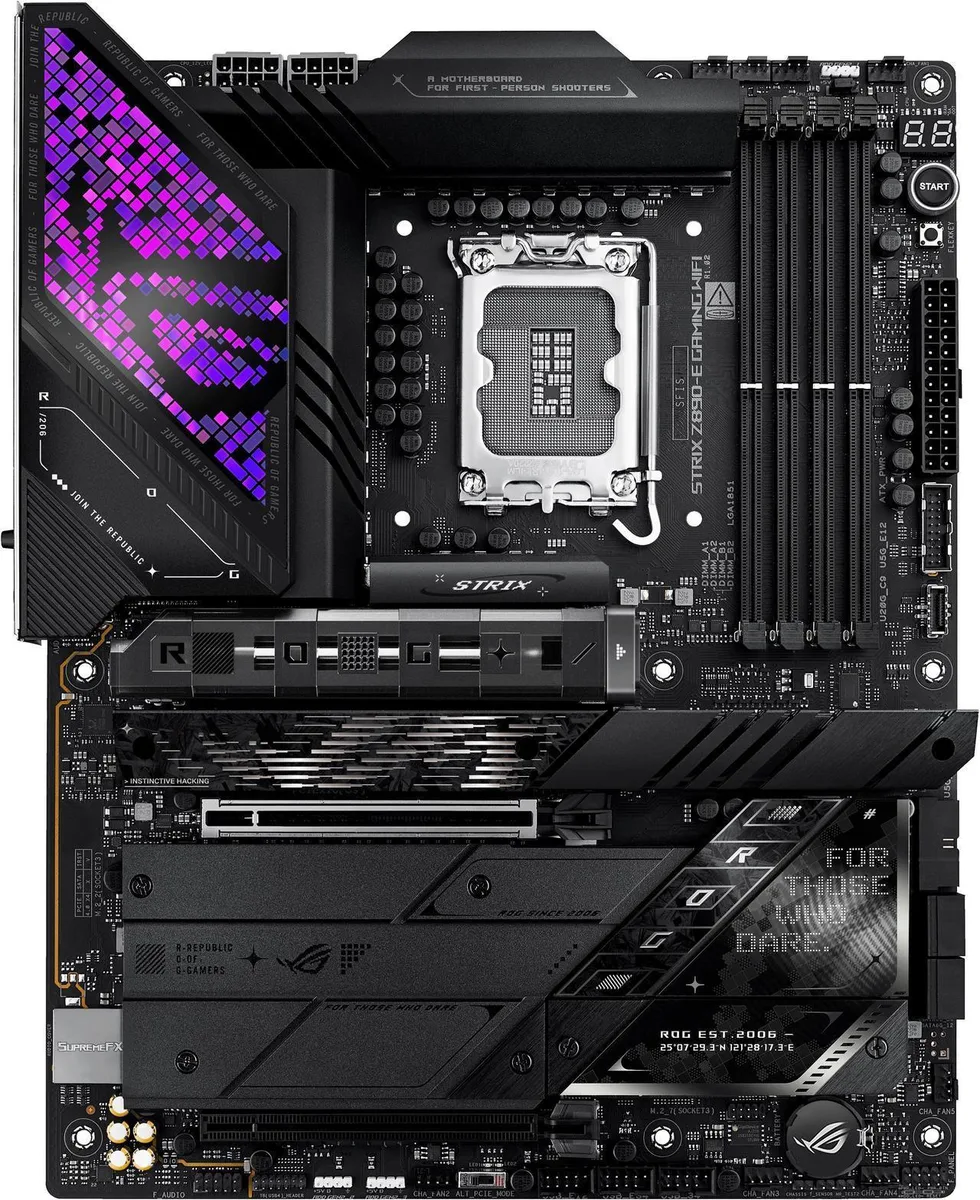
An ATX Intel Z890 board for Core Ultra Series 2 CPUs with 18+2+1+2 power stages, DDR5 to 8800 MT/s, three PCIe 5.0 and four PCIe 4.0 M.2 slots, WiFi 7, Bluetooth 5.4, Thunderbolt 4 and 5 Gbps LAN
This motherboard uses the Intel Z890 chipset and an LGA 1851 socket for Intel Core Ultra Series 2 processors. It targets builders who want an ATX board prepared for advanced AI workloads and high-speed connectivity. Four DDR5 slots support up to 192GB of memory with speeds reaching 8800+ MT/s when overclocked.
Massive heatsinks with an integrated I/O cover and a C-shaped heatpipe manage heat from the 18+2+1+2 power stage array rated at 110A, 90A, 90A and 80A. ProCool II connectors and MicroFine alloy chokes deliver stable current. High-conductivity thermal pads cover all seven M.2 slots to keep storage temperatures low under load.
ASUS-exclusive AI Overclocking, AI Cooling II and AI Networking II automatically tune frequencies, fan curves and traffic prioritisation. NPU Boost and ASUS AI Advisor add workload-specific acceleration and guided setup. DIMM Fit, DIMM Flex and AEMP III simplify memory configuration while improving stability and performance.
| Brand | ASUS |
|---|---|
| Model | ROG STRIX Z890-E GAMING WIFI |
| CPU Socket Type | LGA 1851 |
| CPU Type | LGA 1851 |
| Chipset | Intel Z890 |
| Number of Memory Slots | 4x288pin (DDR5) |
| Memory Standard | DDR5 |
| Maximum Memory Supported | 192GB |
| Memory Feature | Support up to 8800+MT/s (OC), Non-ECC, Clocked Unbuffered DIMM (CUDIMM)* Dual Channel Memory Architecture Supports Intel Extreme Memory Profile (XMP) memory module Supports DIMM Flex NitroPath DRAM Technology DIMM Fit ASUS Enhanced Memory Profile III (AEMP III) * Non-ECC, Un-buffered DDR5 Memory supports On-Die ECC function |
| PCI Express 5.0 x16 | Intel Core Ultra Processors(series 2)* 1 x PCIe 5.0 x16 slots (supports x16 mode) |
| PCI Express 4.0 x16 | Intel Z890 Chipset** 1 x PCIe 4.0 x16 slot (supports x4 mode) |
| Serial ATA (SATA) | 4 x SATA 6Gb/s |
| M.2 | Intel Core Ultra Processors(series 2)* M.2_1 slot (Key M), type 2242/2260/2280/22110 (supports PCIe 5.0 x4 mode) M.2_2 slot (Key M), type 2280 (supports PCIe 4.0 x4 mode) M.2_3 slot (Key M), type 2242/2260/2280 (supports PCIe 5.0 x4 mode)** M.2_4 slot (Key M), type 2242/2260/2280 (supports PCIe 5.0 x4 mode)** Intel Z890 Chipset M.2_5 slot (Key M), type 2280 (supports PCIe 4.0 x4 mode) M.2_6 slot (Key M), type 2280 (supports PCIe 4.0 x4 mode) M.2_7 slot (Key M), type 2242/2260/2280 (supports PCIe 4.0 x4 & SATA modes) ** M.2_2 & M.2_3 slots share bandwidth with PCIEX16(G5). When M.2_2 |
| SATA RAID | * Intel Rapid Storage Technology supports PCIe RAID 0/1/5/10, SATA RAID 0/1/5/10, M.2 slot from CPU only supports RAID 0/1/5. |
| Audio Channels | ROG SupremeFX 7.1 Surround Sound High Definition Audio CODEC ALC4080* - Impedance sense for front and rear headphone outputs - Supports: Jack-detection, Multi-streaming, Front Panel MIC Jack-retasking - High quality 120 dB SNR stereo playback output and 110 dB SNR recording input - Supports up to 32-Bit/384 kHz playback Audio Features - Audio Shielding - Savitech SV3H712 AMP - Gold-plated audio jacks - Rear optical S/PDIF out port - Premium audio capacitors - Audio cover * The LINE OUT port on the rear panel does not support spatial audio. If you wish to use spatial audio, make sure |
| Max LAN Speed | 5Gbps |
| Wireless LAN | Wi-Fi 802.11 be |
| Bluetooth | Bluetooth 5.4 |
| Back I/O Ports | 2 x Thunderbolt 4 USB Type-C ports (2 x USB Type-C) 9 x USB 10Gbps ports (7 x Type-A + 1 x USB Type-C + 1 x USB Type-C with up to 30W PD Fast-charge) 3 x USB 5Gbps ports (3 x Type-A) 1 x DisplayPort 1 x HDMI port 1 x Wi-Fi Module 1 x Realtek 5Gb Ethernet 2 x Gold-plated audio jacks 1 x Optical S/PDIF out port 1 x BIOS FlashBack button 1 x Clear CMOS button |
| Onboard USB | 1 x USB 20Gbps connector (supports USB Type-C) 2 x USB 5Gbps headers support additional 4 USB 5Gbps ports 3 x USB 2.0 headers support additional 6 USB 2.0 ports |
| Other Connectors | Fan and Cooling related 1 x 4-pin CPU Fan header 1 x 4-pin CPU OPT Fan header 1 x 4-pin AIO Pump header 5 x 4-pin Chassis Fan headers Miscellaneous 3 x Addressable Gen 2 headers 1 x CPU Over Voltage jumper 1 x FlexKey button 1 x Front Panel Audio header (F_AUDIO) 1 x Start button 1 x 10⁻¹ pin System Panel header 1 x Thermal Sensor header |
| BIOS Feature | 256 Mb Flash ROM, UEFI AMI BIOS |
| Software | ROG Exclusive Software - ROG CPU-Z - Dolby Atmos ASUS Exclusive Software Armoury Crate - AIDA64 Extreme (60 days free trial) - Aura Creator - Aura Sync - Fan Xpert 4 (with AI Cooling II) - GameFirst - HWiNFO - Power Saving ASUS Driver Hub ASUS GlideX TurboV Core USB Wattage Watcher Adobe Creative Cloud (Free Trial) Norton 360 for Gamers (60 Days Free Trial) WinRAR (40 Days Free Trial) UEFI BIOS AI Overclocking Guide ASUS EZ DIY - ASUS CrashFree BIOS 3 - ASUS EZ Flash 3 - ASUS UEFI BIOS EZ Mode - ASUS MyHotkey NPU Boost FlexKey |
| Windows 11 | Supported |
| Form Factor | ATX |
| Dimensions (W x L) | 12.0" x 9.6" |
| Power Pin | 1 x 24-pin Main Power connector 2 x 8-pin +12V CPU Power connectors |
| Features | Extreme Engine Digi+ - 5K Black Metallic Capacitors ASUS Q-Design - M.2 Q-Latch - M.2 Q-Release - M.2 Q-Slide - PCIe Slot Q-Release Slim (with PCIe SafeSlot) - Q-Antenna - Q-Code - Q-Dashboard - Q-DIMM - Q-LED (CPU [red], DRAM [yellow], VGA [white], Boot Device [yellow green]) - Q-Slot ASUS Thermal Solution - M.2 heatsinks - M.2 heatsink backplate - VRM heatsink design ASUS EZ DIY - BIOS FlashBack button - BIOS FlashBack LED - Clear CMOS button - ProCool II - Pre-mounted I/O shield - SafeSlot - SafeDIMM Aura Sync - Addressable Gen 2 headers |
| Package Contents | Cables 2 x SATA 6Gb/s cables Additional Cooling Kit 1 x Thermal pad for M.2 22110 Miscellaneous 1 x ASUS Wi-Fi moving antennas 1 x Cable ties pack 1 x M.2 Q-Latch package 2 x M.2 Q-Slides 1 x ROG key chain 1 x ROG Strix stickers 7 x M.2 Rubbers Documentation 1 x Quick start guide |
Align the processor triangle with the socket marker, lower it straight down without pressure, then engage the retention lever fully; the lever should move smoothly if alignment is correct.
The massive heatsinks, integrated I/O cover and C-shaped heatpipe rely on high-conductivity thermal pads that can dry out and should be refreshed during a major teardown.
The 110 A, 90 A and 80 A stages are cooled by the massive heatsink and heatpipe; prolonged maximum current will eventually saturate the thermal mass and throttle.
Tudi v tem oddelku
Ista polica, ista blagajna — osem kriptovalut in 30-minutni zaklep tečaja.
V čem plačujete in v čem berete cene.
Poslano iz Vaše denarnice ob blagajni
Samo za prikaz — katalog je cenovno izražen v dolarjih
Nobena valuta ne ustreza.
Izberite jezik, v katerem Vam govori spletna stran.
Ni ustreznega jezika.
Prvič tu?
Že imate račun?
Samodejne ponastavitve ni: ta trgovina ne pošilja e-pošte, zato ni enkratne povezave, ki bi jo lahko zahtevali. Pustite naslov na računu — nekdo ga bo obravnaval ročno.
Zahteva zabeležena
V Vašo elektronsko pošto ne prihaja nič — ta trgovina ne pošilja nobene e-pošte. Zahteve nekdo obravnava ročno.
Ste se spomnili?



