

EN-Labs
EN-Labs 11-001-366 PCIe x4 USB 3.2 10Gbps 5-port card
- no
- 12CM Case fan,screw…
31,99 $
0.00041077BTC
LaosMe võtame vastu krüptoraha — nii saab teie hoitav krüptoraha osta päris riistvara.Makske krüptorahaga, kulutage seda päris riistvarale. Tasuta kindlustatud tarne kogu maailmas, üle 399 $. Lihtsad, kaubamärgita väliskarbid, saadetud Saksamaalt.Tasuta kindlustatud tarne üle 399 $. Teie kurss lukustatakse 30 minutiks kohe, kui kassa avaneb.Kurss lukustatud 30 minutiks. Iga toode on pitseeritud, selle seerianumber on kontrollitud ja sellel kehtib 24-kuuline garantii.Pitseeritud, 24-kuulise garantiiga.


HP
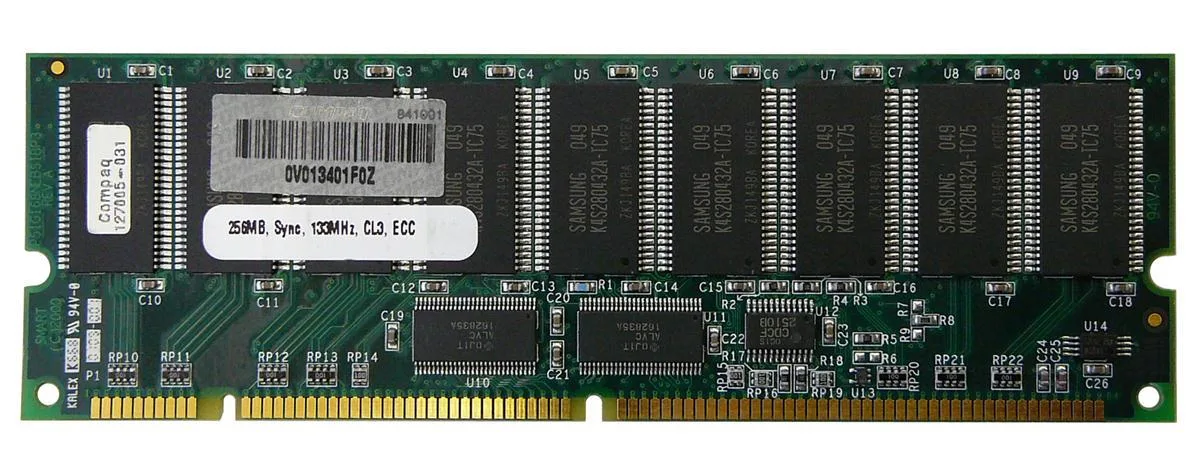
256 MB SDRAM desktop memory module with 168-pin DIMM form factor for legacy system upgrades
The HP 127005-031 is a 256MB SDRAM DIMM built for desktop systems that use 168-pin memory slots. It provides a basic capacity upgrade for older machines running legacy operating systems or applications that require this specific form factor and pin count.
As a standard SDRAM module without active cooling, it operates silently and draws only the minimal power required by the memory technology itself. No additional case airflow or power budget considerations are needed beyond what the motherboard slot supplies.
Under continuous memory workloads the module maintains its rated specification without thermal throttling because it generates negligible heat. Stability depends on the host system memory controller and the quality of the power delivery to the DIMM slots.
| Brand | HP |
|---|
Align the notch on the 168-pin edge connector with the key in the motherboard slot, press down firmly until both side clips snap shut, and verify the module sits evenly; the most common error is stopping before the clips engage fully.
No scheduled maintenance is required; keep the gold contacts clean and ensure the system cooling keeps the DIMM within normal operating temperature, replacing the module only if memory errors appear or capacity becomes insufficient.
The 256MB capacity ceiling is reached before any thermal or timing limit, causing the operating system to swap to disk once active workloads exceed the installed memory size.
Veel samast osakonnast
Sama osakond, sama kassa — kaheksa krüptovaluutat ja 30-minutiline kursilukk.
See, millega maksate, ja see, milles vaatate hindu.
Saadetud teie rahakotist kassas
Ainult kuvamiseks — kataloogi hinnad on dollarites
Ükski vääring ei vasta sellele.
Valige keel, milles sait teiega räägib.
Ükski keel ei vasta.
Esimest korda siin?
Teil on juba konto?
Automaatset lähtestamist ei ole: see pood ei saada ühtegi e-kirja, seega pole ka ühekordset linki, mida küsida. Jätke aadress kontole alles, seda käsitletakse käsitsi.
Päring registreeritud
Teie postkasti ei jõua midagi — see pood ei saada e-kirju üldse. Keegi tegeleb sellega käsitsi.
Tuli meelde?



