

NEMIX RAM
NEMIX RAM DDR5-5600 2TB (16x128GB) ECC RDIMM CL46 1.1V Supermicro H14SST-G memory upgrade
- 2TB (16 x 128GB)
- 288-Pin DDR5 RDIMM
62.908,99 USD
0.81045309BTC
Til á lagerVið tökum við rafmynt — svo myntirnar sem þú átt geta keypt alvöru vélbúnað.Greiddu í rafmynt, eyddu henni í alvöru vélbúnað. Frí, tryggð sending um allan heim fyrir pantanir yfir 399 $. Hlutlausir pappakassar án merkinga, sendir frá Þýskalandi.Frí, tryggð sending yfir 399 $. Gengið þitt er læst í 30 mínútur um leið og greiðsluferlið hefst.Gengið læst í 30 mínútur. Hver vara er innsigluð, raðnúmer hennar yfirfarið, og hún nýtur 24 mánaða ábyrgðar.Innsiglað, með 24 mánaða ábyrgð.


HP
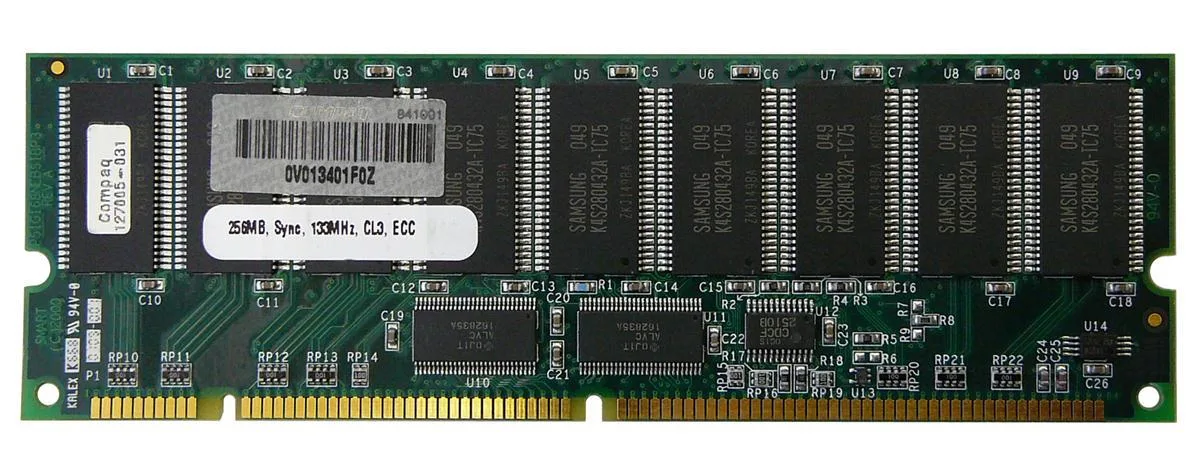
256 MB SDRAM desktop memory module with 168-pin DIMM form factor for legacy system upgrades
The HP 127005-031 is a 256MB SDRAM DIMM built for desktop systems that use 168-pin memory slots. It provides a basic capacity upgrade for older machines running legacy operating systems or applications that require this specific form factor and pin count.
As a standard SDRAM module without active cooling, it operates silently and draws only the minimal power required by the memory technology itself. No additional case airflow or power budget considerations are needed beyond what the motherboard slot supplies.
Under continuous memory workloads the module maintains its rated specification without thermal throttling because it generates negligible heat. Stability depends on the host system memory controller and the quality of the power delivery to the DIMM slots.
| Brand | HP |
|---|
Align the notch on the 168-pin edge connector with the key in the motherboard slot, press down firmly until both side clips snap shut, and verify the module sits evenly; the most common error is stopping before the clips engage fully.
No scheduled maintenance is required; keep the gold contacts clean and ensure the system cooling keeps the DIMM within normal operating temperature, replacing the module only if memory errors appear or capacity becomes insufficient.
The 256MB capacity ceiling is reached before any thermal or timing limit, causing the operating system to swap to disk once active workloads exceed the installed memory size.
Einnig í þessum vöruflokki
Sama hilla, sama greiðsluferli — átta myntir og 30 mínútna gengislæsing.
Það sem þú greiðir í, og það sem þú sérð verð í.
Sent úr veskinu þínu í greiðsluferlinu
Aðeins til skýringar — verð í vörulistanum eru í Bandaríkjadölum
Enginn gjaldmiðill passar við það.
Veldu tungumálið sem síðan talar við þig á.
Fyrsta heimsókn?
Áttu þegar aðgang?
Það er engin sjálfvirk endurstilling: þessi verslun sendir engan tölvupóst, svo það er enginn einnota tengill til að biðja um. Skildu netfangið eftir á aðganginum og einhver sinnir því handvirkt.
Beiðni skráð
Ekkert er á leiðinni í pósthólfið þitt — þessi verslun sendir engan tölvupóst. Einhver sinnir þessu handvirkt.
Mundir þú það?


