

NEMIX RAM
NEMIX RAM DDR5-5600 2TB (16x128GB) ECC RDIMM CL46 1.1V Supermicro H14SST-G memory upgrade
- 2TB (16 x 128GB)
- 288-Pin DDR5 RDIMM
62 908,99 USD
0.80987924BTC
Yra sandėlyjePriimame kriptovaliutą — taip monetos, kurias turite, gali nupirkti tikrą techniką.Mokėkite kriptovaliuta, išleiskite ją tikrai technikai. Nemokamas apdraustas pristatymas visame pasaulyje virš 399 $. Paprastos, be žymų siuntos dėžės, siunčiamos iš Vokietijos.Nemokamas apdraustas pristatymas virš 399 $. Jūsų kursas fiksuojamas 30 minučių, kai tik prasideda atsiskaitymas.Kursas fiksuojamas 30 minučių. Kiekvienas gaminys užplombuotas, jo serijos numeris patikrintas, ir jam taikoma 24 mėnesių garantija.Užplombuota, 24 mėnesių garantija.


HP
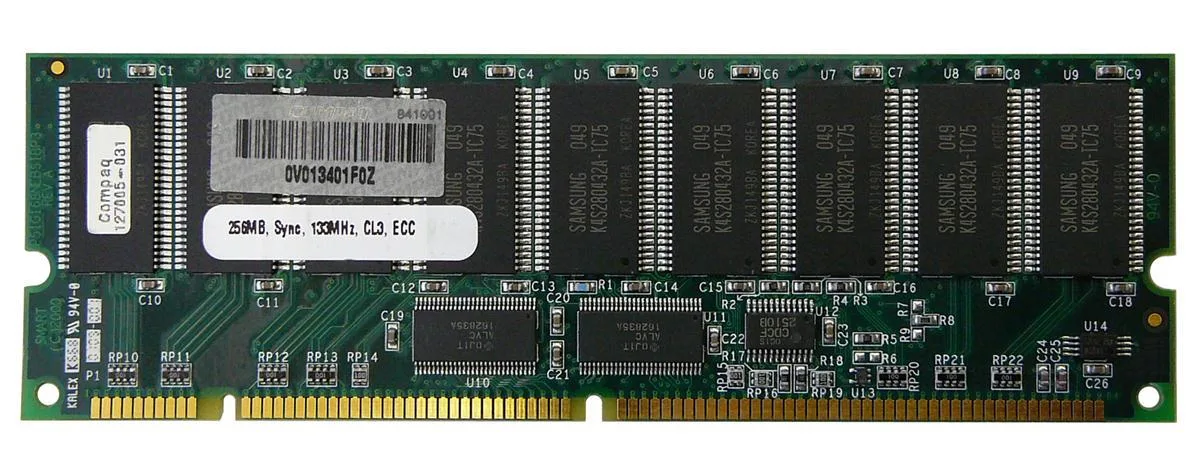
256 MB SDRAM desktop memory module with 168-pin DIMM form factor for legacy system upgrades
The HP 127005-031 is a 256MB SDRAM DIMM built for desktop systems that use 168-pin memory slots. It provides a basic capacity upgrade for older machines running legacy operating systems or applications that require this specific form factor and pin count.
As a standard SDRAM module without active cooling, it operates silently and draws only the minimal power required by the memory technology itself. No additional case airflow or power budget considerations are needed beyond what the motherboard slot supplies.
Under continuous memory workloads the module maintains its rated specification without thermal throttling because it generates negligible heat. Stability depends on the host system memory controller and the quality of the power delivery to the DIMM slots.
| Brand | HP |
|---|
Align the notch on the 168-pin edge connector with the key in the motherboard slot, press down firmly until both side clips snap shut, and verify the module sits evenly; the most common error is stopping before the clips engage fully.
No scheduled maintenance is required; keep the gold contacts clean and ensure the system cooling keeps the DIMM within normal operating temperature, replacing the module only if memory errors appear or capacity becomes insufficient.
The 256MB capacity ceiling is reached before any thermal or timing limit, causing the operating system to swap to disk once active workloads exceed the installed memory size.
Taip pat šiame skyriuje
Ta pati lentyna, tas pats atsiskaitymas — aštuonios monetos ir 30 minučių fiksuotas kursas.
Tai, kuo mokate, ir valiuta, kuria matote kainas.
Išsiunčiama iš Jūsų piniginės atsiskaitant
Tik rodoma — katalogo kainos nurodytos doleriais
Tokios valiutos nerasta.
Pasirinkite kalbą, kuria Jums kalbės svetainė.
Pirmą kartą čia?
Jau turite paskyrą?
Automatinio atstatymo nėra: ši parduotuvė nesiunčia jokių el. laiškų, todėl nėra jokios vienkartinės nuorodos, kurios būtų galima paprašyti. Palikite adresą paskyroje, ir juo bus pasirūpinta rankiniu būdu.
Prašymas užfiksuotas
Į Jūsų pašto dėžutę niekas nekeliauja — ši parduotuvė apskritai nesiunčia jokių el. laiškų. Šiuos prašymus kažkas peržiūri rankiniu būdu.
Prisiminėte?


