

NEMIX RAM
NEMIX RAM DDR5-5600 2TB (16x128GB) ECC RDIMM CL46 1.1V Supermicro H14SST-G memory upgrade
- 2TB (16 x 128GB)
- 288-Pin DDR5 RDIMM
62 908,99 $
0.80848453BTC
VarastossaHyväksymme kryptoa — hallussasi olevat kolikot voivat näin ostaa oikeaa laitteistoa.Maksa kryptolla, käytä se oikeaan laitteistoon. Ilmainen vakuutettu toimitus maailmanlaajuisesti yli 399 $. Neutraalit, tuotemerkittömät ulkopakkaukset, lähetetään Saksasta.Ilmainen vakuutettu toimitus yli 399 $. Kurssisi lukitaan 30 minuutiksi heti, kun kassa avautuu.Kurssi lukittu 30 minuutiksi. Jokainen tuote on sinetöity, sen sarjanumero on tarkistettu, ja sillä on 24 kuukauden takuu.Sinetöity, 24 kuukauden takuu.


HP
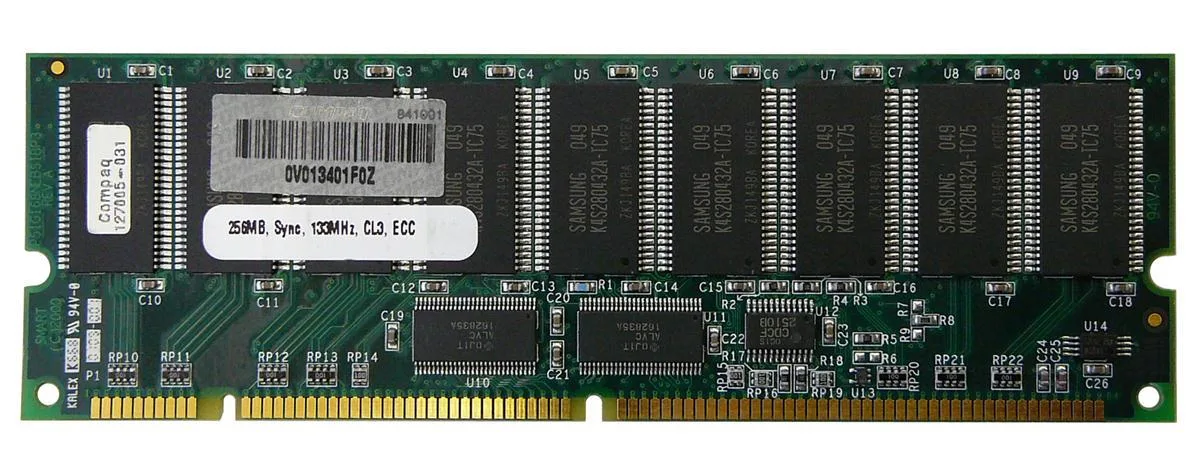
256 MB SDRAM desktop memory module with 168-pin DIMM form factor for legacy system upgrades
The HP 127005-031 is a 256MB SDRAM DIMM built for desktop systems that use 168-pin memory slots. It provides a basic capacity upgrade for older machines running legacy operating systems or applications that require this specific form factor and pin count.
As a standard SDRAM module without active cooling, it operates silently and draws only the minimal power required by the memory technology itself. No additional case airflow or power budget considerations are needed beyond what the motherboard slot supplies.
Under continuous memory workloads the module maintains its rated specification without thermal throttling because it generates negligible heat. Stability depends on the host system memory controller and the quality of the power delivery to the DIMM slots.
| Brand | HP |
|---|
Align the notch on the 168-pin edge connector with the key in the motherboard slot, press down firmly until both side clips snap shut, and verify the module sits evenly; the most common error is stopping before the clips engage fully.
No scheduled maintenance is required; keep the gold contacts clean and ensure the system cooling keeps the DIMM within normal operating temperature, replacing the module only if memory errors appear or capacity becomes insufficient.
The 256MB capacity ceiling is reached before any thermal or timing limit, causing the operating system to swap to disk once active workloads exceed the installed memory size.
Myös tällä osastolla
Sama osasto, sama kassa — kahdeksan kryptovaluuttaa ja 30 minuutin kurssilukko.
Valuutta, jolla maksetaan, sekä valuutta, jossa hinnat näytetään.
Lähetetään lompakostasi kassalla
Vain näyttöä varten — hinnat ovat Yhdysvaltain dollareissa
Valuuttaa ei löytynyt.
Valitse kieli, jolla sivusto puhuu sinulle.
Uusi täällä?
Onko sinulla jo tili?
Automaattista palautusta ei ole: kauppa ei lähetä sähköpostia lainkaan, joten kertakäyttöistä linkkiä ei ole mistä pyytää. Jätä osoite tilille, niin se käsitellään käsin.
Pyyntö kirjattu
Mikään ei ole tulossa sähköpostiisi — tämä kauppa ei lähetä sähköpostia lainkaan. Joku käsittelee nämä pyynnöt käsin.
Muistitko sen?


