ASUS
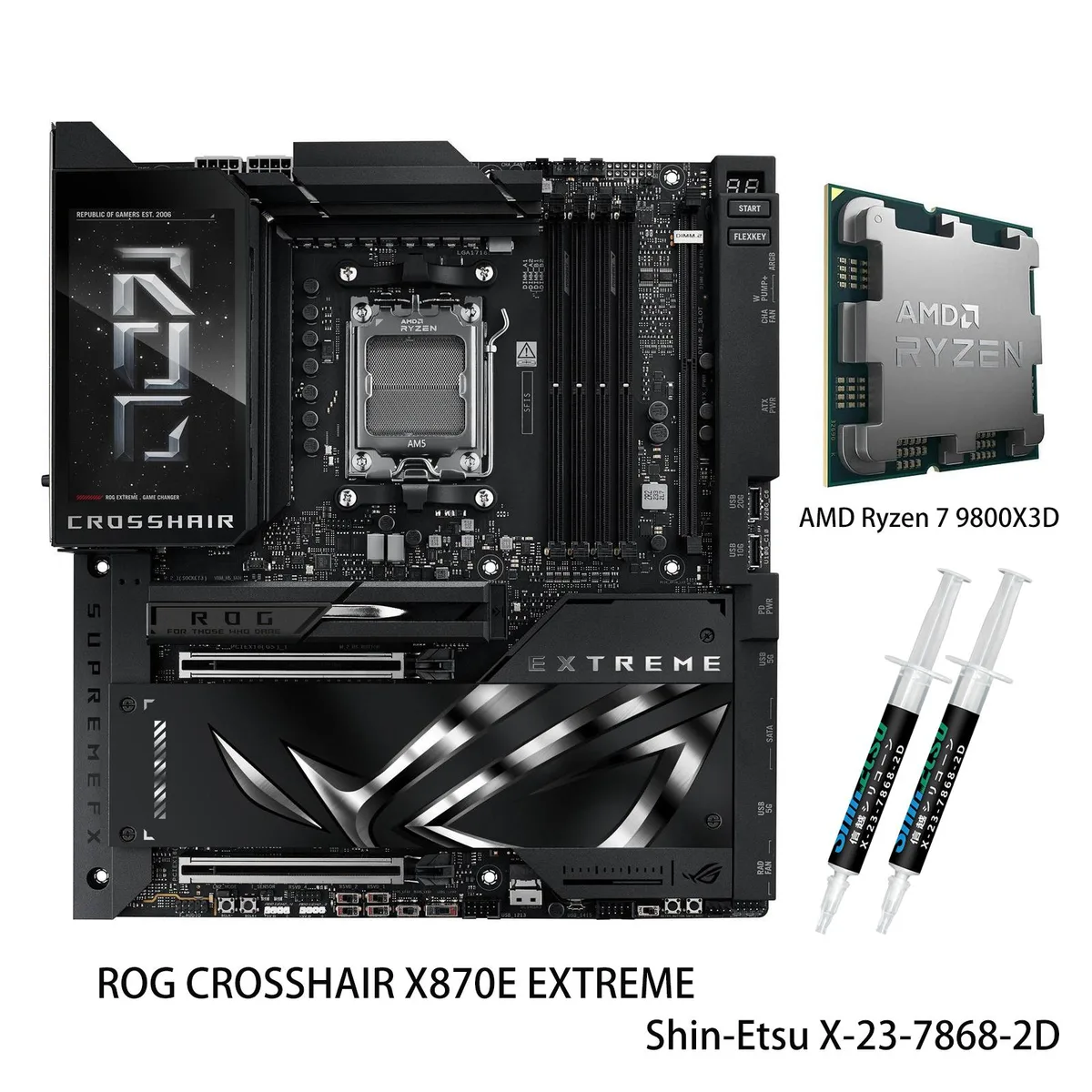
ASUS ROG Crosshair X870E Extreme+ R9 9950X3D AMD motherboard CPU combo
- AM5
- Supports up to 8200…
2,052.99 $
0.02636466BTC
במלאיאנחנו מקבלים תשלום בקריפטו — כך שמטבעות הקריפטו שברשותך יכולים לקנות ציוד אמיתי.שלם בקריפטו, קנה איתו ציוד אמיתי. משלוח חינם ומבוטח לכל העולם מעל 399 $. קרטונים ניטרליים וללא מיתוג, נשלחים מגרמניה.משלוח חינם ומבוטח מעל 399 $. השער שלך ננעל ל-30 דקות מרגע פתיחת הקופה.שער נעול ל-30 דקות. כל פריט אטום, המספר הסידורי שלו נבדק, והוא מכוסה באחריות ל-24 חודשים.אטום, באחריות ל-24 חודשים.


ASUS
A motherboard and CPU bundle with a 16-core Ryzen 9 9950X, DDR5 support up to 256 GB, three PCIe 5.0 M.2 slots, 5G and 10G LAN, Wi-Fi 7, and a 20+2+2 phase power design
model ROG CROSSHAIR X870E EXTREME
+CPU +Ryzen 9 9950X
This bundle pairs the ROG Crosshair X870E Extreme motherboard with a Ryzen 9 9950X processor. The board uses the AMD X870E chipset and AM5 socket, supporting Ryzen 9000, 8000 and 7000 series CPUs. It delivers four DDR5 slots for up to 256GB of memory in dual-channel mode. The combination targets builders who want a single validated kit for high-end workstations or enthusiast gaming rigs.
The included Ryzen 9 9950X runs 16 cores and 32 threads on the Zen 5 architecture. It reaches a 5.7 GHz maximum boost clock and is unlocked for overclocking. Cache totals 64MB L3 plus 16MB L2. This CPU specification is the primary factor that decides whether the bundle matches a workload needing heavy multi-threaded throughput.
The platform fits developers training local models, content creators rendering complex scenes, and enthusiasts chasing maximum multi-core speed. Buyers who only need mainstream gaming performance or a smaller form factor should consider a less extensive AM5 board and a lower-core-count Ryzen CPU instead.
| Brand | ASUS |
|---|---|
| Series | ROG |
| Model | ROG CROSSHAIR X870E EXTREME+(R9 9950X) |
| CPU Socket Type | AM5 |
| CPU Type | Supports up to 8200+MT/s(OC) with Ryzen 9000 Series Processors 8600+MT/s(OC) with Ryzen 8000 Series Processors 8000+MT/s(OC) with Ryzen 7000 Series Processors |
| Chipset | AMD X870E |
| Number of Memory Slots | 4x288pin (DDR5) |
| Maximum Memory Supported | 256GB |
| Channel Supported | Dual Channel |
| ECC Supported | Non-ECC |
| Memory Feature | ASUS Enhanced Memory Profile (AEMP) NitroPath DRAM Technology |
| PCI Express 5.0 x16 | AMD Ryzen 9000 & 7000 Series Desktop Processors* 2 x PCIe 5.0 x16 slots with Q-Release Slim (supports x16 or x8/x8** or x8/x4/x4 modes***) ** When you use both PCIEX16(G5)_1 and PCIEX16(G5)_2, PCIEX16(G5)_1 and PCIEX16(G5)_2 will run x8. ***When M.2_3 is enabled, PCIEX16(G5)_1 will run x8, and PCIEX16(G5)_2 will run x4. **** When M.2_2 and M.2_3 are enabled simultaneously, PCIEX16(G5)_2 will be disabled. |
| PCI Express 4.0 x16 | AMD Ryzen 8700 & 8600 & 8400 Series Desktop Processors* 2 x PCIe 4.0 x16 slots with Q-Release Slim (only supports PCIEx16(G5)_1 & total bandwidth for x8, PCIEx16(G5)_2 will be disabled) AMD Ryzen 8500 & 8300 Series Desktop Processors* 2 x PCIe 4.0 x16 slots with Q-Release Slim (only supports PCIEx16(G5)_1 & total bandwidth for x4, PCIEx16(G5)_2 will be disabled) |
| Serial ATA (SATA) | 4 x SATA 6Gb/s |
| M.2 | AMD Ryzen 9000 & 7000 Series Desktop Processors M.2_1 slot (Key M), type 2242/2260/2280/22110 (supports PCIe 5.0 x4 mode) M.2_2 slot (Key M), type 2242/2260/2280 (supports PCIe 5.0 x4 mode)* M.2_3 slot (Key M), type 2242/2260/2280/22110 (supports PCIe 5.0 x4 mode)** AMD Ryzen 8000 Series Desktop Processors M.2_1 slot (Key M), type 2242/2260/2280/22110 (supports PCIe 4.0 x4 mode) M.2_2 slot (Key M), type 2242/2260/2280 (Not supports) M.2_3 slot (Key M), type 2242/2260/2280/22110 (Not supports) AMD X870E Chipset DIMM.2_1 slot (Key M) via ROG Q-DIMM.2, type 2230/2242/2260/2280/22110 (su |
| SATA RAID | 0/1/5/10 |
| Audio Channels | Audio Features - SupremeFX Shielding Technology - ESS ES9219 QUAD DAC - LED-illuminated audio jacks - Rear optical S/PDIF out port - Premium audio capacitors * A chassis with an HD audio module in the front panel is required to support 7.1 Surround Sound audio output. ** The LINE OUT port on the rear panel does not support spatial audio. If you wish to use spatial audio, make sure to connect your audio output device to the audio jack on the front panel of your chassis or use a USB interface audio device. |
| LAN Chipset | 1 x Realtek 5Gb Ethernet |
| Second LAN Chipset | 1 x Marvell AQtion 10Gb Ethernet |
| Max LAN Speed | 10Gbps |
| Wireless LAN | Wi-Fi 802.11 be |
| Bluetooth | Bluetooth 5.4 |
| Back I/O Ports | 2 x USB4 (40Gbps) ports (2 x USB Type-C) 10 x USB 10Gbps ports (8 x Type-A + 2 x USB Type-C) 1 x HDMI port 1 x Wi-Fi Module 1 x Realtek 5Gb Ethernet port 1 x Marvell AQtion 10Gb Ethernet port 2 x LED-illuminated audio jacks 1 x Optical S/PDIF out port 1 x BIOS FlashBack button 1 x Clear CMOS button |
| Onboard USB | 1 x USB 20Gbps connector (supports USB Type-C) 1 x USB 10Gbps connector (supports USB Type-C) 2 x USB 5Gbps headers support 4 additional USB 5Gbps ports 2 x USB 2.0 headers support 4 additional USB 2.0 ports |
| Other Connectors | Fan and Cooling related 1 x 4-pin CPU Fan header 1 x 4-pin CPU OPT Fan header 2 x 4-pin Chassis Fan headers 2 x 4-pin Radiator Fan headers 2 x W_PUMP+ headers 1 x VRM Heatsink Fan header Miscellaneous 1 x 6-pin ARGB Gen 2 header to support 2 x ARGB Gen 2 headers 2 x Addressable Gen 2 header 1 x Alteration PCIe mode switch 2 x BCLK button 1 x BIOS Switch 1 x FlexKey button 1 x Front Panel Audio header (F_AUDIO) 1 x LN2 Mode jumper 12 x ProbeIt Measurement Points 1 x ReTry button 2 x RSVD switchs 1 x RSVD header 1 x Safe Boot button 1 x Slow Mode switch 1 x Start button 1 x 10⁻¹ pin Sy |
| Form Factor | Extended ATX |
| Dimensions (W x L) | 12.0" x 10.9" |
| Power Pin | 1 x 24-pin Main Power connector 2 x 8-pin +12V CPU Power connector 1 x 8-pin PCIe Power connector |
| BIOS Feature | 2 x 256 Mb Flash ROM, UEFI AMI BIOS |
| Software | ROG Exclusive Software - ROG CPU-Z - Dolby Atmos - Internet Security (1-year full version) ASUS Exclusive Software Armoury Crate - AIDA64 Extreme (1 year full version) - Aura Creator - Aura Sync - Fan Xpert 4 (with AI Cooling II) - GameFirst - HWiNFO - Power Saving - LCD Display ASUS AI Advisor ASUS DriverHub Turbo Vcore ASUS GlideX USB Wattage Watcher WinRAR (40 Days Free Trial) Adobe Creative Cloud (Free Trial) UEFI BIOS AI Overclocking Guide ASUS EZ DIY - ASUS CrashFree BIOS 3 - ASUS EZ Flash 3 - ASUS UEFI BIOS EZ Mode - ASUS MyHotkey FlexKey |
| Windows 11 | Supported |
| Features | Extreme OC Kit - FlexKey button - LN2 Mode - ProbeIt - ReTry button - Safe boot button - Start button - Slow Mode Extreme Engine Digi+ - 10K Black Metallic Capacitors - MicroFine Alloy Choke ASUS Q-Design - M.2 Q-Latch - M.2 Q-Release - M.2 Q-Slide - Q-Release Slim (with PCIe SafeSlot) - Q-Antenna - Q-Code - Q-Connector - Q-Dashboard - Q-LED (CPU [red], DRAM [yellow], VGA [white], Boot Device [yellow green]) - Q-Slot - Q-DIMM.2 ASUS Thermal Solution - Fan bracket - M.2 heatsink backplate - M.2 heatsink - Metal backplate - VRM heatsink design - 3D VC M.2 Heatsink ASUS EZ DIY - Backpla |
גרסאות נוספות של דגם זה
אותה משפחה, זיכרון, קירור או תדר שונים — השווה לפני שתחליט.
The 16-core CPU can reach 5.7 GHz on a single core when thermal and power headroom allow, giving snappy response in lightly threaded tasks while the unlocked multiplier lets enthusiasts push frequencies higher with adequate cooling.
With Ryzen 9000 or 7000 series the first slot runs at x16 or drops to x8/x8 when the second slot is used; with Ryzen 8700/8600/8400 the second slot is disabled and the first runs at x8 total bandwidth.
The E-ATX board needs a chassis that accepts the form factor; the LCD sits on the I/O cover so the side panel must clear it, and the massive VRM heatsinks with heatpipes demand a CPU cooler that does not overhang the top-edge mounting zone.
גם במדף הזה
אותו מדף, אותה קופה — שמונה מטבעות קריפטו ונעילת שער ל-30 דקות.
באיזה מטבע משלמים, ובאיזה מטבע מוצגים המחירים.
נשלח מהארנק שלך בקופה
לתצוגה בלבד — הקטלוג מתומחר בדולר ארה״ב
לא נמצא מטבע מתאים.
בחר את השפה שבה האתר פונה אליך.
אף שפה לא תואמת.
חדש כאן?
כבר יש לך חשבון?
אין כאן איפוס אוטומטי: החנות הזו לא שולחת אימייל, ולכן אין קישור חד-פעמי לבקש. השאר את הכתובת בחשבון, והיא תטופל ידנית.
הבקשה נקלטה
שום דבר לא בדרך לתיבת האימייל שלך — החנות הזו לא שולחת אימייל בכלל. מישהו אוסף את הבקשות האלה ידנית.
נזכרת בה?