

SanDisk
SanDisk Cruzer Blade 8 GB USB 2.0 USB flash drive Black SDCZ50-008G-B35
391.99 $
0.00501112BTC
במלאיאנחנו מקבלים תשלום בקריפטו — כך שמטבעות הקריפטו שברשותך יכולים לקנות ציוד אמיתי.שלם בקריפטו, קנה איתו ציוד אמיתי. משלוח חינם ומבוטח לכל העולם מעל 399 $. קרטונים ניטרליים וללא מיתוג, נשלחים מגרמניה.משלוח חינם ומבוטח מעל 399 $. השער שלך ננעל ל-30 דקות מרגע פתיחת הקופה.שער נעול ל-30 דקות. כל פריט אטום, המספר הסידורי שלו נבדק, והוא מכוסה באחריות ל-24 חודשים.אטום, באחריות ל-24 חודשים.


LORDWORLD
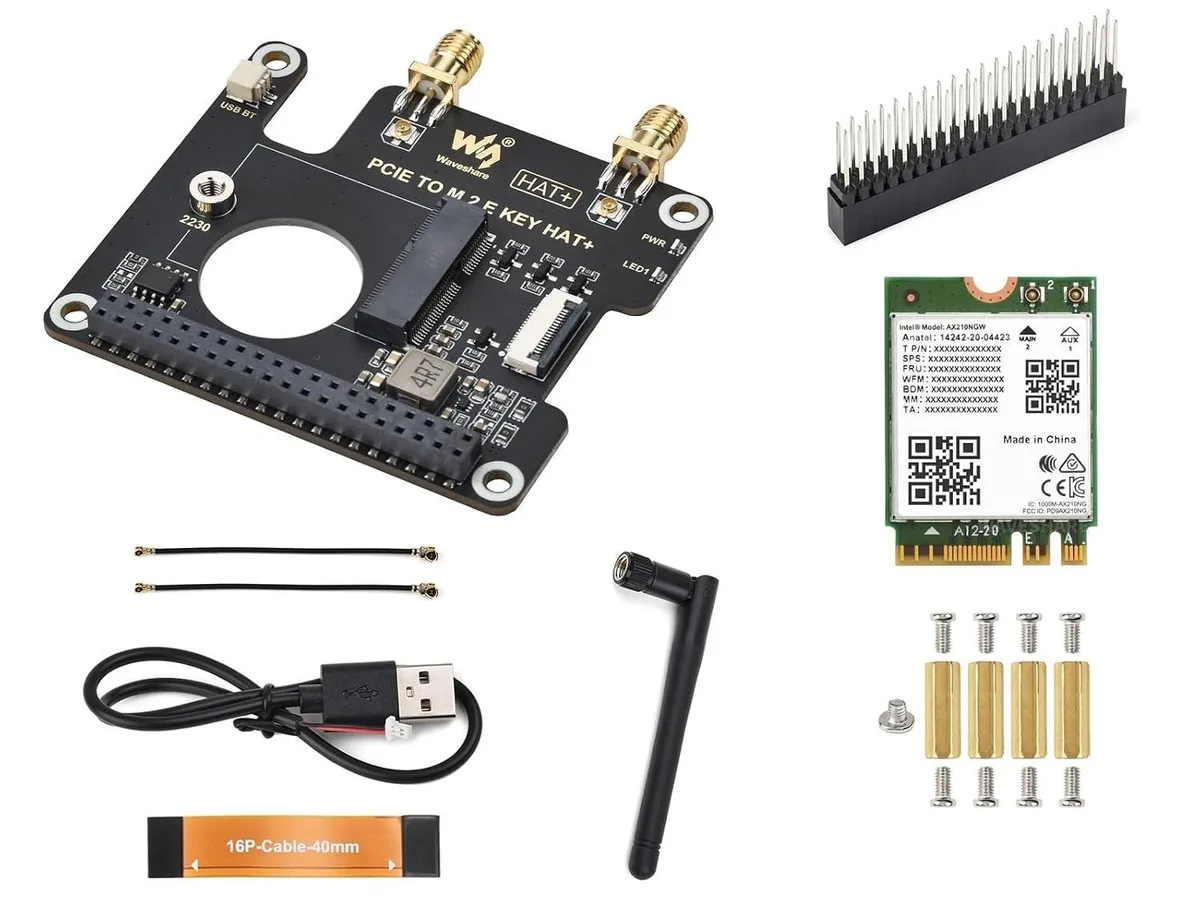
Adds an M.2 E Key wireless card with Bluetooth over USB to the Raspberry Pi 5 via its 16-pin PCIe interface, including an SMA antenna connector
This HAT adds a PCIe-to-M.2 E-key slot to the Raspberry Pi 5 using its 16-pin PCIe interface. It accepts a variety of NGFF wireless NICs in A/E-key or E-key form factors. The included AX210 card provides Wi-Fi and Bluetooth connectivity for maker and IoT projects. Builders who need a second wireless card or a different form factor cannot use this single-slot design.
The board connects to the Pi 5 through a 16-pin flexible cable that carries the PCIe lanes. An onboard SMA female connector allows an external antenna to be mounted on a case or panel for better signal placement. Bluetooth signals are routed to the Pi via a USB link on the HAT. Users who require internal-only antennas or a direct board-to-board connection without a cable will not find that here.
The AX210 card draws power from the Pi 5’s PCIe and USB rails during normal operation. Heat output is modest and typically managed by the Pi’s own cooling solution without extra heatsinks. The radio operates quietly with no moving parts, so acoustic noise is not a concern. Deployments that demand sustained high-throughput traffic in sealed enclosures may need additional airflow not provided by this kit.
| Brand | LORDWORLD |
|---|
The 16-pin cable connects the Raspberry Pi 5's PCIe interface to the HAT, giving the installed M.2 E Key wireless NIC direct PCIe access.
The HAT aligns with the Pi 5's 40-pin GPIO header and 16-pin PCIe connector; standard Pi 5 standoffs secure the board.
Bluetooth signal from the AX210 card routes through the HAT's onboard USB interface to the Pi 5, separate from the PCIe Wi-Fi path.
גם במדף הזה
אותו מדף, אותה קופה — שמונה מטבעות קריפטו ונעילת שער ל-30 דקות.
באיזה מטבע משלמים, ובאיזה מטבע מוצגים המחירים.
נשלח מהארנק שלך בקופה
לתצוגה בלבד — הקטלוג מתומחר בדולר ארה״ב
לא נמצא מטבע מתאים.
בחר את השפה שבה האתר פונה אליך.
אף שפה לא תואמת.
חדש כאן?
כבר יש לך חשבון?
אין כאן איפוס אוטומטי: החנות הזו לא שולחת אימייל, ולכן אין קישור חד-פעמי לבקש. השאר את הכתובת בחשבון, והיא תטופל ידנית.
הבקשה נקלטה
שום דבר לא בדרך לתיבת האימייל שלך — החנות הזו לא שולחת אימייל בכלל. מישהו אוסף את הבקשות האלה ידנית.
נזכרת בה?



