

NEMIX RAM
NEMIX RAM DDR5-5600 2TB (16x128GB) ECC RDIMM CL46 1.1V Supermicro H14SST-G memory upgrade
- 2TB (16 x 128GB)
- 288-Pin DDR5 RDIMM
62.908,99 USD
0.80987924BTC
Til á lagerVið tökum við rafmynt — svo myntirnar sem þú átt geta keypt alvöru vélbúnað.Greiddu í rafmynt, eyddu henni í alvöru vélbúnað. Frí, tryggð sending um allan heim fyrir pantanir yfir 399 $. Hlutlausir pappakassar án merkinga, sendir frá Þýskalandi.Frí, tryggð sending yfir 399 $. Gengið þitt er læst í 30 mínútur um leið og greiðsluferlið hefst.Gengið læst í 30 mínútur. Hver vara er innsigluð, raðnúmer hennar yfirfarið, og hún nýtur 24 mánaða ábyrgðar.Innsiglað, með 24 mánaða ábyrgð.


DELL
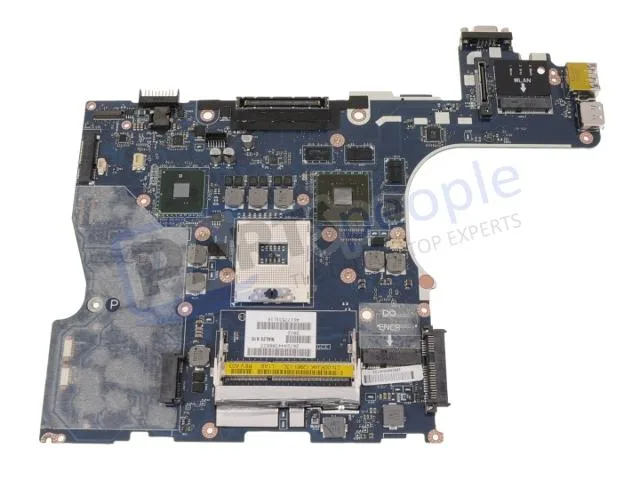
Genuine Dell Precision M4500 laptop motherboard with discrete Nvidia graphics, CPU and memory not included
This is a genuine Dell OEM system board built for the Precision M4500 laptop. It arrives with discrete Nvidia graphics already integrated on the board. The processor and memory modules are not included and must be sourced separately.
The board relies on the laptop's original cooling assembly to manage heat from the CPU and discrete GPU. Power draw follows the factory specification for the M4500 platform. Acoustic output matches the standard fan profile designed for this chassis.
| Brand | DELL |
|---|
Remove the battery, disconnect all cables, unscrew the old board, transfer the CPU and heat sink, seat the new board, reconnect cables, and refit screws. The step most often missed is reapplying thermal paste on the CPU and GPU dies before mounting the heat sink.
The CMOS coin cell will eventually lose charge and should be replaced when the system loses date or BIOS settings. The discrete Nvidia graphics chip is soldered to the board, so a GPU failure means replacing the entire motherboard.
Einnig í þessum vöruflokki
Sama hilla, sama greiðsluferli — átta myntir og 30 mínútna gengislæsing.
Það sem þú greiðir í, og það sem þú sérð verð í.
Sent úr veskinu þínu í greiðsluferlinu
Aðeins til skýringar — verð í vörulistanum eru í Bandaríkjadölum
Enginn gjaldmiðill passar við það.
Veldu tungumálið sem síðan talar við þig á.
Fyrsta heimsókn?
Áttu þegar aðgang?
Það er engin sjálfvirk endurstilling: þessi verslun sendir engan tölvupóst, svo það er enginn einnota tengill til að biðja um. Skildu netfangið eftir á aðganginum og einhver sinnir því handvirkt.
Beiðni skráð
Ekkert er á leiðinni í pósthólfið þitt — þessi verslun sendir engan tölvupóst. Einhver sinnir þessu handvirkt.
Mundir þú það?


