

NEMIX RAM
NEMIX RAM DDR5-5600 2TB (16x128GB) ECC RDIMM CL46 1.1V Supermicro H14SST-G memory upgrade
- 2TB (16 x 128GB)
- 288-Pin DDR5 RDIMM
62 908,99 US$
0.79018489BTC
Em stockAceitamos criptomoeda — para que as moedas que detém possam comprar material informático real.Pague em cripto, gaste-a em material informático real. Envio seguro gratuito para todo o mundo acima de 399 $. Caixas neutras, sem marca, expedidas a partir da Alemanha.Envio seguro gratuito acima de 399 $. A sua taxa fica bloqueada durante 30 minutos assim que abre a finalização da compra.Taxa bloqueada 30 minutos. Cada artigo é selado, o seu número de série é verificado, e está coberto por uma garantia de 24 meses.Selado, garantido 24 meses.


DELL
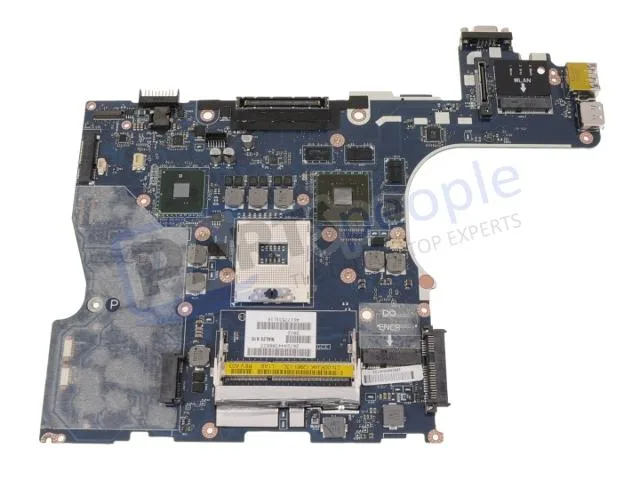
Genuine Dell Precision M4500 laptop motherboard with discrete Nvidia graphics, CPU and memory not included
This is a genuine Dell OEM system board built for the Precision M4500 laptop. It arrives with discrete Nvidia graphics already integrated on the board. The processor and memory modules are not included and must be sourced separately.
The board relies on the laptop's original cooling assembly to manage heat from the CPU and discrete GPU. Power draw follows the factory specification for the M4500 platform. Acoustic output matches the standard fan profile designed for this chassis.
| Brand | DELL |
|---|
Remove the battery, disconnect all cables, unscrew the old board, transfer the CPU and heat sink, seat the new board, reconnect cables, and refit screws. The step most often missed is reapplying thermal paste on the CPU and GPU dies before mounting the heat sink.
The CMOS coin cell will eventually lose charge and should be replaced when the system loses date or BIOS settings. The discrete Nvidia graphics chip is soldered to the board, so a GPU failure means replacing the entire motherboard.
Também nesta secção
Mesma prateleira, mesma finalização da compra — oito moedas e uma taxa bloqueada durante 30 minutos.
O que paga, e a moeda em que vê os preços.
Enviado da sua carteira ao finalizar a compra
Apenas informativo — o catálogo está em dólares
Nenhuma moeda corresponde.
Escolha o idioma em que o site lhe fala.
Ainda não tem conta?
Já tem conta?
Não existe reposição automática: esta loja não envia qualquer e-mail, pelo que não há nenhum link de utilização única para pedir. Deixe o endereço na conta e ele será tratado manualmente.
Pedido registado
Não vai chegar nada à sua caixa de entrada — esta loja não envia qualquer e-mail. Alguém trata disto manualmente.
Recordou-se dela?


