


DELL
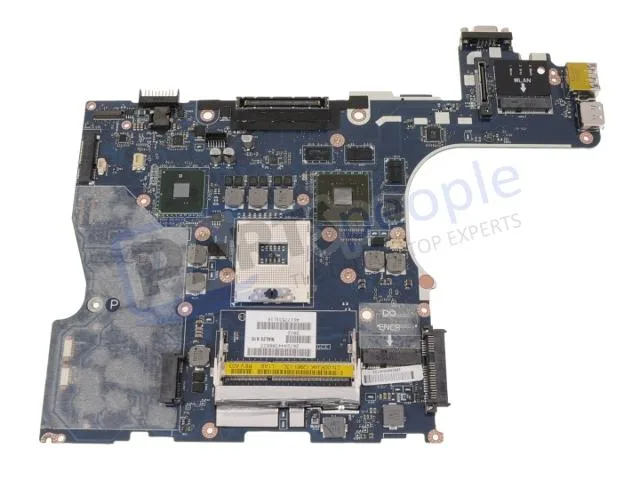
DELL Precision M4500 Intel Motherboard 0RJ4K
Genuine Dell Precision M4500 laptop motherboard with discrete Nvidia graphics, CPU and memory not included
- Genuine Dell OEM part ensures exact fit for Precision M4500
- Discrete Nvidia graphics delivers dedicated GPU performance on the system board
- Part number 0RJ4K confirms correct replacement identification
- CPU and memory not included allows flexible processor and RAM selection
Genuine Dell Precision M4500 Motherboard
This is a genuine Dell OEM system board built for the Precision M4500 laptop. It arrives with discrete Nvidia graphics already integrated on the board. The processor and memory modules are not included and must be sourced separately.
Thermals and power in normal use
The board relies on the laptop's original cooling assembly to manage heat from the CPU and discrete GPU. Power draw follows the factory specification for the M4500 platform. Acoustic output matches the standard fan profile designed for this chassis.
Highlights
- Genuine Dell OEM part ensures exact fit for Precision M4500
- Discrete Nvidia graphics delivers dedicated GPU performance on the system board
- Part number 0RJ4K confirms correct replacement identification
- CPU and memory not included allows flexible processor and RAM selection
Specifications
| Brand | DELL |
|---|
Questions about this item
How do I install the 0RJ4K motherboard in a Precision M4500 and which step is most often done incorrectly?
Remove the battery, disconnect all cables, unscrew the old board, transfer the CPU and heat sink, seat the new board, reconnect cables, and refit screws. The step most often missed is reapplying thermal paste on the CPU and GPU dies before mounting the heat sink.
What maintenance or replacement will the 0RJ4K motherboard need later?
The CMOS coin cell will eventually lose charge and should be replaced when the system loses date or BIOS settings. The discrete Nvidia graphics chip is soldered to the board, so a GPU failure means replacing the entire motherboard.
Also in this aisle
People compared these
Same shelf, same checkout — eight coins and a 30-minute rate lock.


PrimoChill
PrimoChill Praxis Wetbench Open-Air Test Bench 461.8mm
- Open-Air
$274.89
0.00353893BTC
In stock
Silverstone Technology
SilverStone Technology Strider 1200W 80 Plus Platinum Modular Power Supply
- ATX Mid Tower
- 1200W
$324.03
0.00417156BTC
In stock