

NEMIX RAM
NEMIX RAM DDR5-5600 2TB (16x128GB) ECC RDIMM CL46 1.1V Supermicro H14SST-G memory upgrade
- 2TB (16 x 128GB)
- 288-Pin DDR5 RDIMM
62 908,99 USD
0.78879779BTC
SkladomPrijímame kryptomeny — takže mince, ktoré držíte, môžete zameniť za skutočný hardvér.Plaťte v krypte, miňte ho na skutočný hardvér. Poistená doprava zadarmo po celom svete nad 399 $. Neutrálne kartóny bez potlače, odosielané z Nemecka.Poistená doprava zadarmo nad 399 $. Váš kurz je zablokovaný na 30 minút hneď po otvorení pokladne.Kurz zablokovaný na 30 minút. Každý produkt je zapečatený, jeho sériové číslo je overené a vzťahuje sa naň 24-mesačná záruka.Zapečatené, 24-mesačná záruka.


DELL
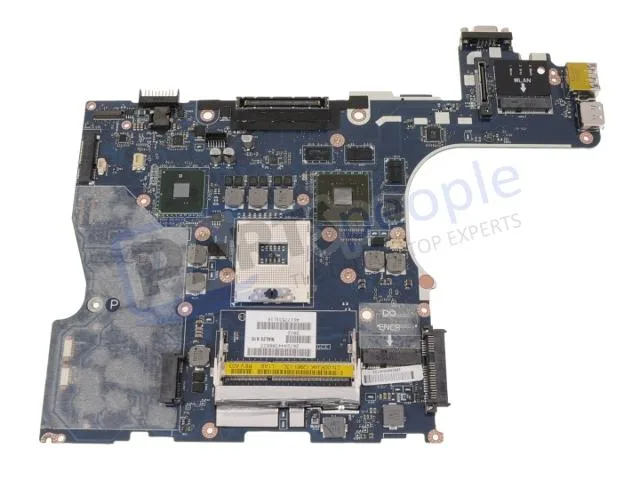
Genuine Dell Precision M4500 laptop motherboard with discrete Nvidia graphics, CPU and memory not included
This is a genuine Dell OEM system board built for the Precision M4500 laptop. It arrives with discrete Nvidia graphics already integrated on the board. The processor and memory modules are not included and must be sourced separately.
The board relies on the laptop's original cooling assembly to manage heat from the CPU and discrete GPU. Power draw follows the factory specification for the M4500 platform. Acoustic output matches the standard fan profile designed for this chassis.
| Brand | DELL |
|---|
Remove the battery, disconnect all cables, unscrew the old board, transfer the CPU and heat sink, seat the new board, reconnect cables, and refit screws. The step most often missed is reapplying thermal paste on the CPU and GPU dies before mounting the heat sink.
The CMOS coin cell will eventually lose charge and should be replaced when the system loses date or BIOS settings. The discrete Nvidia graphics chip is soldered to the board, so a GPU failure means replacing the entire motherboard.
Aj v tomto oddelení
Rovnaké oddelenie, rovnaká pokladňa — osem mien a kurz zablokovaný na 30 minút.
Mena, v ktorej platíte, a mena, v ktorej sa zobrazujú ceny.
Odoslané z vašej peňaženky na pokladni
Len na zobrazenie — katalóg je uvedený v dolároch
Žiadna mena nezodpovedá.
Vyberte jazyk, v ktorom s vami bude web komunikovať.
Ste tu prvýkrát?
Účet už máte?
Automatický reset hesla neexistuje: tento obchod neposiela žiadne e-maily, takže neexistuje jednorazový odkaz, o ktorý by ste mohli požiadať. Nechajte adresu na účte — niekto sa jej ujme ručne.
Žiadosť zaznamenaná
Do vašej schránky nič nepríde — tento obchod neposiela vôbec žiadne e-maily. Niekto sa o to postará ručne.
Spomenuli ste si?


