

HP
HP EliteBook 1040 G9 i7-1255U 32GB 512GB 14in business laptop
- Silver
- Windows 11 Pro
418,99 USD
0.00540221BTC
În stocAcceptăm criptomonede — astfel, criptomonedele pe care le dețineți pot cumpăra echipamente reale.Plătiți în cripto, cheltuiți-o pe echipamente reale. Livrare asigurată gratuită oriunde în lume peste 399 $. Cartoane neutre, fără marcă, expediate din Germania.Livrare asigurată gratuită peste 399 $. Cursul dumneavoastră este blocat timp de 30 de minute de la deschiderea paginii de plată.Curs blocat 30 de minute. Fiecare articol este sigilat, numărul de serie este verificat, iar produsul este acoperit de o garanție de 24 de luni.Sigilat, garantat 24 de luni.


Lenovo
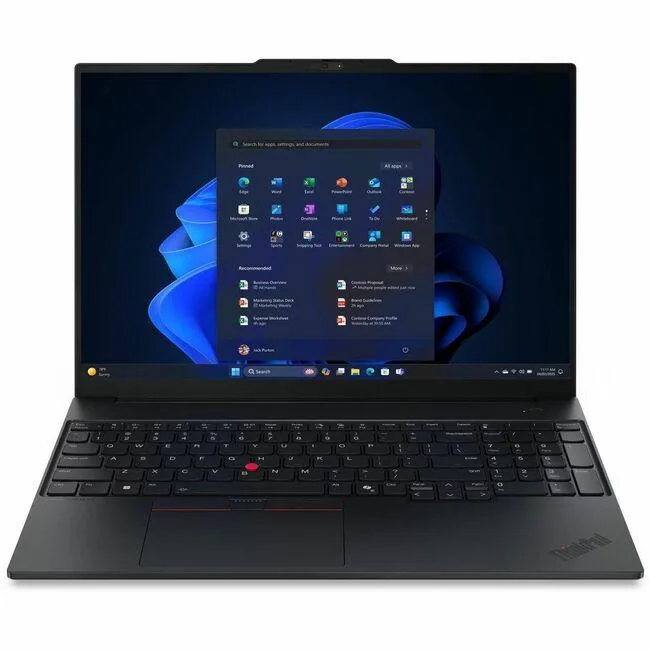
16-inch WUXGA notebook with Intel Core Ultra 7 255H, 16GB DDR5, 512GB SSD and Intel Arc 140T graphics
The ThinkPad E16 Gen 3 pairs a 16.0 inch 1920 x 1200 display at 60 Hz with an Intel Core Ultra 7 255H processor reaching 5.10 GHz turbo. Sixteen gigabytes of DDR5 5600 memory and a 512 GB SSD support multitasking and fast boot times. The integrated Intel Arc 140T GPU handles everyday graphics workloads. Windows 11 Pro is pre-installed for business environments.
The CPU E-cores run up to 4.40 GHz with 24 MB of cache, balancing throughput and heat output for office applications. Fan activity stays low during typical document and browser workloads, keeping acoustic levels suited to shared workspaces. Power draw scales with the 140T graphics load, remaining moderate for a 16 inch chassis under normal productivity scenarios.
The non-touch WUXGA panel offers a matte finish that reduces glare under office lighting. An 802.11ax wireless radio provides modern Wi-Fi performance for cloud-based workflows. The English keyboard layout and black chassis match standard ThinkPad ergonomics. Buyers who want more storage or a discrete graphics option should consider other configurations.
| Brand | Lenovo |
|---|---|
| Series | ThinkPad |
| Model | ThinkPad E16 Gen 3 |
| Part Number | 21SR0033US |
| AI Features | AI Boost |
| Operating System | Windows 11 Pro |
| CPU Type | Intel Core Ultra 7 |
| Processor Name | Intel Core Ultra 7 255H |
| Turbo Frequency | 5.10 GHz |
| Screen Size | 16.0" |
| Touchscreen | Non-Touch Screen |
| Display Type | WUXGA |
| Resolution | 1920 x 1200 |
| Refresh Rate | 60 Hz |
| GPU/VPU | Intel Arc 140T GPU |
| Graphic Type | Integrated Card |
| SSD | 512GB |
| Memory | 16GB DDR5 |
| Memory Speed | DDR5 5600 |
| WLAN | 802.11ax Wireless LAN |
| Bluetooth | Yes |
| HDMI | 1 x HDMI |
| Ethernet | Gigabit Ethernet |
| Webcam | 5 Megapixel |
| Type | Home / Personal |
| Dimensions (W x D x H) | Height: 0.83" Width: 14" Depth: 9.8" |
| Weight | 3.59 lb |
| Package Content | ThinkPad E16 Gen 3 (Intel) 21SR0033US Standard Battery AC Adapter |
| Greutate la expediere | 2.77 kg |
| Dimensiunile coletului | 495 × 325 × 79 mm |
Power off and unplug the laptop, remove the base screws, lift the cover, align the DDR5 5600 module notch with the slot key, press firmly until the side clips click, then reassemble; the step often missed is pressing evenly on both ends until both clips engage.
The 512 GB SSD has no moving parts and requires no scheduled maintenance; replacement is only needed if capacity runs out or a drive health tool reports media wear, at which point a compatible M.2 module can be swapped in.
Under continuous load the Intel Arc 140T GPU hits its thermal ceiling first; the shared cooling system throttles clock speeds to keep temperatures safe, which reduces 3D performance before the 5.10 GHz CPU turbo limit is reached.
Tot din acest raion
Același raion, aceeași finalizare a comenzii — opt monede și un curs blocat 30 de minute.
În ce monedă plătiți și în ce monedă citiți prețurile.
Trimis din portofelul dumneavoastră la finalizarea comenzii
Doar pentru afișare — catalogul este exprimat în dolari
Nicio monedă nu corespunde.
Alegeți limba în care vă vorbește site-ul.
Nicio limbă nu corespunde.
Prima vizită?
Aveți deja un cont?
Nu există o resetare automată: acest magazin nu trimite niciun e-mail, deci nu există niciun link de unică folosință de solicitat. Lăsați adresa în cont. Va fi tratată manual.
Cerere înregistrată
Nu veți primi nimic în căsuța de e-mail — acest magazin nu trimite niciun e-mail. Cineva se ocupă de asta manual.
V-ați amintit-o?


