

ASUS
ASUS TM420IA-DB71T 2-in-1 laptop 14" FHD touch AMD Ryzen 7 4700U 8GB 512GB
- Bespoke Black
- Convertible
593,99 US$
0.0074047BTC
Em stockAceitamos criptomoeda — para que as moedas que detém possam comprar material informático real.Pague em cripto, gaste-a em material informático real. Envio seguro gratuito para todo o mundo acima de 399 $. Caixas neutras, sem marca, expedidas a partir da Alemanha.Envio seguro gratuito acima de 399 $. A sua taxa fica bloqueada durante 30 minutos assim que abre a finalização da compra.Taxa bloqueada 30 minutos. Cada artigo é selado, o seu número de série é verificado, e está coberto por uma garantia de 24 meses.Selado, garantido 24 meses.


Lenovo
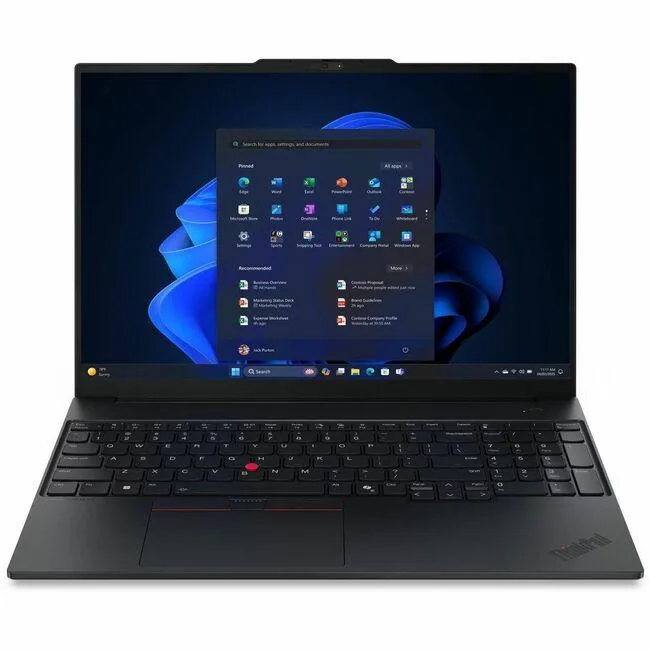
16-inch WUXGA notebook with Intel Core Ultra 7 255H, 16GB DDR5, 512GB SSD and Intel Arc 140T graphics
The ThinkPad E16 Gen 3 pairs a 16.0 inch 1920 x 1200 display at 60 Hz with an Intel Core Ultra 7 255H processor reaching 5.10 GHz turbo. Sixteen gigabytes of DDR5 5600 memory and a 512 GB SSD support multitasking and fast boot times. The integrated Intel Arc 140T GPU handles everyday graphics workloads. Windows 11 Pro is pre-installed for business environments.
The CPU E-cores run up to 4.40 GHz with 24 MB of cache, balancing throughput and heat output for office applications. Fan activity stays low during typical document and browser workloads, keeping acoustic levels suited to shared workspaces. Power draw scales with the 140T graphics load, remaining moderate for a 16 inch chassis under normal productivity scenarios.
The non-touch WUXGA panel offers a matte finish that reduces glare under office lighting. An 802.11ax wireless radio provides modern Wi-Fi performance for cloud-based workflows. The English keyboard layout and black chassis match standard ThinkPad ergonomics. Buyers who want more storage or a discrete graphics option should consider other configurations.
| Brand | Lenovo |
|---|---|
| Series | ThinkPad |
| Model | ThinkPad E16 Gen 3 |
| Part Number | 21SR0033US |
| AI Features | AI Boost |
| Operating System | Windows 11 Pro |
| CPU Type | Intel Core Ultra 7 |
| Processor Name | Intel Core Ultra 7 255H |
| Turbo Frequency | 5.10 GHz |
| Screen Size | 16.0" |
| Touchscreen | Non-Touch Screen |
| Display Type | WUXGA |
| Resolution | 1920 x 1200 |
| Refresh Rate | 60 Hz |
| GPU/VPU | Intel Arc 140T GPU |
| Graphic Type | Integrated Card |
| SSD | 512GB |
| Memory | 16GB DDR5 |
| Memory Speed | DDR5 5600 |
| WLAN | 802.11ax Wireless LAN |
| Bluetooth | Yes |
| HDMI | 1 x HDMI |
| Ethernet | Gigabit Ethernet |
| Webcam | 5 Megapixel |
| Type | Home / Personal |
| Dimensions (W x D x H) | Height: 0.83" Width: 14" Depth: 9.8" |
| Weight | 3.59 lb |
| Package Content | ThinkPad E16 Gen 3 (Intel) 21SR0033US Standard Battery AC Adapter |
| Peso de envio | 2.77 kg |
| Dimensões da embalagem | 495 × 325 × 79 mm |
Power off and unplug the laptop, remove the base screws, lift the cover, align the DDR5 5600 module notch with the slot key, press firmly until the side clips click, then reassemble; the step often missed is pressing evenly on both ends until both clips engage.
The 512 GB SSD has no moving parts and requires no scheduled maintenance; replacement is only needed if capacity runs out or a drive health tool reports media wear, at which point a compatible M.2 module can be swapped in.
Under continuous load the Intel Arc 140T GPU hits its thermal ceiling first; the shared cooling system throttles clock speeds to keep temperatures safe, which reduces 3D performance before the 5.10 GHz CPU turbo limit is reached.
Também nesta secção
Mesma prateleira, mesma finalização da compra — oito moedas e uma taxa bloqueada durante 30 minutos.
O que paga, e a moeda em que vê os preços.
Enviado da sua carteira ao finalizar a compra
Apenas informativo — o catálogo está em dólares
Nenhuma moeda corresponde.
Escolha o idioma em que o site lhe fala.
Ainda não tem conta?
Já tem conta?
Não existe reposição automática: esta loja não envia qualquer e-mail, pelo que não há nenhum link de utilização única para pedir. Deixe o endereço na conta e ele será tratado manualmente.
Pedido registado
Não vai chegar nada à sua caixa de entrada — esta loja não envia qualquer e-mail. Alguém trata disto manualmente.
Recordou-se dela?


