


MSI
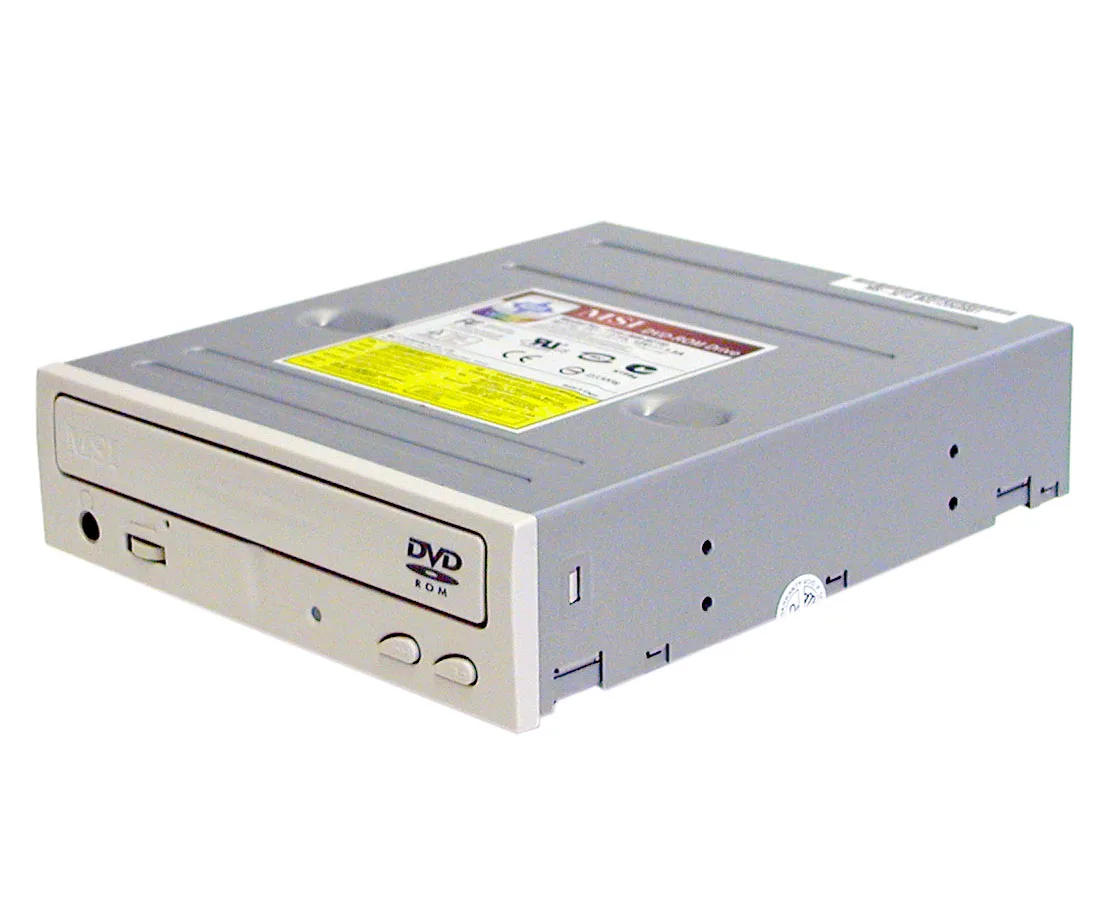
MSI MS-8216 Beige IDE DVD-ROM Drive 16X DVD 48X CD
A beige IDE DVD-ROM drive reading DVDs at 16X and CDs at 48X with a 512KB cache
- TypeDVD-ROM Drive
- CD-ROM Access Time95ms
- Cache512KB
- DVD-ROM16X
- CD-ROM48X
- Panel ColorBeige
- Reads DVDs at 16X speed for quick media access
- Reads CDs at 48X speed for fast data retrieval
- 512 KB cache buffers data to smooth playback
- 95 ms access time locates disc sectors promptly
- Beige tray-loading front panel matches classic beige cases
DVD-ROM drive with IDE interface
This internal optical drive reads DVDs at 16X and CDs at 48X through a standard IDE connection. A 512 KB buffer and 95 ms average access time support smooth data retrieval from legacy media. The beige front panel and tray-load mechanism match period-correct chassis designs.
Suits legacy restorations and archival reads
Builders repairing or preserving systems that rely on a 40-pin IDE channel will find this unit a direct fit. It is not suited for modern motherboards that lack native IDE headers or for users who need DVD writing capability.
16X DVD and 48X CD read speeds
These maximum read rates determine how quickly software install discs, audio CDs or archived DVD-ROMs can be accessed. If your workflow demands faster throughput or write functions, a different drive type is required.
Prednosti
- Reads DVDs at 16X speed for quick media access
- Reads CDs at 48X speed for fast data retrieval
- 512 KB cache buffers data to smooth playback
- 95 ms access time locates disc sectors promptly
- Beige tray-loading front panel matches classic beige cases
Špecifikácie
| Brand | MSI |
|---|---|
| Type | DVD-ROM Drive |
| Model | MS-8216 |
| CD-ROM Access Time | 95ms |
| Cache | 512KB |
| DVD-ROM | 16X |
| CD-ROM | 48X |
| Panel Color | Beige |
| Load Type | Tray |
| Interface | IDE |
| Prepravná hmotnosť | 0.91 kg |
| Rozmery balenia | 254 × 203 × 102 mm |
Otázky k tomuto produktu
Does the 5.25-inch tray-load MS-8216 fit a standard front-panel bay?
Yes, the beige tray-load unit is a 5.25-inch half-height drive that mounts in any standard desktop optical bay with four M3 screws.
Which jumper setting avoids the master/slave conflict during IDE cable installation?
Set the rear jumpers to Cable Select before fitting the 40-pin IDE ribbon; the BIOS will then assign the drive automatically.
When should the 512 KB cache laser lens be cleaned to keep 16× DVD and 48× CD reads reliable?
Clean the lens with a dry optical disc cleaner only when read errors appear or after roughly 12 months of regular use.
Aj v tomto oddelení
Zákazníci tiež porovnávali
Rovnaké oddelenie, rovnaká pokladňa — osem mien a kurz zablokovaný na 30 minút.


Lenovo
Lenovo 4XB0F28690 ThinkServer RAID 110i RAID 5 Upgrade Key
66,99 USD73,99 USD−9%
0.00085392BTC
Skladom
