


DELL
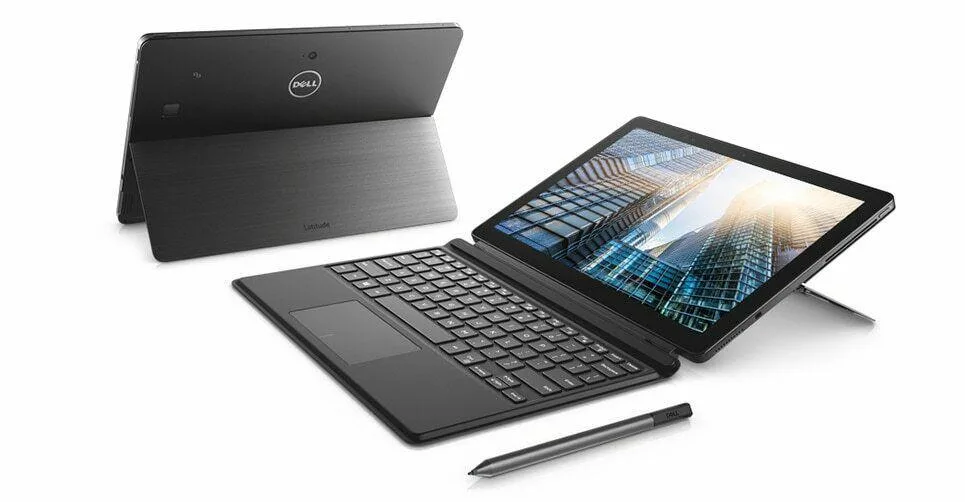
DELL Latitude 5290 2-in-1 i7-8650U 16 GB 512 GB NVMe 12.5" FHD Touchscreen Windows 11 Pro
Detachable 12.5" FHD touchscreen 2-in-1 with i7-8650U, 16 GB DDR4, 512 GB NVMe and Thunderbolt
- ColorBlack
- StyleDetachable
- TypeWork / Business
- UsageConsumer
- Operating SystemWindows 11 Pro
- CPU TypeIntel Core i7 8th Gen
Operating System Windows 11 Pro
- Windows 11 Pro
- Windows 10 Pro
- Quad-core i7-8650U up to 4.2 GHz for responsive multitasking
- 16 GB DDR4 memory keeps many apps open smoothly
- 512 GB NVMe SSD gives fast boot and file access
- 5" FHD IPS touchscreen with detachable keyboard for flexible use
- Two USB-C with DisplayPort plus Thunderbolt 3 for versatile connectivity
Detachable 12.5" Business 2-in-1
This new Dell Latitude 5290 is a detachable 2-in-1 built for mobile professionals. It runs Windows 11 Pro on an 8th Gen Intel Core i7-8650U quad-core processor with 16 GB of onboard DDR4 memory and a 512 GB NVMe M.2 SSD. The 12.5 inch FHD IPS touchscreen delivers 1920 x 1080 resolution with stylus support included.
Suits Travel Workers Not Gamers
The integrated Intel HD Graphics 620 handles office applications and video playback but cannot run modern games or GPU-accelerated rendering workloads. Memory is soldered to the board with zero slots available, so the 16 GB capacity cannot be increased later. Buyers who need discrete graphics or user-upgradeable RAM should look at a different form factor.
Single USB-A Port Limits Legacy Peripherals
Connectivity relies on one USB 3.0 Type-A port plus two USB Type-C ports with DisplayPort and Thunderbolt 3 functionality. Users with multiple older USB-A devices will need a hub or dock to connect them simultaneously. The Type-C ports do support external displays and high-speed storage for a streamlined desk setup.
Poudarki
- Quad-core i7-8650U up to 4.2 GHz for responsive multitasking
- 16 GB DDR4 memory keeps many apps open smoothly
- 512 GB NVMe SSD gives fast boot and file access
- 5" FHD IPS touchscreen with detachable keyboard for flexible use
- Two USB-C with DisplayPort plus Thunderbolt 3 for versatile connectivity
Specifikacije
| Brand | DELL |
|---|---|
| Series | Latitude |
| Model | DELL |
| Part Number | 5290 |
| Color | Black |
| Style | Detachable |
| Type | Work / Business |
| Usage | Consumer |
| Operating System | Windows 11 Pro |
| CPU Type | Intel Core i7 8th Gen |
| Processor Name | 8650U (1.90 GHz) |
| Number of Cores | Quad-core Processor |
| Screen Size | 13.3" |
| Touchscreen | Touch Screen |
| Display Type | FHD |
| Panel | IPS |
| Resolution | 1920 x 1080 |
| GPU/VPU | Intel HD Graphics 620 |
| Graphic Type | Integrated Card |
| SSD | 512GB |
| HDD | No |
| Storage Spec | M.2 512. GB NVMe SSD |
| Memory | 16GB |
| Memory Speed | DDR4 |
| Memory Spec | 16 GB x 1 |
| Memory Slot (Available) | 0 |
| Max Memory Supported | 16 GB |
| WLAN | 802.11ac Wireless LAN |
| Bluetooth | Yes |
| USB | 1x USB 3.0, and 2 x USB Type C |
| Thunderbolt | 1 x Thunderbolt 3 |
| Video Port | 1 x Type C |
| Touchpad | Yes |
| Keyboard | Convertible |
| Webcam | Yes |
| AC Adapter/Charger | 65-watt AC Adapter |
| Software Included | NONE |
| Package Content | AC Adapter and Stylus Pen |
| Dimensions (W x D x H) | 12 x 8.3 x 0.7 |
| Weight | < 4lbs |
Druge različice tega modela
še 5 v isti paleti
Ista družina, različen pomnilnik, hladilnik ali takt — primerjajte, preden se odločite.


DELL
DELL XPS 13 9365 13.3" FHD Touchscreen 2-in-1 Laptop i5-7Y57 256GB 8GB
- Silver
- Convertible
597,99 $
0.00761082BTC
Na zalogi
DELL
DELL XPS 13 9365 2-in-1 Laptop i7-7Y75 512GB 8GB 13.3" FHD Touch Silver
- Silver
- Convertible
597,99 $
0.00761082BTC
Na zalogi
DELL
DELL Latitude 5290 12.5" 2-in-1 i7-8650U 16GB 256GB NVMe
- Black
- Detachable
604,99 $
0.00769991BTC
Na zalogi
DELL
DELL Latitude 5290 2-in-1 i5-8350U 8 GB 512 GB 12.5" Touch
- Black
- Detachable
613,99 $
0.00781446BTC
Na zalogiVprašanja o tem izdelku
What display output does the Thunderbolt 3 port carry and how many external monitors can it drive?
The Thunderbolt 3 port provides DisplayPort video output and can drive up to two external monitors.
What are the exact dimensions and weight of the tablet section?
The tablet measures 12 x 8.3 x 0.7 inches and weighs under four pounds.
How do you attach the travel keyboard and what is the common mistake?
Align the magnetic connector on the keyboard with the bottom edge of the tablet and press until it clicks; the mistake is forcing it without the magnets engaged.
Tudi v tem oddelku
Stranke so primerjale tudi te
Ista polica, ista blagajna — osem kriptovalut in 30-minutni zaklep tečaja.


Microsoft
Microsoft Surface 3 1657 128GB CRB 2-in-1 laptop
- Silver
- Windows 10 Pro
244,99 $
0.00311807BTC
Na zalogi
Microsoft
Microsoft Surface Pro FGG-2D-00001-RFB 2-in-1 laptop 16 GB 512 GB 12.0" touchscreen 2736 x 1824 refurbished
- 12.0"
- Touch Screen
687,99 $
0.00875628BTC
Na zalogi
Lenovo
Lenovo Chromebook 500e Gen 5 M89 83TA0004US 12.2" MediaTek 8GB 64GB
- 12.2"
392,99 $420,99 $−7%
0.00500172BTC
Na zalogi