
DELL
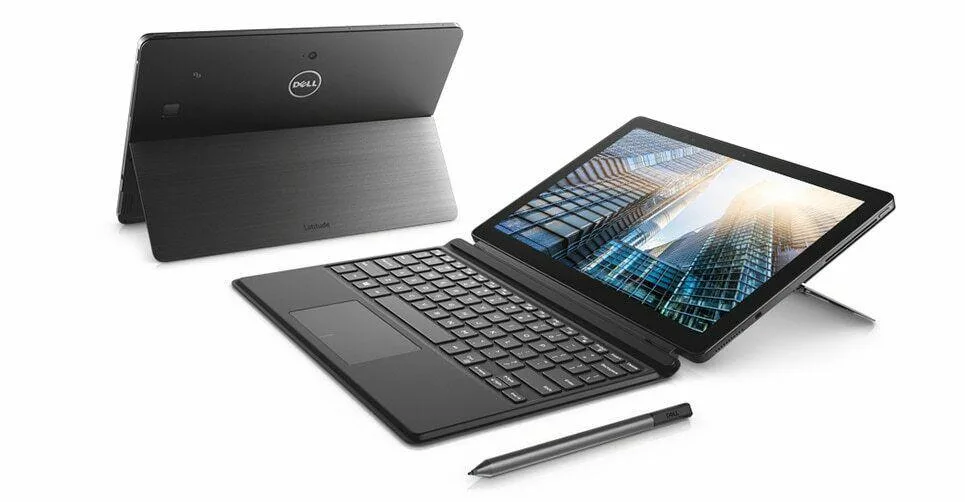
DELL Latitude 5290 12.5" 2-in-1 i5-8350U 8GB 512GB NVMe
- Black
- Detachable
581,99 USD
0.00721866BTC
DisponibileAccettiamo criptovalute — così le crypto che Lei possiede possono comprare hardware reale.Paghi in crypto, la spenda in hardware reale. Spedizione assicurata gratuita in tutto il mondo oltre i 399 $. Cartoni neutri, senza marchio, spediti dalla Germania.Spedizione assicurata gratuita oltre i 399 $. Il Suo tasso resta bloccato per 30 minuti dall’apertura del checkout.Tasso bloccato 30 minuti. Ogni articolo è sigillato, il numero di serie è verificato, ed è coperto da una garanzia di 24 mesi.Sigillato, garantito 24 mesi.


DELL
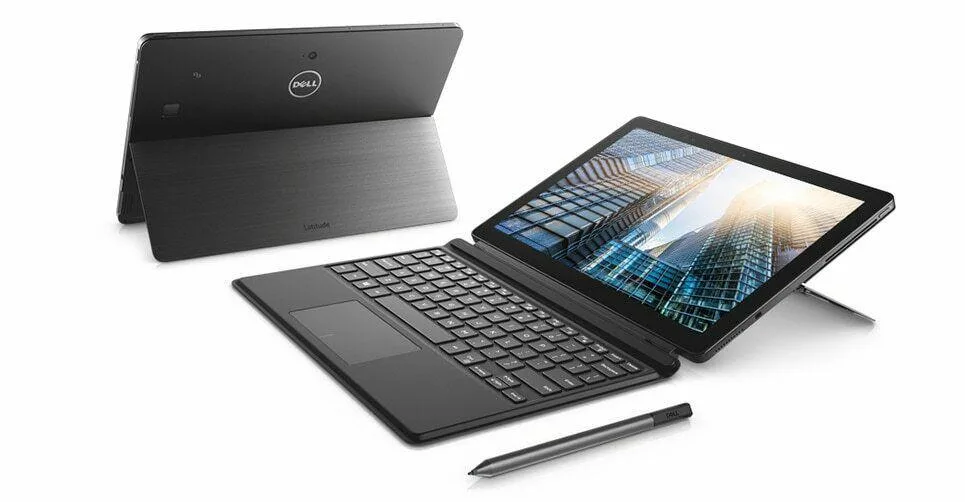
Detachable 12.5" FHD touchscreen 2-in-1 with i7-8650U, 16 GB DDR4, 512 GB NVMe and Thunderbolt
Operating System Windows 11 Pro
This new Dell Latitude 5290 is a detachable 2-in-1 built for mobile professionals. It runs Windows 11 Pro on an 8th Gen Intel Core i7-8650U quad-core processor with 16 GB of onboard DDR4 memory and a 512 GB NVMe M.2 SSD. The 12.5 inch FHD IPS touchscreen delivers 1920 x 1080 resolution with stylus support included.
The integrated Intel HD Graphics 620 handles office applications and video playback but cannot run modern games or GPU-accelerated rendering workloads. Memory is soldered to the board with zero slots available, so the 16 GB capacity cannot be increased later. Buyers who need discrete graphics or user-upgradeable RAM should look at a different form factor.
Connectivity relies on one USB 3.0 Type-A port plus two USB Type-C ports with DisplayPort and Thunderbolt 3 functionality. Users with multiple older USB-A devices will need a hub or dock to connect them simultaneously. The Type-C ports do support external displays and high-speed storage for a streamlined desk setup.
| Brand | DELL |
|---|---|
| Series | Latitude |
| Model | DELL |
| Part Number | 5290 |
| Color | Black |
| Style | Detachable |
| Type | Work / Business |
| Usage | Consumer |
| Operating System | Windows 11 Pro |
| CPU Type | Intel Core i7 8th Gen |
| Processor Name | 8650U (1.90 GHz) |
| Number of Cores | Quad-core Processor |
| Screen Size | 13.3" |
| Touchscreen | Touch Screen |
| Display Type | FHD |
| Panel | IPS |
| Resolution | 1920 x 1080 |
| GPU/VPU | Intel HD Graphics 620 |
| Graphic Type | Integrated Card |
| SSD | 512GB |
| HDD | No |
| Storage Spec | M.2 512. GB NVMe SSD |
| Memory | 16GB |
| Memory Speed | DDR4 |
| Memory Spec | 16 GB x 1 |
| Memory Slot (Available) | 0 |
| Max Memory Supported | 16 GB |
| WLAN | 802.11ac Wireless LAN |
| Bluetooth | Yes |
| USB | 1x USB 3.0, and 2 x USB Type C |
| Thunderbolt | 1 x Thunderbolt 3 |
| Video Port | 1 x Type C |
| Touchpad | Yes |
| Keyboard | Convertible |
| Webcam | Yes |
| AC Adapter/Charger | 65-watt AC Adapter |
| Software Included | NONE |
| Package Content | AC Adapter and Stylus Pen |
| Dimensions (W x D x H) | 12 x 8.3 x 0.7 |
| Weight | < 4lbs |
Altre versioni di questo modello
Stessa famiglia, con memoria, dissipatore o frequenza diversi — confronti prima di decidere.
The Thunderbolt 3 port provides DisplayPort video output and can drive up to two external monitors.
The tablet measures 12 x 8.3 x 0.7 inches and weighs under four pounds.
Align the magnetic connector on the keyboard with the bottom edge of the tablet and press until it clicks; the mistake is forcing it without the magnets engaged.
Anche in questo reparto
Stesso reparto, stessa cassa — otto monete e un cambio bloccato per 30 minuti.
Cosa invia per pagare, e in quale valuta legge i prezzi.
Inviato dal Suo portafoglio alla cassa
Solo a titolo indicativo — il catalogo è espresso in dollari
Nessuna valuta corrisponde.
Scelga la lingua in cui il sito Le parla.
Prima visita?
Ne ha già uno?
Non esiste un ripristino automatico: questo negozio non invia e-mail, quindi non esiste alcun link monouso da richiedere. Lasci l’indirizzo sull’account: verrà gestito manualmente.
Richiesta registrata
Non arriverà nulla nella Sua casella di posta — questo negozio non invia e-mail. Qualcuno se ne occupa manualmente.
L’ha ritrovata?


