DELL
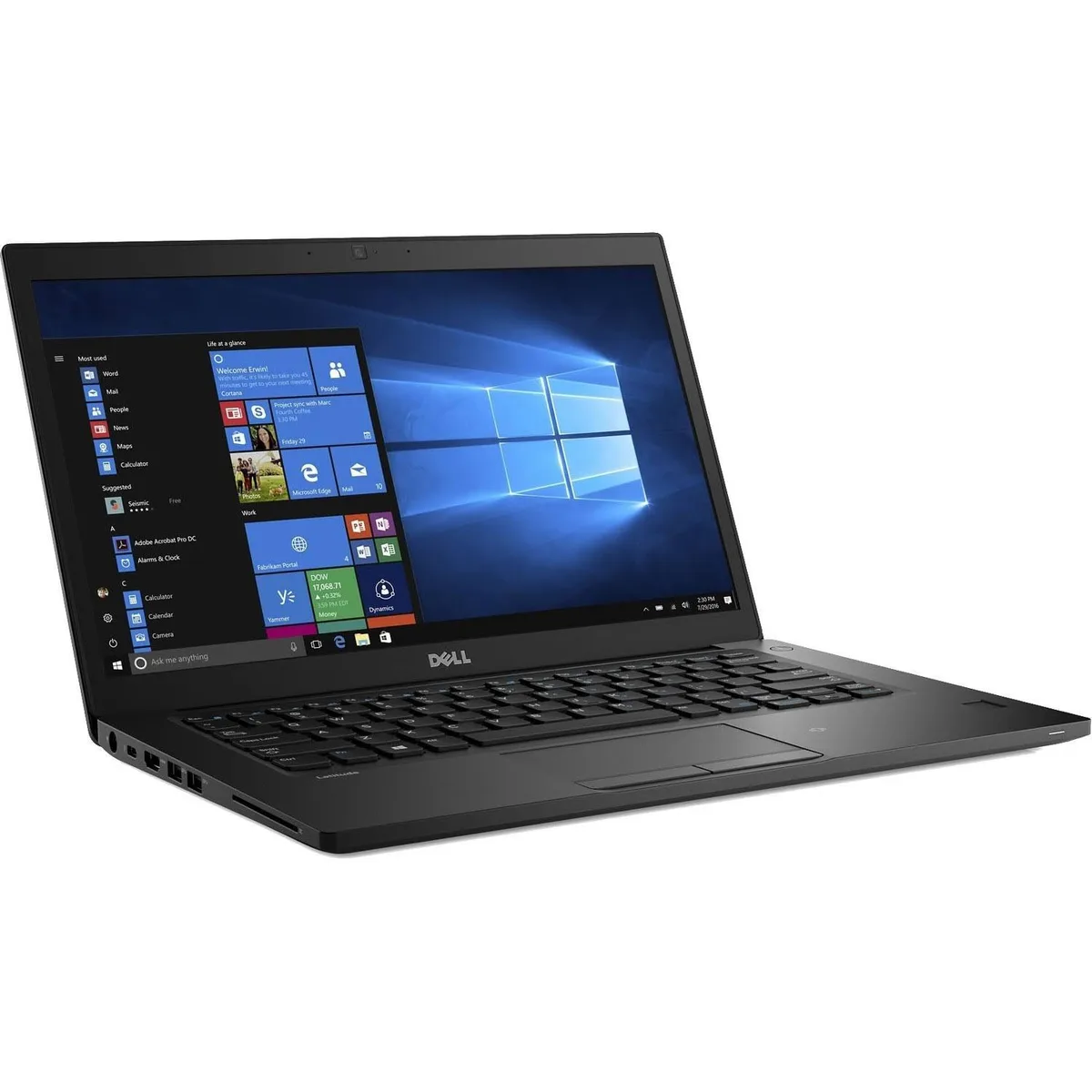
DELL Latitude 7490 7000 14 FHD i7-8650U 8GB 1TB SSD
- Black
- Windows 11 Pro
370,99 $
0.00475982BTC
Na zalogiSprejemamo kriptovalute — tako lahko sredstva, ki jih imate, kupijo pravo strojno opremo.Plačajte v kriptovaluti, zapravite jo za pravo strojno opremo. Brezplačna zavarovana dostava po vsem svetu nad 399 $. Nevtralni kartoni brez znamke, poslani iz Nemčije.Brezplačna zavarovana dostava nad 399 $. Vaš tečaj je zaklenjen za 30 minut, takoj ko se odpre blagajna.Tečaj zaklenjen 30 minut. Vsak izdelek je zapečaten, njegova serijska številka preverjena, in krit z 24-mesečno garancijo.Zapečateno, 24-mesečna garancija.


DELL
13.3-inch FHD touchscreen ultrabook with quad-core i5-8350U, 16GB DDR4 and 1TB NVMe storage
Options 16GB/1TB W11P
The Dell Latitude 7390 is a 13.3-inch ultrabook built for professionals who need a portable Windows 11 Pro device with touchscreen input. It runs on an 8th Gen Intel Core i5-8350U quad-core processor with Intel UHD Graphics 620. The system includes 16 GB DDR4 memory and a 1 TB PCIe NVMe M.2 SSD for fast storage.
The chassis features a spill-resistant keyboard and a BrightView touchscreen finished with Corning Gorilla Glass 4. Connectivity covers USB 3.1 Gen 1, USB 3.1 Gen 1 PowerShare, USB-C 3.1 Gen 1 with DisplayPort, HDMI, and a headphone/microphone combo jack. Wireless uses Wi-Fi and Bluetooth 4.2.
The platform supports up to 32 GB DDR4, so buyers planning future upgrades should confirm the current 16 GB configuration meets their workload. Touchscreen users should note the optional active pen is sold separately. Ensure your peripherals match the available USB-A, USB-C and HDMI outputs.
| Brand | DELL |
|---|---|
| Series | Latitude |
| Model | DELL |
| Part Number | 7390 |
| Color | Black |
| Operating System | Windows 11 Pro |
| CPU Type | Intel Core i5 8th Gen |
| Processor Name | Intel Core i5-8350U |
| Number of Cores | Quad-core Processor |
| Screen Size | 13.3" |
| Touchscreen | Touch Screen |
| Display Type | FHD |
| Resolution | 1920 x 1080 |
| GPU/VPU | Intel UHD Graphics 620 |
| Graphic Type | Integrated Card |
| SSD | 1TB |
| HDD | No |
| Storage Spec | M.2 1TB NVMe SSD |
| Memory | 16GB |
| Memory Speed | DDR4 |
| Memory Spec | 8 GB x 2 |
| Memory Slot (Total) | 2 |
| Memory Slot (Available) | 0 |
| Max Memory Supported | 32 GB |
| Optical Drive Type | No |
| LAN | 10/100/1000Mbps |
| WLAN | 802.11ac Wireless LAN |
| WiFi Generation | Wi-Fi 4 and earlier generation |
| Bluetooth | Yes |
| USB | USB 3.1 Gen 1, USB 3.1 Gen 1 (PowerShare), USB-C 3.1 Gen 1/DisplayPort |
| Video Port | 1 x HDMI |
| HDMI | 1 x HDMI |
| Ethernet | 1 x RJ-45 (1Gbps) |
| Audio Ports | Yes |
| Touchpad | Yes |
| Keyboard | Standard |
| Webcam | Yes |
| Style | Ultrabook |
| Type | Mainstream |
| Usage | Business |
| AC Adapter/Charger | 65-watt AC Adapter |
| Dimensions (W x D x H) | 12 x 8.3 x 0.7 |
| Weight | < 4lbs |
| Software Included | NONE |
Druge različice tega modela
Ista družina, različen pomnilnik, hladilnik ali takt — primerjajte, preden se odločite.
The USB 3.1 Gen 1 Type-C port caps external drives at 5 Gbit/s and carries DisplayPort video on the same connector.
A single M2 × 3 mm Phillips-head screw holds the M.2 2280 NVMe module in place.
Enable UEFI boot mode and disable Secure Boot in the BIOS so the NVMe drive appears as a boot target.
Tudi v tem oddelku
Ista polica, ista blagajna — osem kriptovalut in 30-minutni zaklep tečaja.
V čem plačujete in v čem berete cene.
Poslano iz Vaše denarnice ob blagajni
Samo za prikaz — katalog je cenovno izražen v dolarjih
Nobena valuta ne ustreza.
Izberite jezik, v katerem Vam govori spletna stran.
Ni ustreznega jezika.
Prvič tu?
Že imate račun?
Samodejne ponastavitve ni: ta trgovina ne pošilja e-pošte, zato ni enkratne povezave, ki bi jo lahko zahtevali. Pustite naslov na računu — nekdo ga bo obravnaval ročno.
Zahteva zabeležena
V Vašo elektronsko pošto ne prihaja nič — ta trgovina ne pošilja nobene e-pošte. Zahteve nekdo obravnava ročno.
Ste se spomnili?