


ICY DOCK
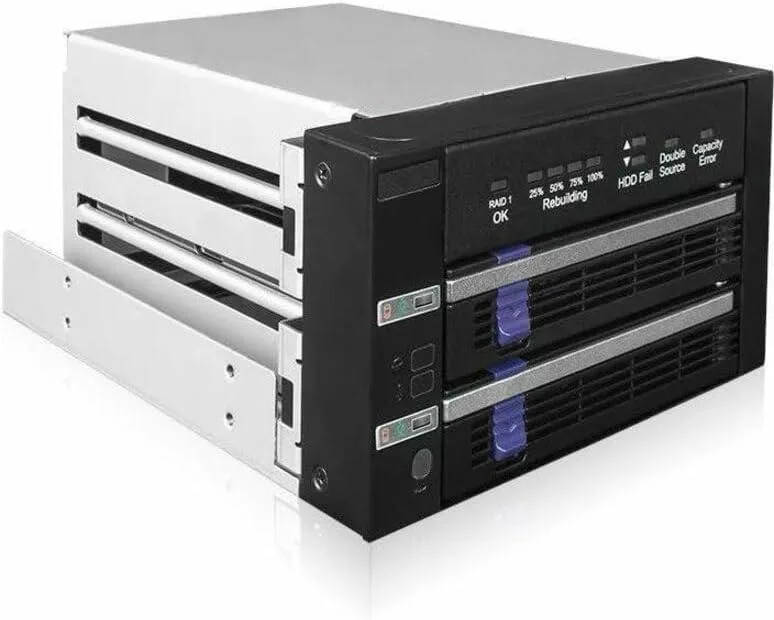
ICY DOCK MB901SPR-B R1 Dual 2.5"/3.5" SATA RAID 1 JBOD 5.25" Bay Hard Drive Adapter
Dual 2.5" or 3.5" SATA drive enclosure with hardware RAID 1 and JBOD fits two 5.25" bays
- Hardware RAID 1 mirroring protects data automatically
- JMS562 chipset handles RAID without using system resources
- Fits two 2.5 or 3.5 SATA drives in a 5.25 bay
- Hot-swap trays let you replace a failed drive without shutdown
- LED indicators show power, access, fail and rebuild status
Dual-bay RAID enclosure for 2.5"
The ICY DOCK MB901SPR-B R1 fits two 2.5-inch SSDs or 3.5-inch SATA hard drives into a pair of standard 5.25-inch optical bays. It uses a built-in JMS562 hardware RAID chipset to provide RAID 1 mirroring or JBOD spanning without consuming host CPU cycles. Hot-swap trays allow drive replacement while the system stays powered on, making it suited for file servers and industrial workstations that need continuous uptime.
Anti-vibration design with locking power connectors
Anti-Vibration Technology dampens mechanical noise and protects drives from environmental shock during normal operation. The unit accepts standard SATA data cables and 15-pin SATA power connectors that feature a locking latch to prevent accidental disconnection. Status LEDs on the front panel show drive power, access activity, drive failure and RAID 1 rebuild progress at a glance.
Hardware RAID offload maintains throughput under
Because the JMS562 controller handles all mirroring calculations on-board, sustained write workloads do not increase host processor utilisation the way software RAID does. The enclosure supports the full 6 Gbps SATA link speed for each drive, so extended rebuilds or continuous streaming reads proceed without throttling. Hot-swap capability means a degraded array can be repaired without scheduling downtime.
נקודות עיקריות
- Hardware RAID 1 mirroring protects data automatically
- JMS562 chipset handles RAID without using system resources
- Fits two 2.5 or 3.5 SATA drives in a 5.25 bay
- Hot-swap trays let you replace a failed drive without shutdown
- LED indicators show power, access, fail and rebuild status
מפרט טכני
טרם פורסם מפרט טכני לפריט זה.
שאלות על הפריט הזה
How do I install the MB901SPR-B R1 into a 5.25" bay and which step is often missed?
Slide the enclosure into two adjacent 5.25" bays, secure it with screws, connect the SATA data cable and 15-pin power cable with locking latch to each tray, then set the RAID mode switch before powering on; the step most often missed is configuring the RAID 1 or JBOD mode via the hardware switch prior to first boot.
What maintenance will the MB901SPR-B R1 need over time?
The removable trays support hot-swap replacement of a failed 2.5" or 3.5" SATA drive without shutting down; periodically check the RAID status LEDs for drive power, access, fail or rebuild indication and clean dust from the Anti-Vibration Technology mounts to maintain cooling efficiency.
What limit appears first during sustained heavy writes on the MB901SPR-B R1?
The JMS562 hardware RAID chipset caps the array at 6 Gbps SATA throughput, so sustained sequential writes will hit that interface ceiling before the mechanical drives or the chipset thermal throttle become the bottleneck.
גם במדף הזה
לקוחות השוו בין אלה
אותו מדף, אותה קופה — שמונה מטבעות קריפטו ונעילת שער ל-30 דקות.


Black Box Corporation
Black Box Corporation DisplayPort to DVI Fibre Optic Cable 15 ft 4.5 m 1.35 GB/s
- Consumer Electronics
39.99 $
0.00051402BTC
במלאי