


ICY DOCK
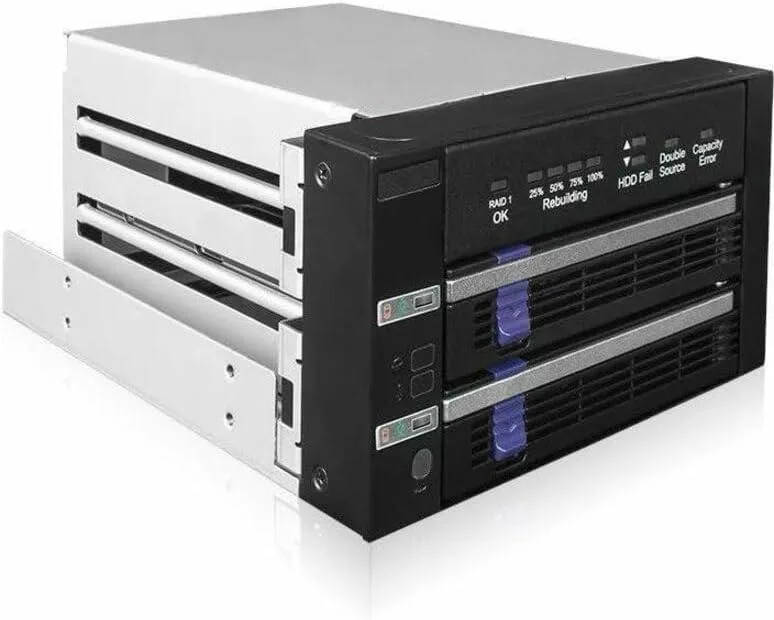
ICY DOCK MB901SPR-B R1 Dual 2.5"/3.5" SATA RAID 1 JBOD 5.25" Bay Hard Drive Adapter
Dual 2.5" or 3.5" SATA drive enclosure with hardware RAID 1 and JBOD fits two 5.25" bays
- Hardware RAID 1 mirroring protects data automatically
- JMS562 chipset handles RAID without using system resources
- Fits two 2.5 or 3.5 SATA drives in a 5.25 bay
- Hot-swap trays let you replace a failed drive without shutdown
- LED indicators show power, access, fail and rebuild status
Dual-bay RAID enclosure for 2.5"
The ICY DOCK MB901SPR-B R1 fits two 2.5-inch SSDs or 3.5-inch SATA hard drives into a pair of standard 5.25-inch optical bays. It uses a built-in JMS562 hardware RAID chipset to provide RAID 1 mirroring or JBOD spanning without consuming host CPU cycles. Hot-swap trays allow drive replacement while the system stays powered on, making it suited for file servers and industrial workstations that need continuous uptime.
Anti-vibration design with locking power connectors
Anti-Vibration Technology dampens mechanical noise and protects drives from environmental shock during normal operation. The unit accepts standard SATA data cables and 15-pin SATA power connectors that feature a locking latch to prevent accidental disconnection. Status LEDs on the front panel show drive power, access activity, drive failure and RAID 1 rebuild progress at a glance.
Hardware RAID offload maintains throughput under
Because the JMS562 controller handles all mirroring calculations on-board, sustained write workloads do not increase host processor utilisation the way software RAID does. The enclosure supports the full 6 Gbps SATA link speed for each drive, so extended rebuilds or continuous streaming reads proceed without throttling. Hot-swap capability means a degraded array can be repaired without scheduling downtime.
特長
- Hardware RAID 1 mirroring protects data automatically
- JMS562 chipset handles RAID without using system resources
- Fits two 2.5 or 3.5 SATA drives in a 5.25 bay
- Hot-swap trays let you replace a failed drive without shutdown
- LED indicators show power, access, fail and rebuild status
仕様
この商品の仕様はまだ公開されていません。
この商品に関する質問
How do I install the MB901SPR-B R1 into a 5.25" bay and which step is often missed?
Slide the enclosure into two adjacent 5.25" bays, secure it with screws, connect the SATA data cable and 15-pin power cable with locking latch to each tray, then set the RAID mode switch before powering on; the step most often missed is configuring the RAID 1 or JBOD mode via the hardware switch prior to first boot.
What maintenance will the MB901SPR-B R1 need over time?
The removable trays support hot-swap replacement of a failed 2.5" or 3.5" SATA drive without shutting down; periodically check the RAID status LEDs for drive power, access, fail or rebuild indication and clean dust from the Anti-Vibration Technology mounts to maintain cooling efficiency.
What limit appears first during sustained heavy writes on the MB901SPR-B R1?
The JMS562 hardware RAID chipset caps the array at 6 Gbps SATA throughput, so sustained sequential writes will hit that interface ceiling before the mechanical drives or the chipset thermal throttle become the bottleneck.
同じ売り場の商品
よく比較されている商品
同じ売り場、同じレジ — 8種類のコインと30分間のレートロック。


Black Box Corporation
Black Box Corporation DisplayPort to DVI Fibre Optic Cable 15 ft 4.5 m 1.35 GB/s
- Consumer Electronics
$39.99
0.00051402BTC
在庫あり