Lenovo
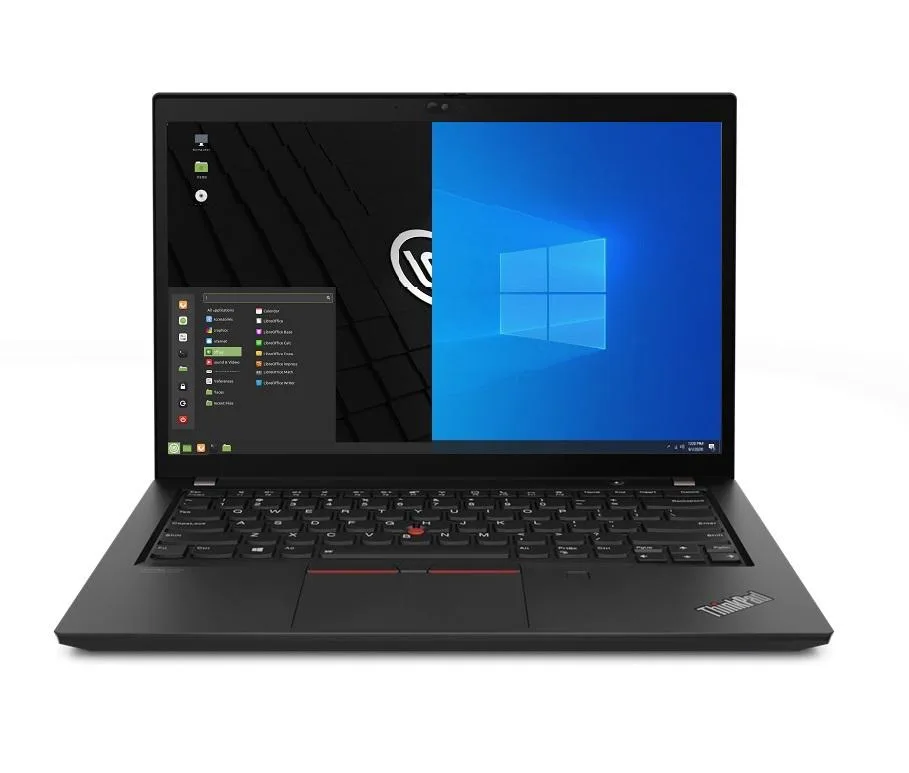
Lenovo Thinkpad T14 Gen 2 laptop i5-1135G7 16GB 2TB Ubuntu
- 16GB
- DDR4
872,99 USD
0.0112737BTC
DisponibileAccettiamo criptovalute — così le crypto che Lei possiede possono comprare hardware reale.Paghi in crypto, la spenda in hardware reale. Spedizione assicurata gratuita in tutto il mondo oltre i 399 $. Cartoni neutri, senza marchio, spediti dalla Germania.Spedizione assicurata gratuita oltre i 399 $. Il Suo tasso resta bloccato per 30 minuti dall’apertura del checkout.Tasso bloccato 30 minuti. Ogni articolo è sigillato, il numero di serie è verificato, ed è coperto da una garanzia di 24 mesi.Sigillato, garantito 24 mesi.


Lenovo
Business laptop with an 11th Gen Intel Core i5, 32GB DDR4, 500GB PCIe SSD and 14.0" Full HD IPS display running Linux Mint 20 Cinnamon
Options 32GB/500GB
This new Lenovo ThinkPad T14 Gen 2 is a 14.0 inch business laptop built around an 11th Gen Intel Core i5-1135G7 processor with four cores and a 4.2 GHz maximum turbo frequency. It ships with 32GB of DDR4 memory and a 500GB PCIe SSD, running Linux Mint 20 Cinnamon out of the box. The configuration targets professionals who need a ready-to-work Linux environment with ample memory for multitasking.
The chassis measures 12.9 by 8.9 by 0.70 inches and weighs 3.23lb, finished in black. A 1920 x 1080 IPS panel provides the visual output without touch input. Connectivity includes Wi-Fi 6, Bluetooth 5.2 and a gigabit Ethernet RJ-45 jack. Two USB-C Thunderbolt 4 ports, two USB-A 3.2 Gen1 ports, one HDMI port and a micro SD reader handle peripheral and display connections.
The laptop arrives with Linux Mint 20 Cinnamon pre-installed, delivering a familiar desktop experience without Windows licensing overhead. A 720p HD webcam supports video calls. Power is supplied by a 65W adapter charging the integrated 50WHr lithium-polymer battery. Buyers who require a dedicated GPU, a larger screen or a touchscreen should consider other models.
| Memory | 32GB |
|---|---|
| Memory Speed | DDR4 |
| Type | Work / Business |
| Resolution | 1920 x 1080 |
| Screen Size | 14.0" |
| Display Type | Full HD |
| Touchscreen | No |
| SSD | 500 GB |
| HDD | No |
| Storage Spec | 500GB PCIe SSD |
| Brand | Lenovo |
| Series | Thinkpad T14 Gen 2 |
| Part Number | T14 |
| Model | Thinkpad |
| Color | Black |
| GPU/VPU | Intel Iris Xe Graphics |
| Operating System | Linux |
| WiFi Generation | Wi-Fi 6 |
| LAN | 10/100/1000Mbps |
| WLAN | Wi-Fi 6 |
| Bluetooth | Bluetooth 5.2 |
| CPU Type | Intel Core i5 11th Gen |
| Optical Drive Type | No |
| Webcam | Yes |
| Touchpad | ThinkPad UltraNav |
| Keyboard | Standard |
| Card Reader | Micro SD |
| Battery | Lithium Polymer |
| USB | 2 x USB 3.2 Gen 1 |
| Thunderbolt | 2 x Thunderbolt 4 |
| Video Port | 1 x HDMI |
| Ethernet | 1 x RJ-45 |
| Audio Ports | 1 x Headphone/Microphone Combo Jack |
| Audio | Integrated Sound card |
| Speaker | Integrated Stereo Speakers |
Altre versioni di questo modello
Stessa famiglia, con memoria, dissipatore o frequenza diversi — confronti prima di decidere.
Thunderbolt 4 supports up to 40 Gbps, allowing dual 4K displays or high-speed PCIe SSDs through a single USB-C connector.
The laptop measures 12.9 in × 8.9 in × 0.70 in and weighs 3.23 lb, fitting most 14-inch sleeves and ThinkPad docking stations.
The OS ships pre-installed; on first boot complete the setup wizard, then immediately run the Update Manager to apply security patches before installing additional software.
Anche in questo reparto
Stesso reparto, stessa cassa — otto monete e un cambio bloccato per 30 minuti.
Cosa invia per pagare, e in quale valuta legge i prezzi.
Inviato dal Suo portafoglio alla cassa
Solo a titolo indicativo — il catalogo è espresso in dollari
Nessuna valuta corrisponde.
Scelga la lingua in cui il sito Le parla.
Nessuna lingua corrisponde.
Prima visita?
Ne ha già uno?
Non esiste un ripristino automatico: questo negozio non invia e-mail, quindi non esiste alcun link monouso da richiedere. Lasci l’indirizzo sull’account: verrà gestito manualmente.
Richiesta registrata
Non arriverà nulla nella Sua casella di posta — questo negozio non invia e-mail. Qualcuno se ne occupa manualmente.
L’ha ritrovata?