
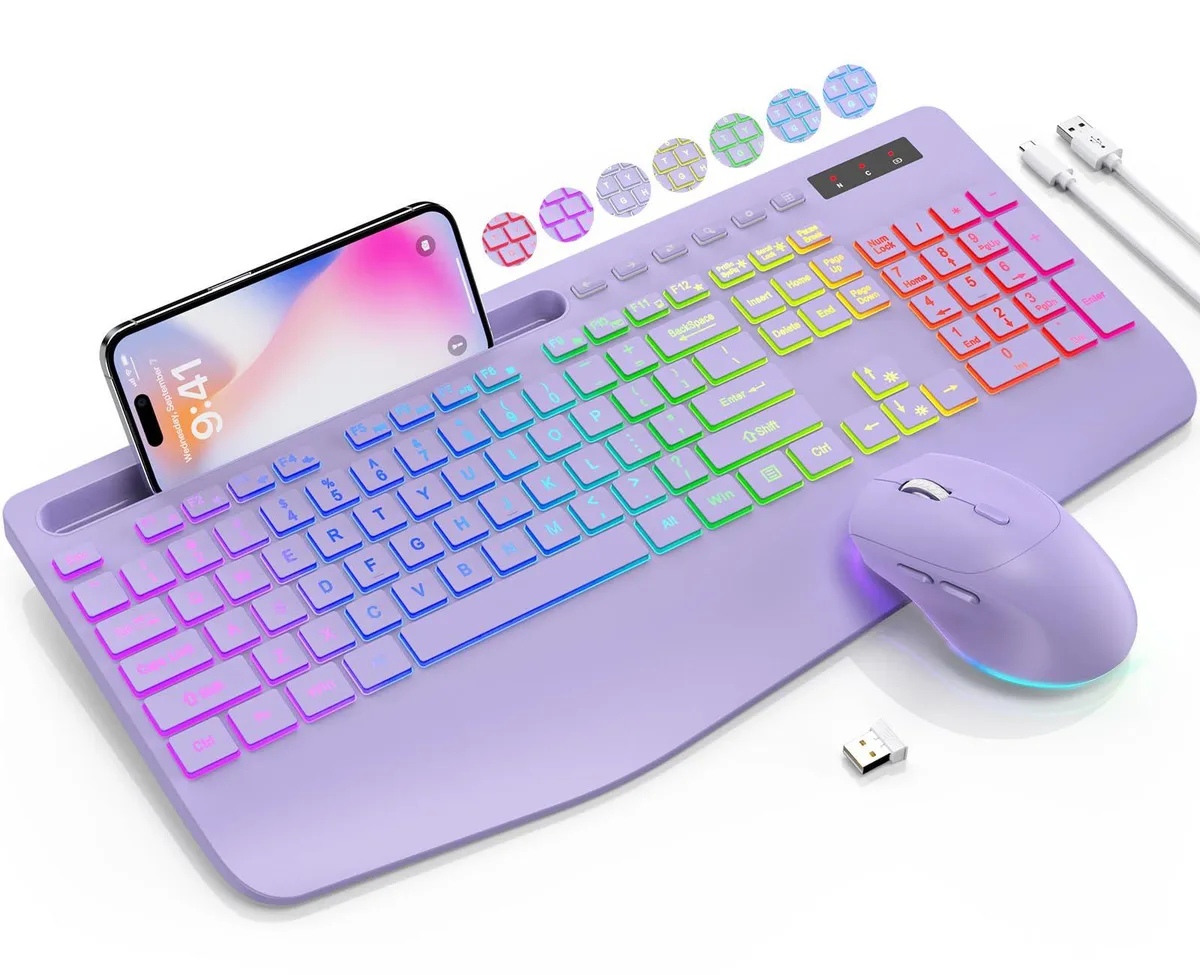


SABLUTE KL3 PRO Wireless Gaming Keyboard Lavender Purple
A wireless keyboard-and-mouse combo with a 2.8-inch wrist rest, phone holder for devices up to 11.9 inches, 9 backlit effects and 3-level DPI for quiet, lag-free use across Windows, Mac and Linux
- Keyboard Interface2.4G USB Wireless
- Palm RestBacklit, Ergonomic Wrist Rest, Phone Holder
- Normal KeysErgonomic wireless keyborad and mouse
- Function KeysFull-size
- Mechanical KeyboardErgonomic wireless keyborad and mouse
- Keycaps3-level DPI
- 54% wider wrist rest at 2.8 inches for all-day comfort
- 9 backlit effects with 7 solid and 1 rainbow mode
- Silent keys and clicks ideal for shared spaces
- 4 GHz wireless connects instantly to Windows, Mac, Linux
- Built-in phone holder fits devices up to 11.9 inches
Lavender Purple Wireless Combo
The SABLUTE KL3 PRO is a lavender purple wireless keyboard and mouse set that connects through a 2.4G USB receiver. It is built for home-office workers and students who want a quiet, comfortable typing experience across Windows, Chrome OS, Linux and Mac devices. The bundle includes a full-size keyboard with low-profile keycaps, a right-handed mouse and an integrated phone holder.
Upgrade From Wired Or Basic Sets
This combo replaces a wired keyboard and mouse or an entry-level wireless pair that lacks ergonomic support or backlighting. The jump is worth it when you need 2.4 GHz stability, silent keystrokes and a 2.8-inch wrist rest that gives 54 percent more support for long sessions. It is not for buyers who require a USB-C dongle, Bluetooth pairing or connectivity with tablets and phones.
Sustained Office And Study Use
During extended work or study periods the rechargeable batteries power both peripherals while a smart sleep mode conserves energy during breaks. The keyboard offers 7 solid plus 1 rainbow backlight colours with three brightness modes and the mouse provides 3-level DPI adjustment for consistent cursor control. Silent switches keep noise low in shared spaces throughout the day.
Punti di forza
- 54% wider wrist rest at 2.8 inches for all-day comfort
- 9 backlit effects with 7 solid and 1 rainbow mode
- Silent keys and clicks ideal for shared spaces
- 4 GHz wireless connects instantly to Windows, Mac, Linux
- Built-in phone holder fits devices up to 11.9 inches
Caratteristiche tecniche
| Brand | SABLUTE |
|---|---|
| Model | KL3 PRO |
| Keyboard Interface | 2.4G USB Wireless |
| Palm Rest | Backlit, Ergonomic Wrist Rest, Phone Holder |
| Normal Keys | Ergonomic wireless keyborad and mouse |
| Function Keys | Full-size |
| Mechanical Keyboard | Ergonomic wireless keyborad and mouse |
| Keycaps | 3-level DPI |
| Keyboard Color | Lavender Purple |
| Backlit | Backlit, Ergonomic Wrist Rest, Phone Holder |
| Dimensions | 5.207 cm x 28.3972 cm x 44.704 cm |
| Type | 2.4G USB Wireless, Battery Powered |
| Mouse Interface | 2.4G USB Wireless |
| Hand Orientation | Right |
| Mouse Color | Lavender Purple |
| Power Source | Battery Powered, true, false |
| System Requirement | 2.4G USB Wireless |
| Features | Backlit, Ergonomic Wrist Rest, Phone Holder, Shortcut Keys, Low-profile keycap, 3-level DPI |
Domande su questo articolo
How much desk depth does the keyboard with its 2.8-inch wrist rest require?
The keyboard measures 16.85 inches wide by 8.46 inches deep and the extra-wide wrist rest adds 2.8 inches of support, so allow at least 11 inches of desk depth for comfortable placement.
Does the 2.4 GHz USB receiver plug into the keyboard or the computer for pairing?
Insert the USB dongle into a free port on the computer; the keyboard and mouse link automatically with no extra software on Windows, Chrome OS, Linux or Mac.
How do I recharge the built-in battery when it runs low?
Connect the keyboard to a USB power source using the supplied cable; a smart sleep mode conserves charge during breaks so you can top it up overnight.
Anche in questo reparto
Anche i clienti hanno confrontato questi
Stesso reparto, stessa cassa — otto monete e un cambio bloccato per 30 minuti.



Cherry
Cherry MX 3.1 Mechanical Wired Gaming Keyboard White MX2A Silent Red
- Red Switch
- White
116,99 USD
0.00147605BTC
Disponibile