

NEMIX RAM
NEMIX RAM DDR5-5600 2TB (16x128GB) ECC RDIMM CL46 1.1V Supermicro H14SST-G memory upgrade
- 2TB (16 x 128GB)
- 288-Pin DDR5 RDIMM
62.908,99 USD
0.80693933BTC
În stocAcceptăm criptomonede — astfel, criptomonedele pe care le dețineți pot cumpăra echipamente reale.Plătiți în cripto, cheltuiți-o pe echipamente reale. Livrare asigurată gratuită oriunde în lume peste 399 $. Cartoane neutre, fără marcă, expediate din Germania.Livrare asigurată gratuită peste 399 $. Cursul dumneavoastră este blocat timp de 30 de minute de la deschiderea paginii de plată.Curs blocat 30 de minute. Fiecare articol este sigilat, numărul de serie este verificat, iar produsul este acoperit de o garanție de 24 de luni.Sigilat, garantat 24 de luni.
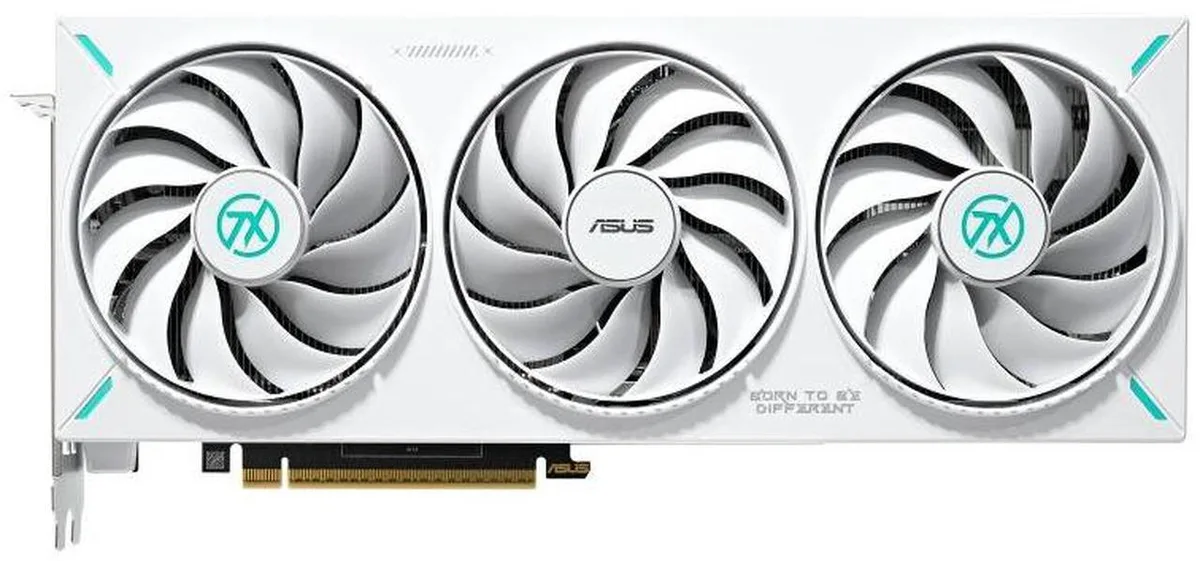


ASUS
GeForce RTX 5070 graphics card with 12GB GDDR7 memory, 6144 CUDA cores, PCI Express 5.0 and four-display output via HDMI 2.1b and DisplayPort 2.1b
The ASUS TX Gaming GeForce RTX 5070 OC delivers 12 GB of GDDR7 memory on a 192-bit bus with an effective clock of 28 Gbps. It targets gamers who want high frame rates at 4K resolution using DLSS 4 and ray tracing. The GPU provides 6144 CUDA cores and supports DirectX 12 Ultimate for modern titles. A PCI Express 5.0 x16 link supplies the necessary bandwidth.
Mount the card into a full-length PCI Express 5.0 x16 slot and connect the required power cables from your PSU. Ensure the case offers enough length clearance for the cooler. Driver installation follows the standard NVIDIA GeForce Experience or clean install process. Common issues include forgetting to seat the power connectors fully or running an older motherboard BIOS that limits the link to PCIe 4.0 speeds.
The PCI Express 5.0 x16 interface caps theoretical throughput at the specification maximum for this link width. Display outputs consist of two HDMI 2.1b and three DisplayPort 2.1b ports supporting up to 7680 x 4320 resolution across four monitors. Memory bandwidth is limited by the 192-bit bus and 28 Gbps GDDR7 clocks. No SLI or CrossFireX multi-GPU scaling is available.
| Brand | ASUS |
|---|---|
| Series | TX |
| Model | TX-RTX5070-O12G |
| Interface | PCI Express 5.0 |
| Chipset Manufacturer | NVIDIA |
| GPU Series | NVIDIA GeForce RTX 50 Series |
| GPU | GeForce RTX 5070 |
| CUDA Cores | 6144 |
| Effective Memory Clock | 28 Gbps |
| Memory Size | 12GB |
| Memory Interface | 192-Bit |
| Memory Type | GDDR7 |
| DirectX | DirectX 12 Ultimate |
| OpenGL | OpenGL 4.6 |
| Multi-Monitor Support | 4 |
| HDMI | 2 x HDMI 2.1b |
| DisplayPort | 3 x DisplayPort 2.1b |
| Max Resolution | 7680 x 4320 |
| CrossFireX Support | No |
| SLI Support | No |
| Cooler | Double Fans |
| Recommended PSU Wattage | 750W |
| Power Connector | 1 x 16-Pin |
| HDCP Ready | Yes |
| Form Factor | ATX |
| Max GPU Length | 329 mm |
| Card Dimensions (L x H) | 12.95 x 5.51 x 2.46 inch |
| Slot Width | 3.125 Slot |
Open GPU-Z or NVIDIA Control Panel and check that the memory clock reports 28 Gbps effective.
The card provides 2 x HDMI 2.1b and 3 x DisplayPort 2.1b; you supply the matching cables for each monitor you connect.
Install it in the primary PCI Express 5.0 x16 slot on your motherboard for full bandwidth.
Tot din acest raion
Același raion, aceeași finalizare a comenzii — opt monede și un curs blocat 30 de minute.
În ce monedă plătiți și în ce monedă citiți prețurile.
Trimis din portofelul dumneavoastră la finalizarea comenzii
Doar pentru afișare — catalogul este exprimat în dolari
Nicio monedă nu corespunde.
Alegeți limba în care vă vorbește site-ul.
Prima vizită?
Aveți deja un cont?
Nu există o resetare automată: acest magazin nu trimite niciun e-mail, deci nu există niciun link de unică folosință de solicitat. Lăsați adresa în cont. Va fi tratată manual.
Cerere înregistrată
Nu veți primi nimic în căsuța de e-mail — acest magazin nu trimite niciun e-mail. Cineva se ocupă de asta manual.
V-ați amintit-o?


