

Micron Technology, Inc.
Micron Technology, Inc. MT4JTF12864AZ-1G4D1 1GB DDR3 1333 Desktop RAM
- 1GB
- DDR3 1333 (PC3 1060…
$28.99
0.00037433BTC
En stockNous acceptons la cryptomonnaie — les cryptos que vous détenez peuvent ainsi acheter du matériel réel.Payez en crypto, dépensez-la en matériel réel. Livraison assurée offerte partout dans le monde au-delà de 399 $. Cartons neutres, sans marque, expédiés depuis l’Allemagne.Livraison assurée offerte au-delà de 399 $. Votre taux est bloqué pendant 30 minutes dès l’ouverture de la caisse.Taux bloqué 30 minutes. Chaque article est scellé, son numéro de série est vérifié, et il est couvert par une garantie de 24 mois.Scellé, garanti 24 mois.


ASUS
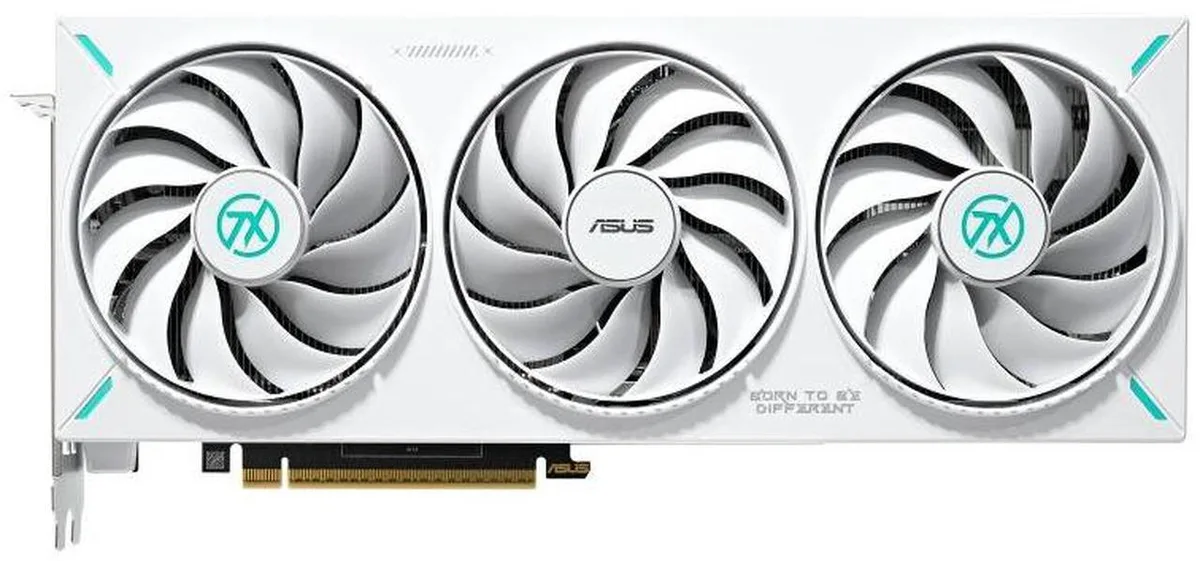
GeForce RTX 5070 graphics card with 12GB GDDR7 memory, 6144 CUDA cores, PCI Express 5.0 and four-display output via HDMI 2.1b and DisplayPort 2.1b
The ASUS TX Gaming GeForce RTX 5070 OC delivers 12 GB of GDDR7 memory on a 192-bit bus with an effective clock of 28 Gbps. It targets gamers who want high frame rates at 4K resolution using DLSS 4 and ray tracing. The GPU provides 6144 CUDA cores and supports DirectX 12 Ultimate for modern titles. A PCI Express 5.0 x16 link supplies the necessary bandwidth.
Mount the card into a full-length PCI Express 5.0 x16 slot and connect the required power cables from your PSU. Ensure the case offers enough length clearance for the cooler. Driver installation follows the standard NVIDIA GeForce Experience or clean install process. Common issues include forgetting to seat the power connectors fully or running an older motherboard BIOS that limits the link to PCIe 4.0 speeds.
The PCI Express 5.0 x16 interface caps theoretical throughput at the specification maximum for this link width. Display outputs consist of two HDMI 2.1b and three DisplayPort 2.1b ports supporting up to 7680 x 4320 resolution across four monitors. Memory bandwidth is limited by the 192-bit bus and 28 Gbps GDDR7 clocks. No SLI or CrossFireX multi-GPU scaling is available.
| Brand | ASUS |
|---|---|
| Series | TX |
| Model | TX-RTX5070-O12G |
| Interface | PCI Express 5.0 |
| Chipset Manufacturer | NVIDIA |
| GPU Series | NVIDIA GeForce RTX 50 Series |
| GPU | GeForce RTX 5070 |
| CUDA Cores | 6144 |
| Effective Memory Clock | 28 Gbps |
| Memory Size | 12GB |
| Memory Interface | 192-Bit |
| Memory Type | GDDR7 |
| DirectX | DirectX 12 Ultimate |
| OpenGL | OpenGL 4.6 |
| Multi-Monitor Support | 4 |
| HDMI | 2 x HDMI 2.1b |
| DisplayPort | 3 x DisplayPort 2.1b |
| Max Resolution | 7680 x 4320 |
| CrossFireX Support | No |
| SLI Support | No |
| Cooler | Double Fans |
| Recommended PSU Wattage | 750W |
| Power Connector | 1 x 16-Pin |
| HDCP Ready | Yes |
| Form Factor | ATX |
| Max GPU Length | 329 mm |
| Card Dimensions (L x H) | 12.95 x 5.51 x 2.46 inch |
| Slot Width | 3.125 Slot |
Open GPU-Z or NVIDIA Control Panel and check that the memory clock reports 28 Gbps effective.
The card provides 2 x HDMI 2.1b and 3 x DisplayPort 2.1b; you supply the matching cables for each monitor you connect.
Install it in the primary PCI Express 5.0 x16 slot on your motherboard for full bandwidth.
Également dans ce rayon
Même rayon, même caisse — huit monnaies et un taux bloqué 30 minutes.
Ce que vous envoyez, et ce dans quoi vous lisez les prix.
Envoyé depuis votre portefeuille à la caisse
Affichage seul — le catalogue est libellé en dollars
Aucune monnaie ne correspond.
Choisissez la langue dans laquelle le site vous parle.
Première visite ?
Vous avez déjà un compte ?
Il n’y a pas de réinitialisation automatique : cette boutique n’envoie aucun e-mail, il n’existe donc aucun lien à usage unique à demander. Laissez l’adresse sur le compte, elle sera traitée à la main.
Demande enregistrée
Rien n’arrivera dans votre boîte de réception — cette boutique n’envoie aucun e-mail. Quelqu’un s’en occupe à la main.
Vous l’avez retrouvé ?



