DELL
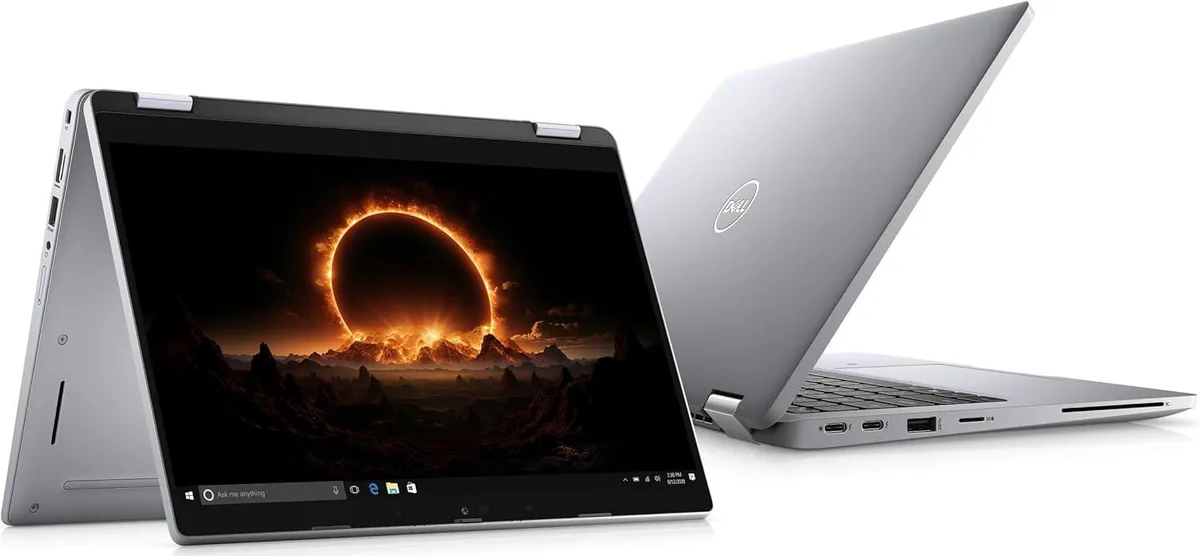
DELL Latitude 5310 13.0" 2-in-1 laptop i5-10210U 8 GB 256 GB
- Silver
- In Good Condition -…
252,99 USD
0.00324604BTC
SkladomPrijímame kryptomeny — takže mince, ktoré držíte, môžete zameniť za skutočný hardvér.Plaťte v krypte, miňte ho na skutočný hardvér. Poistená doprava zadarmo po celom svete nad 399 $. Neutrálne kartóny bez potlače, odosielané z Nemecka.Poistená doprava zadarmo nad 399 $. Váš kurz je zablokovaný na 30 minút hneď po otvorení pokladne.Kurz zablokovaný na 30 minút. Každý produkt je zapečatený, jeho sériové číslo je overené a vzťahuje sa naň 24-mesačná záruka.Zapečatené, 24-mesačná záruka.


DELL
A 13.0 inch convertible 2-in-1 laptop with Full HD touchscreen, Intel Core i5-10210U processor, 1TB M.2 SSD and 8GB RAM running Windows 11 Pro
CPU Type Intel Core i5 10th Gen
The Dell Latitude 5310 is a 13.0-inch convertible notebook with a Full HD touchscreen running at 1920 x 1080 resolution. It ships new with Windows 11 Pro, an Intel Core i5-10210U quad-core processor, 8GB of memory and a 1TB M.2 2242 SSD. The silver chassis measures 12 x 8.3 x 0.7 inches and weighs between 3 and 3.9 lbs.
This configuration suits professionals who need one device for office applications, video calls and light content viewing on the 13.1-inch touch display. The 8GB memory fills both slots, so buyers who want more RAM now or the 64GB maximum later should look elsewhere. The 1TB drive also leaves no free M.2 bay for a second SSD.
The box includes a 65-watt AC adapter, so verify your regional plug type or travel adapter needs. Video output uses a single HDMI 1.4 port; the USB-C connector supports DisplayPort Alt Mode and optional Thunderbolt, while two USB-A 3.2 Gen 1 ports handle peripherals and PowerShare charging. Confirm any smart-card or uSIM requirements, as those readers are optional.
| Brand | DELL |
|---|---|
| Series | Latitude |
| Model | Dell Latitude |
| Part Number | 5310 |
| Color | Silver |
| Style | Convertible |
| Type | Work / Business |
| Usage | Other |
| Operating System | Windows 11 Pro |
| CPU Type | Intel Core i5 10th Gen |
| Processor Name | Intel Core i5-10210U |
| Number of Cores | Quad-core Processor |
| Screen Size | 13.0" |
| Touchscreen | Touch Screen |
| Display Type | Full HD |
| Resolution | 1920 x 1080 |
| SSD | 1TB |
| HDD | No |
| Storage Spec | One drive, up to 1TB M.2 2242 SSD |
| Memory | 8GB |
| Memory Spec | 8 GB x 2 |
| Memory Slot (Total) | 2 |
| Memory Slot (Available) | 0 |
| Max Memory Supported | 64 GB |
| LAN | 10/100/1000Mbps |
| Service | Wi-Fi Only |
| Bluetooth | Yes |
| HDMI | 1 x HDMI |
| Audio | Integrated Sound card |
| Speaker | Internal Speakers |
| Webcam | Yes |
| AC Adapter/Charger | 65-watt AC Adapter |
| Battery | 3-cell Lithium Ion |
| Dimensions (W x D x H) | 12 x 8.3 x 0.7 |
| Weight | 3 - 3.9 lbs. |
Ďalšie verzie tohto modelu
Rovnaký rad, iná pamäť, chladič alebo frekvencia — porovnajte pred rozhodnutím.
A 65-watt AC adapter is included in the box, so the laptop can be charged and used right away without purchasing a separate power supply.
Yes, the built-in HDMI 1.4 port supports external displays, so an HDMI 1.4 monitor will connect directly without an adapter.
Open Windows Settings > System > Display to confirm 1920 x 1080 is selected, then tap the screen to ensure touch input registers across the entire 13.0-inch panel.
Aj v tomto oddelení
Rovnaké oddelenie, rovnaká pokladňa — osem mien a kurz zablokovaný na 30 minút.
Mena, v ktorej platíte, a mena, v ktorej sa zobrazujú ceny.
Odoslané z vašej peňaženky na pokladni
Len na zobrazenie — katalóg je uvedený v dolároch
Žiadna mena nezodpovedá.
Vyberte jazyk, v ktorom s vami bude web komunikovať.
Žiadny jazyk nezodpovedá.
Ste tu prvýkrát?
Účet už máte?
Automatický reset hesla neexistuje: tento obchod neposiela žiadne e-maily, takže neexistuje jednorazový odkaz, o ktorý by ste mohli požiadať. Nechajte adresu na účte — niekto sa jej ujme ručne.
Žiadosť zaznamenaná
Do vašej schránky nič nepríde — tento obchod neposiela vôbec žiadne e-maily. Niekto sa o to postará ručne.
Spomenuli ste si?