DELL
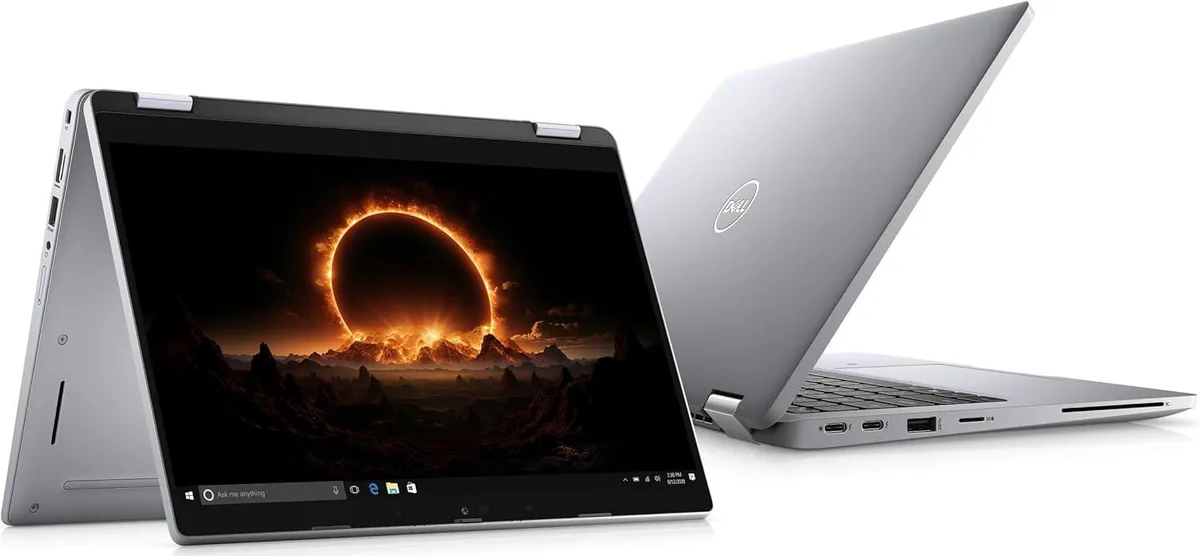
DELL Latitude 5310 13.0" 2-in-1 laptop i5-10210U 8 GB 256 GB
- Silver
- In Good Condition -…
252,99 US$
0.0032614BTC
I lagerVi tar emot kryptovaluta — så att kryptot du äger kan köpa riktig hårdvara.Betala med krypto, använd det till riktig hårdvara. Fri, försäkrad frakt över hela världen vid köp över 399 $. Neutrala, omärkta ytterkartonger, skickade från Tyskland.Fri, försäkrad frakt över 399 $. Din kurs låses i 30 minuter så snart kassan öppnas.Kursen låst i 30 minuter. Varje artikel är förseglad, har kontrollerat serienummer och täcks av 24 månaders garanti.Förseglad, 24 månaders garanti.


DELL
A 13.0 inch convertible 2-in-1 laptop with Full HD touchscreen, Intel Core i5-10210U processor, 1TB M.2 SSD and 8GB RAM running Windows 11 Pro
CPU Type Intel Core i5 10th Gen
The Dell Latitude 5310 is a 13.0-inch convertible notebook with a Full HD touchscreen running at 1920 x 1080 resolution. It ships new with Windows 11 Pro, an Intel Core i5-10210U quad-core processor, 8GB of memory and a 1TB M.2 2242 SSD. The silver chassis measures 12 x 8.3 x 0.7 inches and weighs between 3 and 3.9 lbs.
This configuration suits professionals who need one device for office applications, video calls and light content viewing on the 13.1-inch touch display. The 8GB memory fills both slots, so buyers who want more RAM now or the 64GB maximum later should look elsewhere. The 1TB drive also leaves no free M.2 bay for a second SSD.
The box includes a 65-watt AC adapter, so verify your regional plug type or travel adapter needs. Video output uses a single HDMI 1.4 port; the USB-C connector supports DisplayPort Alt Mode and optional Thunderbolt, while two USB-A 3.2 Gen 1 ports handle peripherals and PowerShare charging. Confirm any smart-card or uSIM requirements, as those readers are optional.
| Brand | DELL |
|---|---|
| Series | Latitude |
| Model | Dell Latitude |
| Part Number | 5310 |
| Color | Silver |
| Style | Convertible |
| Type | Work / Business |
| Usage | Other |
| Operating System | Windows 11 Pro |
| CPU Type | Intel Core i5 10th Gen |
| Processor Name | Intel Core i5-10210U |
| Number of Cores | Quad-core Processor |
| Screen Size | 13.0" |
| Touchscreen | Touch Screen |
| Display Type | Full HD |
| Resolution | 1920 x 1080 |
| SSD | 1TB |
| HDD | No |
| Storage Spec | One drive, up to 1TB M.2 2242 SSD |
| Memory | 8GB |
| Memory Spec | 8 GB x 2 |
| Memory Slot (Total) | 2 |
| Memory Slot (Available) | 0 |
| Max Memory Supported | 64 GB |
| LAN | 10/100/1000Mbps |
| Service | Wi-Fi Only |
| Bluetooth | Yes |
| HDMI | 1 x HDMI |
| Audio | Integrated Sound card |
| Speaker | Internal Speakers |
| Webcam | Yes |
| AC Adapter/Charger | 65-watt AC Adapter |
| Battery | 3-cell Lithium Ion |
| Dimensions (W x D x H) | 12 x 8.3 x 0.7 |
| Weight | 3 - 3.9 lbs. |
Andra versioner av den här modellen
Samma familj, men olika minne, kylning eller klockfrekvens — jämför innan du bestämmer dig.
A 65-watt AC adapter is included in the box, so the laptop can be charged and used right away without purchasing a separate power supply.
Yes, the built-in HDMI 1.4 port supports external displays, so an HDMI 1.4 monitor will connect directly without an adapter.
Open Windows Settings > System > Display to confirm 1920 x 1080 is selected, then tap the screen to ensure touch input registers across the entire 13.0-inch panel.
Även i den här avdelningen
Samma hylla, samma kassa — åtta mynt och ett 30-minuters kurslås.
Det du betalar med, och det du ser priserna i.
Skickas från din plånbok i kassan
Endast visning — katalogen är prissatt i US-dollar
Ingen valuta matchar.
Välj det språk du vill att webbplatsen ska visas på.
Inga språk matchar.
Ny här?
Har du redan ett konto?
Det finns ingen automatisk återställning: den här butiken skickar inga e-postmeddelanden, så det finns ingen engångslänk att begära. Lämna adressen kopplad till kontot, så hanteras den för hand.
Förfrågan noterad
Inget är på väg till din inkorg — den här butiken skickar aldrig e-post. Någon tar hand om detta manuellt.
Kom du på det?