Lenovo
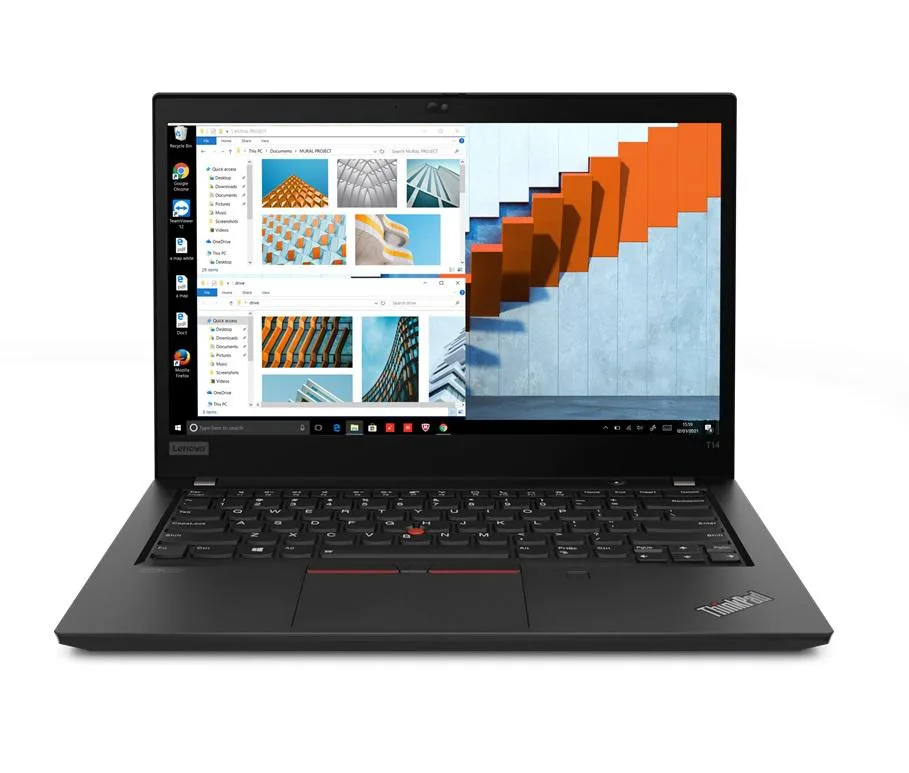
Lenovo Thinkpad T14 Gen 2 laptop i5-1135G7 16GB 1TB SSD 14.0" FHD dual boot
- 16GB
- DDR4
833,99 USD
0.01073512BTC
SkladomPrijímame kryptomeny — takže mince, ktoré držíte, môžete zameniť za skutočný hardvér.Plaťte v krypte, miňte ho na skutočný hardvér. Poistená doprava zadarmo po celom svete nad 399 $. Neutrálne kartóny bez potlače, odosielané z Nemecka.Poistená doprava zadarmo nad 399 $. Váš kurz je zablokovaný na 30 minút hneď po otvorení pokladne.Kurz zablokovaný na 30 minút. Každý produkt je zapečatený, jeho sériové číslo je overené a vzťahuje sa naň 24-mesačná záruka.Zapečatené, 24-mesačná záruka.


Lenovo
Business laptop with 11th Gen Intel Core i5, 24 GB DDR4, 256 GB PCIe SSD, 14.0" Full HD IPS display, Wi-Fi 6, Ethernet, Thunderbolt 4, and dual-boot Windows 10 Pro with Linux Mint
Options 24GB/256GB
The Lenovo Thinkpad T14 Gen 2 is a 14.0" Full HD business laptop powered by an 11th Gen Intel Core i5-1135G7 processor with 24GB DDR4 memory and a 256GB PCIe SSD. It ships with Windows 10 Pro and Linux Mint 20 pre-installed in a dual-boot configuration, letting you select either operating system at startup. Integrated Intel Iris Xe graphics drive the 1920 x 1080 IPS display.
This machine fits users who must run Windows and Linux applications on the same hardware without virtualization overhead. The 24GB memory and fast PCIe storage support typical office workloads and light development tasks. Buyers who want a dedicated GPU for 3D rendering, video editing or gaming should look elsewhere, as only integrated graphics are present. The single 256GB drive may also limit users with large local datasets.
The factory dual-boot setup removes the need to configure a hypervisor or manage virtual disk images, saving setup time and avoiding the performance penalty of running one OS inside another. Thunderbolt 4 ports add high-speed external storage and dock options, while Wi-Fi 6 and a Gigabit Ethernet jack provide flexible network connectivity. A 720p webcam, HDMI output and a microSD reader complete the I/O for conference calls and peripheral expansion.
| Memory | 24GB |
|---|---|
| Memory Speed | DDR4 |
| Type | Work / Business |
| Resolution | 1920 x 1080 |
| Screen Size | 14.0" |
| Display Type | Full HD |
| Touchscreen | No |
| SSD | 256 GB |
| HDD | No |
| Storage Spec | 256GB PCIe SSD |
| Brand | Lenovo |
| Series | Thinkpad T14 Gen 2 |
| Part Number | T14 |
| Model | Thinkpad |
| Color | Black |
| GPU/VPU | Intel Iris Xe Graphics |
| Operating System | Linux |
| WiFi Generation | Wi-Fi 6 |
| LAN | 10/100/1000Mbps |
| WLAN | Wi-Fi 6 |
| Bluetooth | Bluetooth 5.2 |
| CPU Type | Intel Core i5 11th Gen |
| Optical Drive Type | No |
| Webcam | Yes |
| Touchpad | ThinkPad UltraNav |
| Keyboard | Standard |
| Card Reader | Micro SD |
| Battery | Lithium Polymer |
| USB | 2 x USB 3.2 Gen 1 |
| Thunderbolt | 2 x Thunderbolt 4 |
| Video Port | 1 x HDMI |
| Ethernet | 1 x RJ-45 |
| Audio Ports | 1 x Headphone/Microphone Combo Jack |
| Audio | Integrated Sound card |
| Speaker | Integrated Stereo Speakers |
Ďalšie verzie tohto modelu
Rovnaký rad, iná pamäť, chladič alebo frekvencia — porovnajte pred rozhodnutím.
The HDMI port works whenever a display is connected; the built-in 14.0" 1920 x 1080 IPS panel is the primary screen and requires no extra hardware.
Yes, the two USB-A 3.2 Gen1 ports are backward compatible with USB 3.0 and USB 2.0 devices, so existing flash drives will function normally.
On startup a boot selector lets you choose Windows 10 Pro or Linux Mint 20; seeing that menu and loading either OS confirms the dual-boot is working.
Aj v tomto oddelení
Rovnaké oddelenie, rovnaká pokladňa — osem mien a kurz zablokovaný na 30 minút.
Mena, v ktorej platíte, a mena, v ktorej sa zobrazujú ceny.
Odoslané z vašej peňaženky na pokladni
Len na zobrazenie — katalóg je uvedený v dolároch
Žiadna mena nezodpovedá.
Vyberte jazyk, v ktorom s vami bude web komunikovať.
Žiadny jazyk nezodpovedá.
Ste tu prvýkrát?
Účet už máte?
Automatický reset hesla neexistuje: tento obchod neposiela žiadne e-maily, takže neexistuje jednorazový odkaz, o ktorý by ste mohli požiadať. Nechajte adresu na účte — niekto sa jej ujme ručne.
Žiadosť zaznamenaná
Do vašej schránky nič nepríde — tento obchod neposiela vôbec žiadne e-maily. Niekto sa o to postará ručne.
Spomenuli ste si?