

SanDisk
SanDisk Cruzer Blade 8 GB USB 2.0 USB flash drive Black SDCZ50-008G-B35
391,99 US$
0.00494419BTC
I lagerVi tar emot kryptovaluta — så att kryptot du äger kan köpa riktig hårdvara.Betala med krypto, använd det till riktig hårdvara. Fri, försäkrad frakt över hela världen vid köp över 399 $. Neutrala, omärkta ytterkartonger, skickade från Tyskland.Fri, försäkrad frakt över 399 $. Din kurs låses i 30 minuter så snart kassan öppnas.Kursen låst i 30 minuter. Varje artikel är förseglad, har kontrollerat serienummer och täcks av 24 månaders garanti.Förseglad, 24 månaders garanti.


ASUS
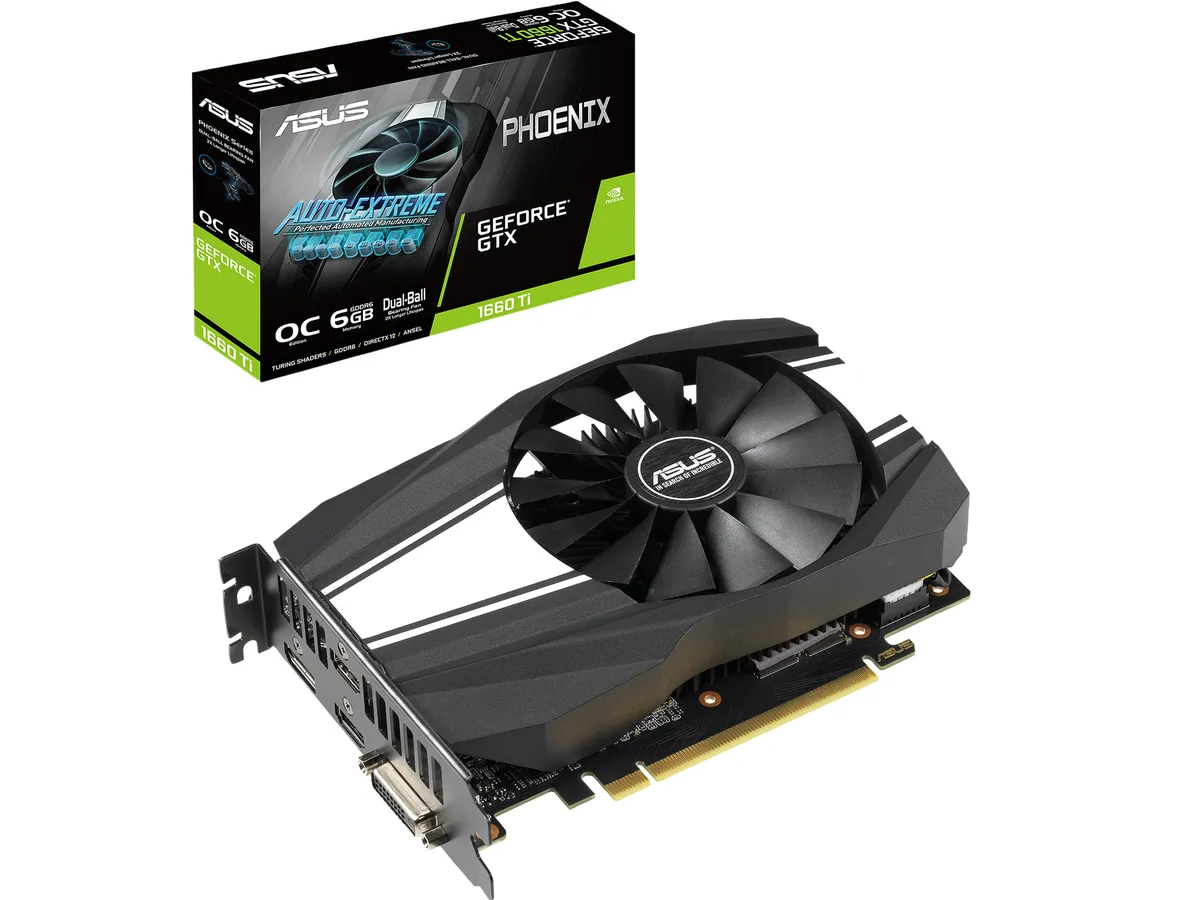
Refurbished GeForce GTX 1660 Ti with 6GB GDDR6, 1536 CUDA cores, OC boost to 1815 MHz, and four-display output via HDMI 2.0b, DisplayPort 1.4 and DVI-D
The ASUS Phoenix GeForce GTX 1660 Ti is a graphics card built on the NVIDIA Turing architecture. It features 1536 CUDA cores and 6GB of GDDR6 memory on a 192-bit bus. The card connects via a PCI Express 3.0 interface and occupies a dual-slot form factor.
This card suits builders who want solid 1080p frame rates in modern titles and need up to four simultaneous displays. It is not intended for 4K gaming workloads or applications that require hardware ray-tracing acceleration.
The 6GB GDDR6 frame buffer paired with a 192-bit memory interface determines the card’s effective resolution ceiling and texture capacity. Buyers targeting higher resolutions or larger VRAM budgets should consider a different model.
| Brand | ASUS |
|---|---|
| Series | Phoenix |
| Model | PH-GTX1660TI-O6G |
| Interface | PCI Express 3.0 |
| Chipset Manufacturer | NVIDIA |
| GPU Series | NVIDIA GeForce GTX 16 Series |
| GPU | GeForce GTX 1660 Ti |
| Core Clock | OC Mode: 1530 MHz Gaming Mode (Default): 1500 MHz |
| Boost Clock | OC Mode: 1815 MHz Gaming Mode (Default): 1785 MHz |
| CUDA Cores | 1536 |
| Effective Memory Clock | 12002 MHz |
| Memory Size | 6GB |
| Memory Interface | 192-Bit |
| Memory Type | GDDR6 |
| OpenGL | OpenGL 4.6 |
| Multi-Monitor Support | 4 |
| HDMI | 2 x HDMI 2.0b |
| DisplayPort | 1 x DisplayPort 1.4 |
| DVI | 1 x DVI-D |
| Max Resolution | 7680 x 4320 |
| SLI Support | No |
| Virtual Reality Ready | Yes |
| Cooler | Single Fan |
| Thermal Design Power | 120W |
| System Requirements | Recommended PSU: 450W |
| Recommended PSU Wattage | 450W |
| Power Connector | 8-Pin |
| HDCP Ready | 2.2 |
| Features | The GeForce GTX 1660 Ti is built with the breakthrough graphics performance of the award-winning NVIDIA Turing architecture. With performance that rivals the GeForce GTX 1070, it's a blazing-fast supercharger for today's most popular games. Broadcast your gameplay: Get amazing performance and image quality while livestreaming to Twitch or YouTube. The GTX 1660 Ti's dedicated hardware encoder delivers 15% improved efficiency over prior generation graphics cards and is optimized for Open Broadcaster Software (OBS). GeForce Experience: Capture and share videos, screenshots, and livestre |
| Max GPU Length | 174 mm |
| Card Dimensions (L x H) | 6.85" x 4.76" |
| Slot Width | 2 Slots |
| Fraktvikt | 0.82 kg |
| Paketstorlek | 305 × 224 × 56 mm |
The Phoenix card measures 6.9 inches long and 1.5 inches tall, occupying two expansion slots; verify your case clearance and that the adjacent slot is free before ordering.
Connect one 8-pin PCIe cable directly from the power supply to the card's top-edge connector; the latch faces the rear bracket, so route the cable before fully seating the card.
Remove dust from the fan blades and fin stack every three to six months using compressed air; hold the fan still while blowing to avoid bearing damage.
Även i den här avdelningen
Samma hylla, samma kassa — åtta mynt och ett 30-minuters kurslås.
Det du betalar med, och det du ser priserna i.
Skickas från din plånbok i kassan
Endast visning — katalogen är prissatt i US-dollar
Ingen valuta matchar.
Välj det språk du vill att webbplatsen ska visas på.
Inga språk matchar.
Ny här?
Har du redan ett konto?
Det finns ingen automatisk återställning: den här butiken skickar inga e-postmeddelanden, så det finns ingen engångslänk att begära. Lämna adressen kopplad till kontot, så hanteras den för hand.
Förfrågan noterad
Inget är på väg till din inkorg — den här butiken skickar aldrig e-post. Någon tar hand om detta manuellt.
Kom du på det?



