

SanDisk
SanDisk Cruzer Blade 8 GB USB 2.0 USB flash drive Black SDCZ50-008G-B35
US$391.99
0.00502371BTC
재고 있음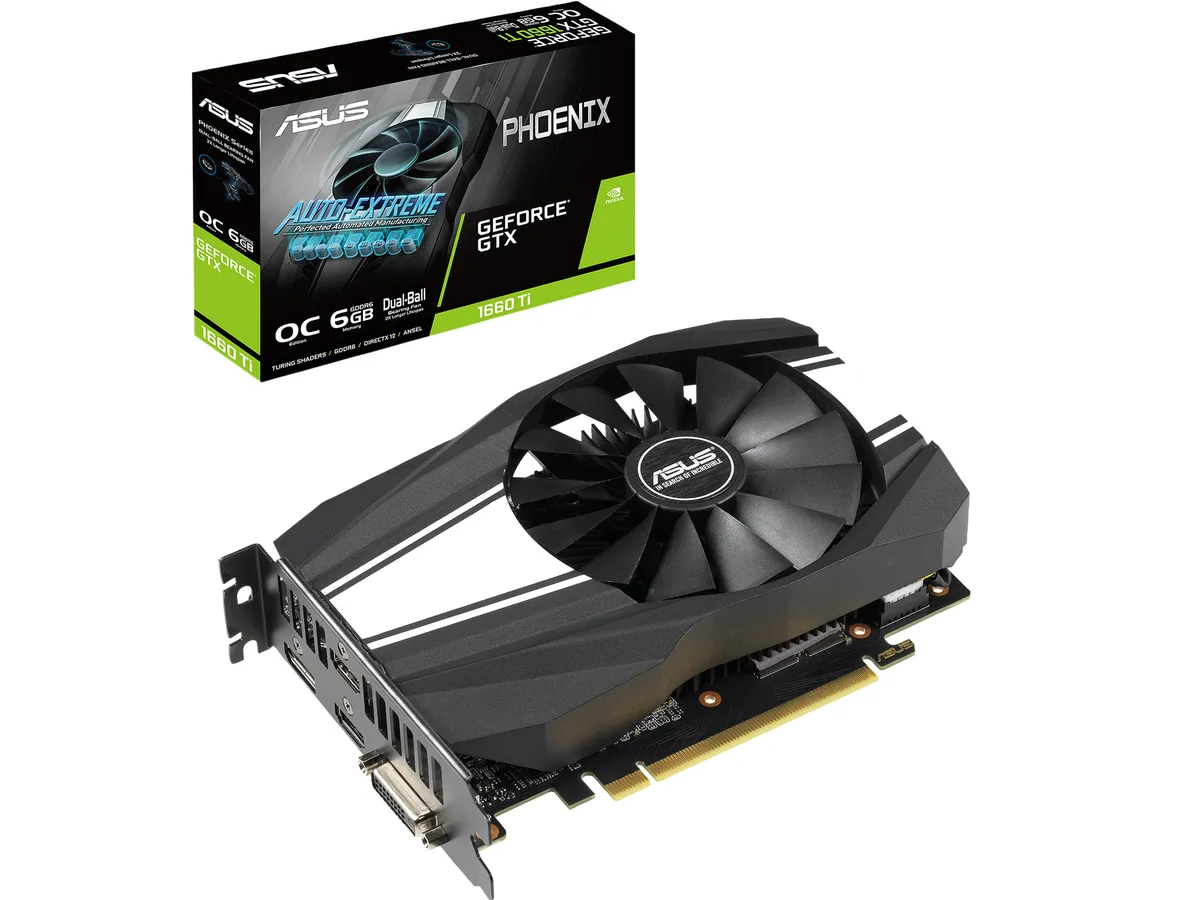


ASUS
Refurbished GeForce GTX 1660 Ti with 6GB GDDR6, 1536 CUDA cores, OC boost to 1815 MHz, and four-display output via HDMI 2.0b, DisplayPort 1.4 and DVI-D
The ASUS Phoenix GeForce GTX 1660 Ti is a graphics card built on the NVIDIA Turing architecture. It features 1536 CUDA cores and 6GB of GDDR6 memory on a 192-bit bus. The card connects via a PCI Express 3.0 interface and occupies a dual-slot form factor.
This card suits builders who want solid 1080p frame rates in modern titles and need up to four simultaneous displays. It is not intended for 4K gaming workloads or applications that require hardware ray-tracing acceleration.
The 6GB GDDR6 frame buffer paired with a 192-bit memory interface determines the card’s effective resolution ceiling and texture capacity. Buyers targeting higher resolutions or larger VRAM budgets should consider a different model.
| Brand | ASUS |
|---|---|
| Series | Phoenix |
| Model | PH-GTX1660TI-O6G |
| Interface | PCI Express 3.0 |
| Chipset Manufacturer | NVIDIA |
| GPU Series | NVIDIA GeForce GTX 16 Series |
| GPU | GeForce GTX 1660 Ti |
| Core Clock | OC Mode: 1530 MHz Gaming Mode (Default): 1500 MHz |
| Boost Clock | OC Mode: 1815 MHz Gaming Mode (Default): 1785 MHz |
| CUDA Cores | 1536 |
| Effective Memory Clock | 12002 MHz |
| Memory Size | 6GB |
| Memory Interface | 192-Bit |
| Memory Type | GDDR6 |
| OpenGL | OpenGL 4.6 |
| Multi-Monitor Support | 4 |
| HDMI | 2 x HDMI 2.0b |
| DisplayPort | 1 x DisplayPort 1.4 |
| DVI | 1 x DVI-D |
| Max Resolution | 7680 x 4320 |
| SLI Support | No |
| Virtual Reality Ready | Yes |
| Cooler | Single Fan |
| Thermal Design Power | 120W |
| System Requirements | Recommended PSU: 450W |
| Recommended PSU Wattage | 450W |
| Power Connector | 8-Pin |
| HDCP Ready | 2.2 |
| Features | The GeForce GTX 1660 Ti is built with the breakthrough graphics performance of the award-winning NVIDIA Turing architecture. With performance that rivals the GeForce GTX 1070, it's a blazing-fast supercharger for today's most popular games. Broadcast your gameplay: Get amazing performance and image quality while livestreaming to Twitch or YouTube. The GTX 1660 Ti's dedicated hardware encoder delivers 15% improved efficiency over prior generation graphics cards and is optimized for Open Broadcaster Software (OBS). GeForce Experience: Capture and share videos, screenshots, and livestre |
| Max GPU Length | 174 mm |
| Card Dimensions (L x H) | 6.85" x 4.76" |
| Slot Width | 2 Slots |
| 배송 무게 | 0.82 kg |
| 포장 크기 | 305 × 224 × 56 mm |
The Phoenix card measures 6.9 inches long and 1.5 inches tall, occupying two expansion slots; verify your case clearance and that the adjacent slot is free before ordering.
Connect one 8-pin PCIe cable directly from the power supply to the card's top-edge connector; the latch faces the rear bracket, so route the cable before fully seating the card.
Remove dust from the fan blades and fin stack every three to six months using compressed air; hold the fan still while blowing to avoid bearing damage.
이 진열대의 다른 상품
같은 진열대, 같은 체크아웃 — 코인 8종, 환율 잠금 30분.
결제할 코인과 가격을 확인할 통화입니다.
체크아웃 시 지갑에서 전송됩니다.
표시 전용 — 카탈로그 가격은 달러 기준입니다.
일치하는 통화가 없습니다.
사이트에서 사용할 언어를 선택하십시오.
일치하는 언어가 없습니다.
처음 방문하셨나요?
이미 계정이 있으신가요?
자동 재설정 기능은 없습니다. 이 쇼핑몰은 어떠한 메일도 보내지 않으므로 요청할 일회용 링크 자체가 없습니다. 계정에 등록된 이메일 주소를 그대로 두시면 담당자가 직접 확인해 처리합니다.
요청 접수
받은편지함으로 오는 것은 아무것도 없습니다 — 이 쇼핑몰은 메일을 전혀 보내지 않습니다. 담당자가 직접 확인해 처리합니다.
기억나셨나요?



