minisforum
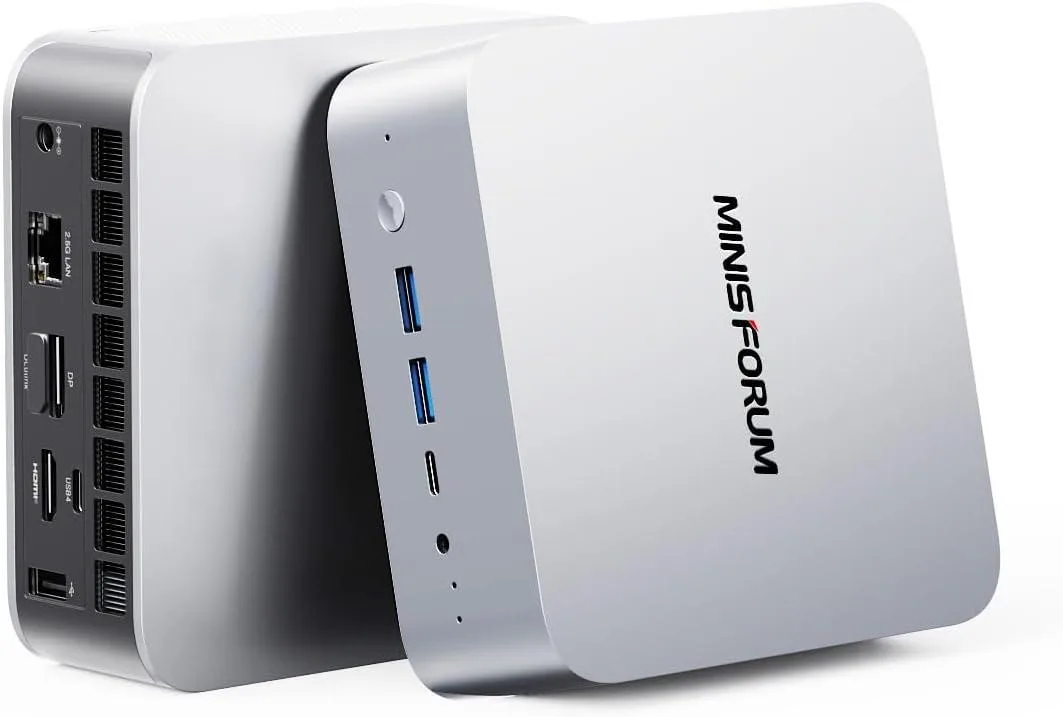
minisforum DeskMini Core Ultra 5 125U 16GB DDR5 512GB barebone mini PC
- Silver
- Intel Core Ultra 5…
451,99 US$
0.0056556BTC
I lagerVi tar emot kryptovaluta — så att kryptot du äger kan köpa riktig hårdvara.Betala med krypto, använd det till riktig hårdvara. Fri, försäkrad frakt över hela världen vid köp över 399 $. Neutrala, omärkta ytterkartonger, skickade från Tyskland.Fri, försäkrad frakt över 399 $. Din kurs låses i 30 minuter så snart kassan öppnas.Kursen låst i 30 minuter. Varje artikel är förseglad, har kontrollerat serienummer och täcks av 24 månaders garanti.Förseglad, 24 månaders garanti.


minisforum
Barebone mini PC with Intel Core Ultra 9 285H, 64 GB DDR5, 2 TB storage, Arc 140T graphics, HDMI 2.1, DP 1.4, dual USB4, OCuLink, 2.5 Gbps LAN, Wi-Fi 7 and Bluetooth 5.4
Option M1 Pro-285H · 64+2T
Genomstrukna varianter finns, men är inte i lager här.
The DeskMini barebone packs an Intel Core Ultra 9 285H with 16 cores and 16 threads alongside 64 GB of DDR5 5600 memory and a 2 TB PCIe 4.0 SSD. Integrated Arc 140T graphics and four video outputs — HDMI 2.1, DP 1.4 and dual USB4 — drive up to four UHD displays. Wireless connectivity uses Wi-Fi 7 and Bluetooth 5.4 plus 2.5 Gbps LAN.
The 285H runs at up to 5.4 GHz while the Arc iGPU reaches 2.35 GHz, keeping frame rates and render times steady during long gaming, 3D or video sessions. Dual-channel DDR5 and PCIe 4.0 storage prevent bottlenecks when large datasets move between memory and SSD. An OCuLink port adds PCIe 4.0 x4 bandwidth for an external GPU if internal graphics become the limit.
Builders who need a full desktop CPU, 64 GB RAM and multi-monitor output in a silent silver chassis will upgrade from larger systems. The jump is worth it when desk space is tight, noise must stay low and the workload fits within integrated Arc performance. Buyers who want more storage than the single spare SSD slot or who need discrete-card power from day one should look elsewhere.
| Brand | MINISFORUM |
|---|---|
| Model | DeskMini |
| Color | Silver |
| CPU Type | Intel Core Ultra 9 Processor 285H |
| CPU Socket | FCBGA2049 |
| CPU Cores | 16-Core (6P+8E+2LP) |
| Memory installed | 64GB |
| Memory slot | 2 |
| Memory Type Supported | DDR5 5600 |
| Max Memory Supported | 64GB |
| Dual Channel Memory Supported | Yes |
| Other | 2x PCIe4.0x4 |
| Storage Installed | 2T |
| Integrated Graphics | Intel Arc 140T GPU |
| Max LAN Speed | 2.5Gbps |
| Wireless LAN | 802.11ax |
| WiFi Generation | Wi-Fi 7 |
| Bluetooth | Bluetooth 5.4 |
| Front USB | 2 |
| HDMI | 1 |
| DisplayPort | 1 |
| Rear USB | 1 |
| RJ45 | 1 |
| Power Supply | 19V/6.32A 120W |
Andra versioner av den här modellen
Samma familj, men olika minne, kylning eller klockfrekvens — jämför innan du bestämmer dig.
The 16-core Core Ultra 9 285H can reach 5.4 GHz boost clocks, so sustained workloads will generate noticeable heat; the compact chassis relies on an internal fan that spins up under load, producing audible airflow in a quiet room.
You need one HDMI 2.1 cable, one DisplayPort 1.4 cable and two USB4-certified cables (or adapters) plus up to four UHD monitors that accept those inputs.
The spare slot is wired for PCIe 4.0 x4; a PCIe 3.0 SSD will function but at 3.0 speeds, while the factory 2 TB drive already occupies the other 4.0 x4 slot.
Även i den här avdelningen
Samma hylla, samma kassa — åtta mynt och ett 30-minuters kurslås.
Det du betalar med, och det du ser priserna i.
Skickas från din plånbok i kassan
Endast visning — katalogen är prissatt i US-dollar
Ingen valuta matchar.
Välj det språk du vill att webbplatsen ska visas på.
Ny här?
Har du redan ett konto?
Det finns ingen automatisk återställning: den här butiken skickar inga e-postmeddelanden, så det finns ingen engångslänk att begära. Lämna adressen kopplad till kontot, så hanteras den för hand.
Förfrågan noterad
Inget är på väg till din inkorg — den här butiken skickar aldrig e-post. Någon tar hand om detta manuellt.
Kom du på det?