minisforum
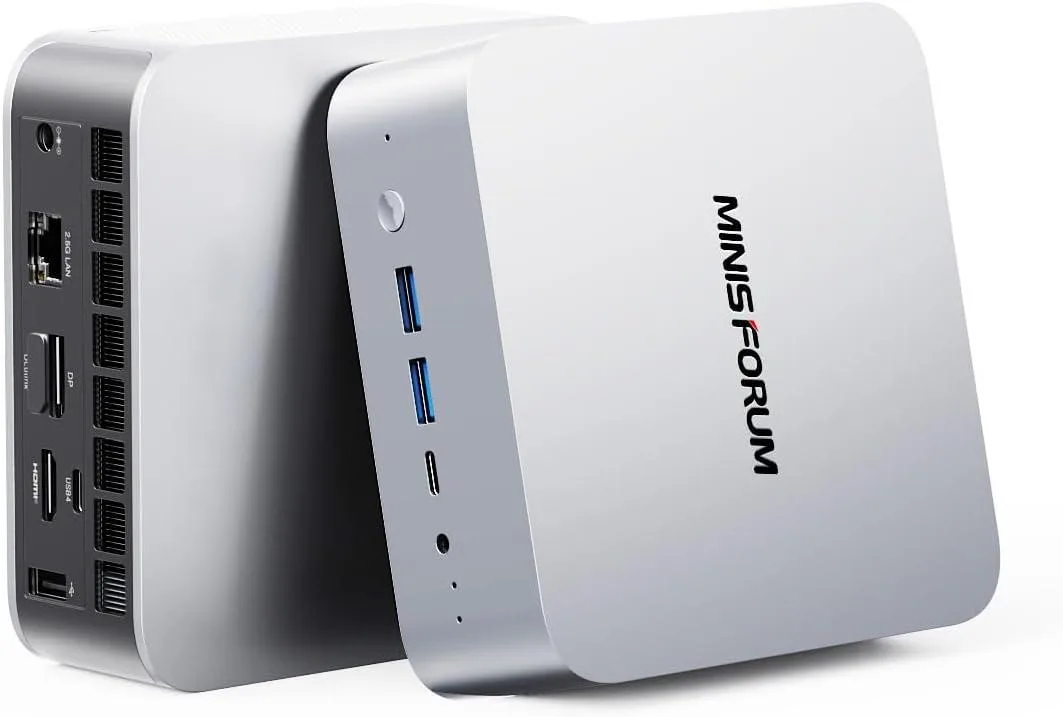
minisforum DeskMini Core Ultra 5 125U 16GB DDR5 512GB barebone mini PC
- Silver
- Intel Core Ultra 5…
$451.99
0.00576481BTC
In stockWe take cryptocurrency — so the coins you hold can buy real hardware.Pay in crypto, spend it on real hardware. Free insured shipping worldwide over $399. Plain, unbranded boxes, sent from Germany.Free insured shipping over $399. Your rate is locked for 30 minutes once checkout opens.Rate locked 30 minutes. Every item sealed, serial-checked and covered by a 24-month warranty.Sealed, 24-month warranty.


minisforum
Barebone mini PC with Intel Core Ultra 9 285H, 64 GB DDR5, 2 TB storage, Arc 140T graphics, HDMI 2.1, DP 1.4, dual USB4, OCuLink, 2.5 Gbps LAN, Wi-Fi 7 and Bluetooth 5.4
Option M1 Pro-285H · 64+2T
Struck-through versions exist but are not stocked here.
The DeskMini barebone packs an Intel Core Ultra 9 285H with 16 cores and 16 threads alongside 64 GB of DDR5 5600 memory and a 2 TB PCIe 4.0 SSD. Integrated Arc 140T graphics and four video outputs — HDMI 2.1, DP 1.4 and dual USB4 — drive up to four UHD displays. Wireless connectivity uses Wi-Fi 7 and Bluetooth 5.4 plus 2.5 Gbps LAN.
The 285H runs at up to 5.4 GHz while the Arc iGPU reaches 2.35 GHz, keeping frame rates and render times steady during long gaming, 3D or video sessions. Dual-channel DDR5 and PCIe 4.0 storage prevent bottlenecks when large datasets move between memory and SSD. An OCuLink port adds PCIe 4.0 x4 bandwidth for an external GPU if internal graphics become the limit.
Builders who need a full desktop CPU, 64 GB RAM and multi-monitor output in a silent silver chassis will upgrade from larger systems. The jump is worth it when desk space is tight, noise must stay low and the workload fits within integrated Arc performance. Buyers who want more storage than the single spare SSD slot or who need discrete-card power from day one should look elsewhere.
| Brand | MINISFORUM |
|---|---|
| Model | DeskMini |
| Color | Silver |
| CPU Type | Intel Core Ultra 9 Processor 285H |
| CPU Socket | FCBGA2049 |
| CPU Cores | 16-Core (6P+8E+2LP) |
| Memory installed | 64GB |
| Memory slot | 2 |
| Memory Type Supported | DDR5 5600 |
| Max Memory Supported | 64GB |
| Dual Channel Memory Supported | Yes |
| Other | 2x PCIe4.0x4 |
| Storage Installed | 2T |
| Integrated Graphics | Intel Arc 140T GPU |
| Max LAN Speed | 2.5Gbps |
| Wireless LAN | 802.11ax |
| WiFi Generation | Wi-Fi 7 |
| Bluetooth | Bluetooth 5.4 |
| Front USB | 2 |
| HDMI | 1 |
| DisplayPort | 1 |
| Rear USB | 1 |
| RJ45 | 1 |
| Power Supply | 19V/6.32A 120W |
Other versions of this model
Same family, different memory, cooler or clock — compare before you commit.
The 16-core Core Ultra 9 285H can reach 5.4 GHz boost clocks, so sustained workloads will generate noticeable heat; the compact chassis relies on an internal fan that spins up under load, producing audible airflow in a quiet room.
You need one HDMI 2.1 cable, one DisplayPort 1.4 cable and two USB4-certified cables (or adapters) plus up to four UHD monitors that accept those inputs.
The spare slot is wired for PCIe 4.0 x4; a PCIe 3.0 SSD will function but at 3.0 speeds, while the factory 2 TB drive already occupies the other 4.0 x4 slot.
Also in this aisle
Same shelf, same checkout — eight coins and a 30-minute rate lock.
What you pay in, and what you read prices in.
Sent from your wallet at checkout
Display only — the catalogue is priced in USD
No currency matches that.
Pick the language the site speaks to you in.
New here?
Already have one?
There is no automatic reset: this shop sends no mail, so there is no one-time link to ask for. Leave the address on the account and it gets picked up by hand.
Request noted
Nothing is on its way to your inbox — this shop sends no mail at all. Someone picks these up by hand.
Remembered it?