minisforum
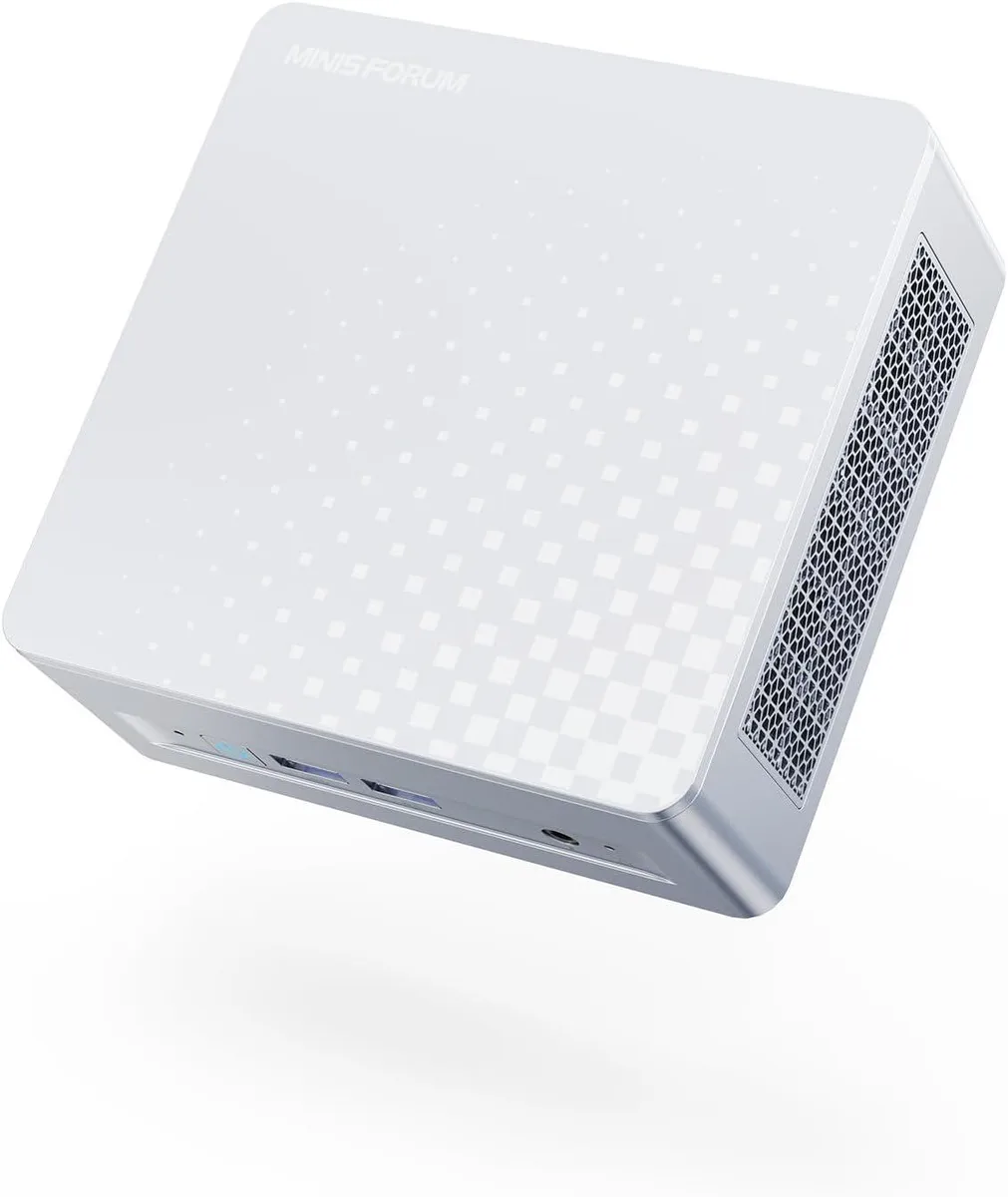
minisforum DeskMini Core Ultra 5 125U barebone mini PC
- Silver
- Intel Core Ultra 5…
$208.99
0.00266396BTC
In stockWe take cryptocurrency — so the coins you hold can buy real hardware.Pay in crypto, spend it on real hardware. Free insured shipping worldwide over $399. Plain, unbranded boxes, sent from Germany.Free insured shipping over $399. Your rate is locked for 30 minutes once checkout opens.Rate locked 30 minutes. Every item sealed, serial-checked and covered by a 24-month warranty.Sealed, 24-month warranty.


minisforum
Barebone mini PC with 16-core Core Ultra 9 285H, dual DDR5-5600 slots up to 64 GB, Arc 140T graphics, quad UHD outputs via HDMI 2.1, DP 1.4 and dual USB4, plus 2.5 GbE.
Option M1 Pro-285H · 0+0
Struck-through versions exist but are not stocked here.
The minisforum DeskMini is a barebone mini PC built around the Intel Core Ultra 9 285H processor with 16 cores and 16 threads. It ships without memory, storage or an operating system, so builders choose their own DDR5 SODIMMs and PCIe SSDs. The compact silver chassis targets users who want a small-footprint desktop for multitasking, rendering or light gaming.
The single specification that decides compatibility is the OCuLink port running at PCIe 4.0 x4 speeds. It allows an external GPU enclosure to connect directly to the CPU lanes, bypassing Thunderbolt or USB4 bandwidth limits. Buyers who do not plan to add a discrete graphics card will not use this port and should verify they have a suitable enclosure and cable before purchasing.
The processor operates at a 45 W base power while the integrated Intel Arc 140T GPU reaches 2.35 GHz graphics frequency. Active cooling handles the thermal load in normal workloads such as video editing, 3D rendering or multi-monitor productivity. Fan noise rises under sustained all-core or graphics-heavy tasks but remains typical for a mini PC of this performance class.
| Brand | MINISFORUM |
|---|---|
| Model | DeskMini |
| Color | Silver |
| CPU Type | Intel Core Ultra 9 Processor 285H |
| CPU Socket | FCBGA2049 |
| CPU Cores | 16-Core (6P+8E+2LP) |
| Memory installed | No Memory |
| Memory slot | 2 |
| Memory Type Supported | DDR5 5600 |
| Max Memory Supported | 64GB |
| Dual Channel Memory Supported | Yes |
| Other | 2x PCIe4.0x4 |
| Integrated Graphics | Intel Arc 140T GPU |
| Max LAN Speed | 2.5Gbps |
| Wireless LAN | 802.11ax |
| WiFi Generation | Wi-Fi 7 |
| Bluetooth | Bluetooth 5.4 |
| Front USB | 2 |
| HDMI | 1 |
| DisplayPort | 1 |
| Rear USB | 1 |
| RJ45 | 1 |
| Power Supply | 19V/6.32A 120W |
Other versions of this model
Same family, different memory, cooler or clock — compare before you commit.
The 16-core processor runs at up to 5.4 GHz with integrated Arc 140T graphics at 2.35 GHz, giving strong multitasking and 3D performance in a barebone mini PC.
The OCuLink port runs at PCIe 4.0 x4, so an external GPU is capped at that bandwidth rather than Thunderbolt or USB4 speeds.
You need to install DDR5 5600 SODIMMs in the two memory slots and add PCIe 4.0 x4 SSDs in the two M.2 slots; the unit ships with no memory or storage.
Also in this aisle
Same shelf, same checkout — eight coins and a 30-minute rate lock.
What you pay in, and what you read prices in.
Sent from your wallet at checkout
Display only — the catalogue is priced in USD
No currency matches that.
Pick the language the site speaks to you in.
New here?
Already have one?
There is no automatic reset: this shop sends no mail, so there is no one-time link to ask for. Leave the address on the account and it gets picked up by hand.
Request noted
Nothing is on its way to your inbox — this shop sends no mail at all. Someone picks these up by hand.
Remembered it?