

SanDisk
SanDisk Cruzer Blade 8 GB USB 2.0 USB flash drive Black SDCZ50-008G-B35
US$391.99
0.00501484BTC
มีสินค้าเรารับชำระด้วยคริปโต — เหรียญที่คุณถืออยู่จึงนำมาซื้อฮาร์ดแวร์ของจริงได้จ่ายด้วยคริปโต แล้วนำไปซื้อฮาร์ดแวร์ของจริง จัดส่งฟรีพร้อมประกันภัยทั่วโลก เมื่อสั่งซื้อเกิน US$399 กล่องพัสดุเรียบไม่มีตราสินค้า จัดส่งจากประเทศเยอรมนีจัดส่งฟรีพร้อมประกันภัย เมื่อสั่งซื้อเกิน US$399 อัตราแลกเปลี่ยนของคุณจะถูกล็อกไว้ 30 นาที ทันทีที่เปิดหน้าชำระเงินล็อกอัตราแลกเปลี่ยน 30 นาที สินค้าทุกชิ้นปิดผนึกจากโรงงาน ตรวจสอบหมายเลขซีเรียล และรับประกัน 24 เดือนปิดผนึกจากโรงงาน รับประกัน 24 เดือน


ASUS
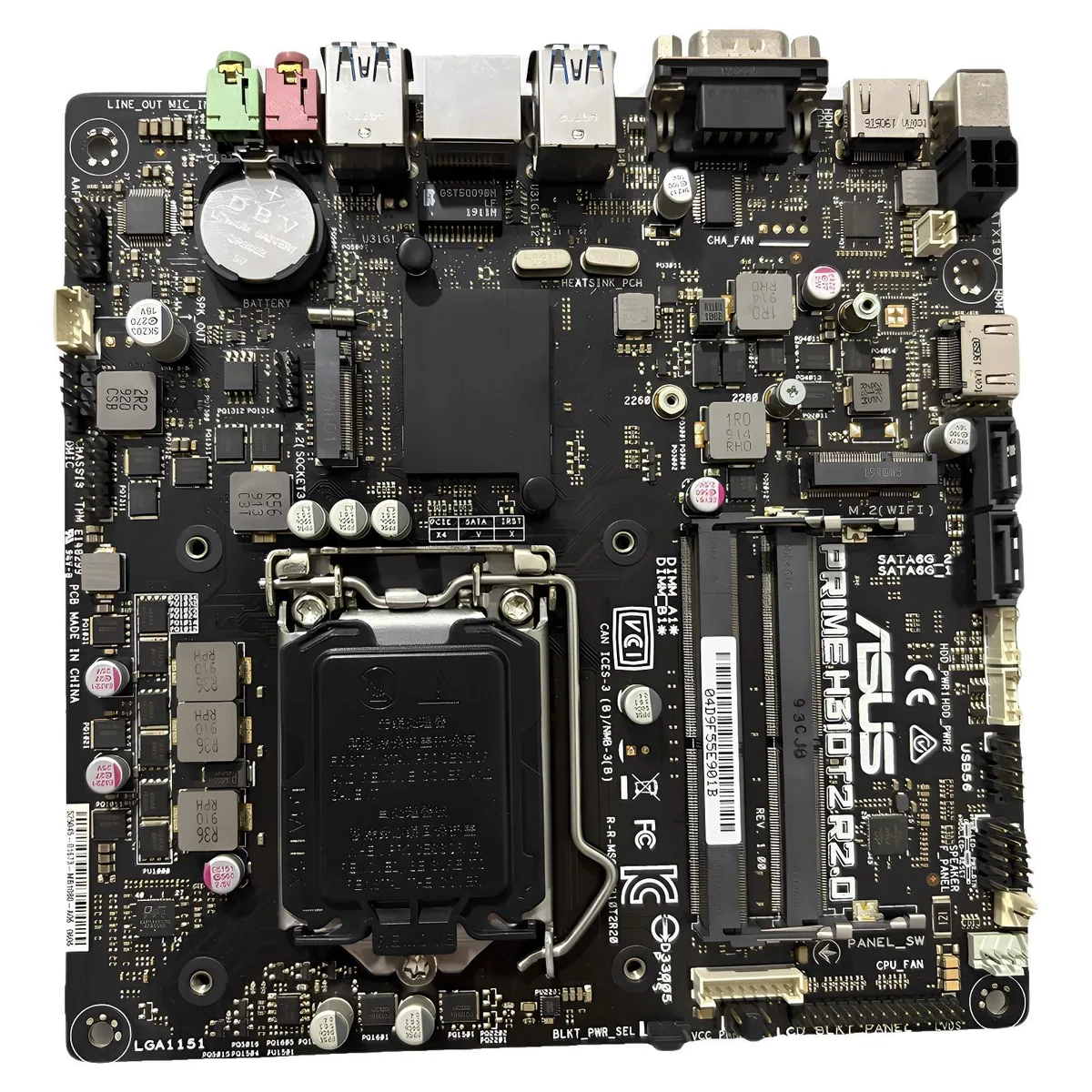
Mini-ITX board for LGA 1151 CPUs with Intel H310 chipset and 32 GB DDR4 limit
The ASUS PRIME H310T2 R2.0 is a Mini-ITX motherboard built around the Intel H310 chipset and LGA 1151 socket. It supports DDR4 memory up to 32 GB and includes a single SATA cable plus an I/O shield. The board is sold new without original packaging.
This board suits builders assembling compact systems with 8th or 9th generation Intel Core processors that fit LGA 1151. It is not for users who need overclocking features, multiple PCIe expansion slots, or more than two memory slots. Buyers requiring integrated Wi-Fi or additional M.2 connectors should consider other platforms.
The memory controller officially supports up to 32 GB of DDR4 RAM across the available slots. This limit determines whether the board can meet the needs of a given workload or if a different chipset is required.
| Brand | ASUS |
|---|---|
| Model | ASUS PRIME H310T2 R2.0 |
| CPU Socket Type | LGA 1151 |
| Chipset | Intel H310 |
| Maximum Memory Supported | 32GB |
The board follows the Mini-ITX form factor with standard mounting holes and includes a chassis I/O back panel that fits the rectangular cut-out in a Mini-ITX case.
Align the processor triangle with the socket marker, lower the retention lever once, then press the DDR4 modules vertically into the two slots until the side clips click — skipping the alignment check is the common error.
The included SATA cable can be swapped if the latch breaks or the connector wears, and the metal battery holder remains reusable.
อื่น ๆ ในหมวดนี้
หมวดเดียวกัน การชำระเงินแบบเดียวกัน — แปดสกุลเงินคริปโตและอัตราแลกเปลี่ยนที่ล็อกไว้ 30 นาที
สิ่งที่คุณใช้ชำระ และสิ่งที่คุณใช้อ่านราคา
ส่งจากกระเป๋าเงินของคุณเมื่อชำระเงิน
แสดงผลเท่านั้น — แคตตาล็อกสินค้าตั้งราคาเป็นดอลลาร์สหรัฐ
ไม่พบสกุลเงินที่ตรงกัน
เลือกภาษาที่ต้องการให้เว็บไซต์แสดงผล
ไม่พบภาษาที่ตรงกัน
ยังไม่เคยใช้งานใช่ไหม
มีบัญชีอยู่แล้วใช่ไหม
ไม่มีการรีเซ็ตแบบอัตโนมัติ ร้านนี้ไม่ส่งอีเมลใด ๆ จึงไม่มีลิงก์ใช้ครั้งเดียวให้ขอ ปล่อยที่อยู่อีเมลนี้ไว้ในบัญชี แล้วเจ้าหน้าที่จะดำเนินการให้ด้วยตนเอง
รับคำขอแล้ว
ไม่มีอะไรถูกส่งไปยังกล่องจดหมายของคุณ — ร้านนี้ไม่ส่งอีเมลใด ๆ เลย มีคนดำเนินการเรื่องนี้ให้ด้วยมือ
นึกออกแล้วใช่ไหม



