

SanDisk
SanDisk Cruzer Blade 8 GB USB 2.0 USB flash drive Black SDCZ50-008G-B35
US$391.99
0.00499535BTC
มีสินค้าเรารับชำระด้วยคริปโต — เหรียญที่คุณถืออยู่จึงนำมาซื้อฮาร์ดแวร์ของจริงได้จ่ายด้วยคริปโต แล้วนำไปซื้อฮาร์ดแวร์ของจริง จัดส่งฟรีพร้อมประกันภัยทั่วโลก เมื่อสั่งซื้อเกิน US$399 กล่องพัสดุเรียบไม่มีตราสินค้า จัดส่งจากประเทศเยอรมนีจัดส่งฟรีพร้อมประกันภัย เมื่อสั่งซื้อเกิน US$399 อัตราแลกเปลี่ยนของคุณจะถูกล็อกไว้ 30 นาที ทันทีที่เปิดหน้าชำระเงินล็อกอัตราแลกเปลี่ยน 30 นาที สินค้าทุกชิ้นปิดผนึกจากโรงงาน ตรวจสอบหมายเลขซีเรียล และรับประกัน 24 เดือนปิดผนึกจากโรงงาน รับประกัน 24 เดือน
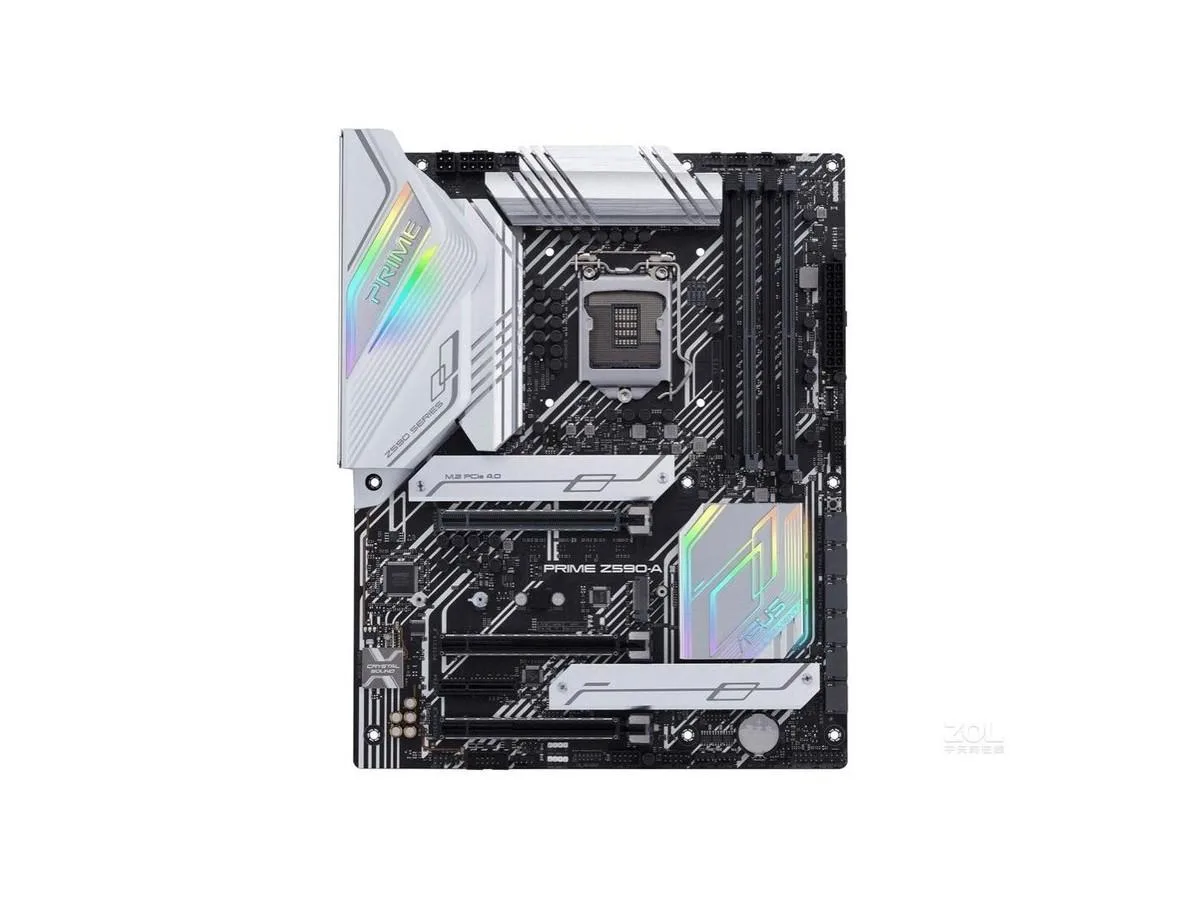


ASUS
Intel Z590 ATX board with LGA 1200 socket supporting up to 128 GB DDR4 memory
This ASUS PRIME Z590-A is an Intel Z590 ATX motherboard built for LGA 1200 processors. It supports DDR4 memory up to 128GB capacity. The board delivers a foundation for desktop builds using the Intel Z590 chipset platform.
Builders assembling a system around an LGA 1200 CPU will find the correct socket and chipset here. The DDR4 memory architecture matches existing DDR4 module inventories. Users requiring a different CPU socket or a different memory standard should look at alternative motherboard options.
The board supports a maximum of 128GB of DDR4 memory across its slots. This capacity ceiling determines the upper limit for memory-intensive workloads on this platform. Verify your planned memory kit does not exceed this 128GB total before purchase.
| Brand | ASUS |
|---|---|
| Model | ASUS PRIME Z590-A |
| CPU Socket Type | LGA 1200 |
| Chipset | Intel Z590 |
| Maximum Memory Supported | 128GB |
The board follows ATX dimensions and uses the LGA 1200 socket, so it aligns with standard ATX standoffs and cooler brackets designed for that socket.
Install the processor into the LGA 1200 socket first, then press the DDR4 sticks until the latches click, and finally connect the included SATA cable to the board and drive.
The onboard metal battery typically lasts several years; replace it when the system loses date or BIOS settings after power is removed.
อื่น ๆ ในหมวดนี้
หมวดเดียวกัน การชำระเงินแบบเดียวกัน — แปดสกุลเงินคริปโตและอัตราแลกเปลี่ยนที่ล็อกไว้ 30 นาที
สิ่งที่คุณใช้ชำระ และสิ่งที่คุณใช้อ่านราคา
ส่งจากกระเป๋าเงินของคุณเมื่อชำระเงิน
แสดงผลเท่านั้น — แคตตาล็อกสินค้าตั้งราคาเป็นดอลลาร์สหรัฐ
ไม่พบสกุลเงินที่ตรงกัน
เลือกภาษาที่ต้องการให้เว็บไซต์แสดงผล
ไม่พบภาษาที่ตรงกัน
ยังไม่เคยใช้งานใช่ไหม
มีบัญชีอยู่แล้วใช่ไหม
ไม่มีการรีเซ็ตแบบอัตโนมัติ ร้านนี้ไม่ส่งอีเมลใด ๆ จึงไม่มีลิงก์ใช้ครั้งเดียวให้ขอ ปล่อยที่อยู่อีเมลนี้ไว้ในบัญชี แล้วเจ้าหน้าที่จะดำเนินการให้ด้วยตนเอง
รับคำขอแล้ว
ไม่มีอะไรถูกส่งไปยังกล่องจดหมายของคุณ — ร้านนี้ไม่ส่งอีเมลใด ๆ เลย มีคนดำเนินการเรื่องนี้ให้ด้วยมือ
นึกออกแล้วใช่ไหม



