

SanDisk
SanDisk Cruzer Blade 8 GB USB 2.0 USB flash drive Black SDCZ50-008G-B35
US$391.99
0.00501805BTC
มีสินค้าเรารับชำระด้วยคริปโต — เหรียญที่คุณถืออยู่จึงนำมาซื้อฮาร์ดแวร์ของจริงได้จ่ายด้วยคริปโต แล้วนำไปซื้อฮาร์ดแวร์ของจริง จัดส่งฟรีพร้อมประกันภัยทั่วโลก เมื่อสั่งซื้อเกิน US$399 กล่องพัสดุเรียบไม่มีตราสินค้า จัดส่งจากประเทศเยอรมนีจัดส่งฟรีพร้อมประกันภัย เมื่อสั่งซื้อเกิน US$399 อัตราแลกเปลี่ยนของคุณจะถูกล็อกไว้ 30 นาที ทันทีที่เปิดหน้าชำระเงินล็อกอัตราแลกเปลี่ยน 30 นาที สินค้าทุกชิ้นปิดผนึกจากโรงงาน ตรวจสอบหมายเลขซีเรียล และรับประกัน 24 เดือนปิดผนึกจากโรงงาน รับประกัน 24 เดือน


ASUS
An ATX board for 11th and 10th Gen Intel CPUs with 10+1 power stages, three M.2 slots, 2.5 Gb LAN and front USB 3.2 Gen 2 Type-C
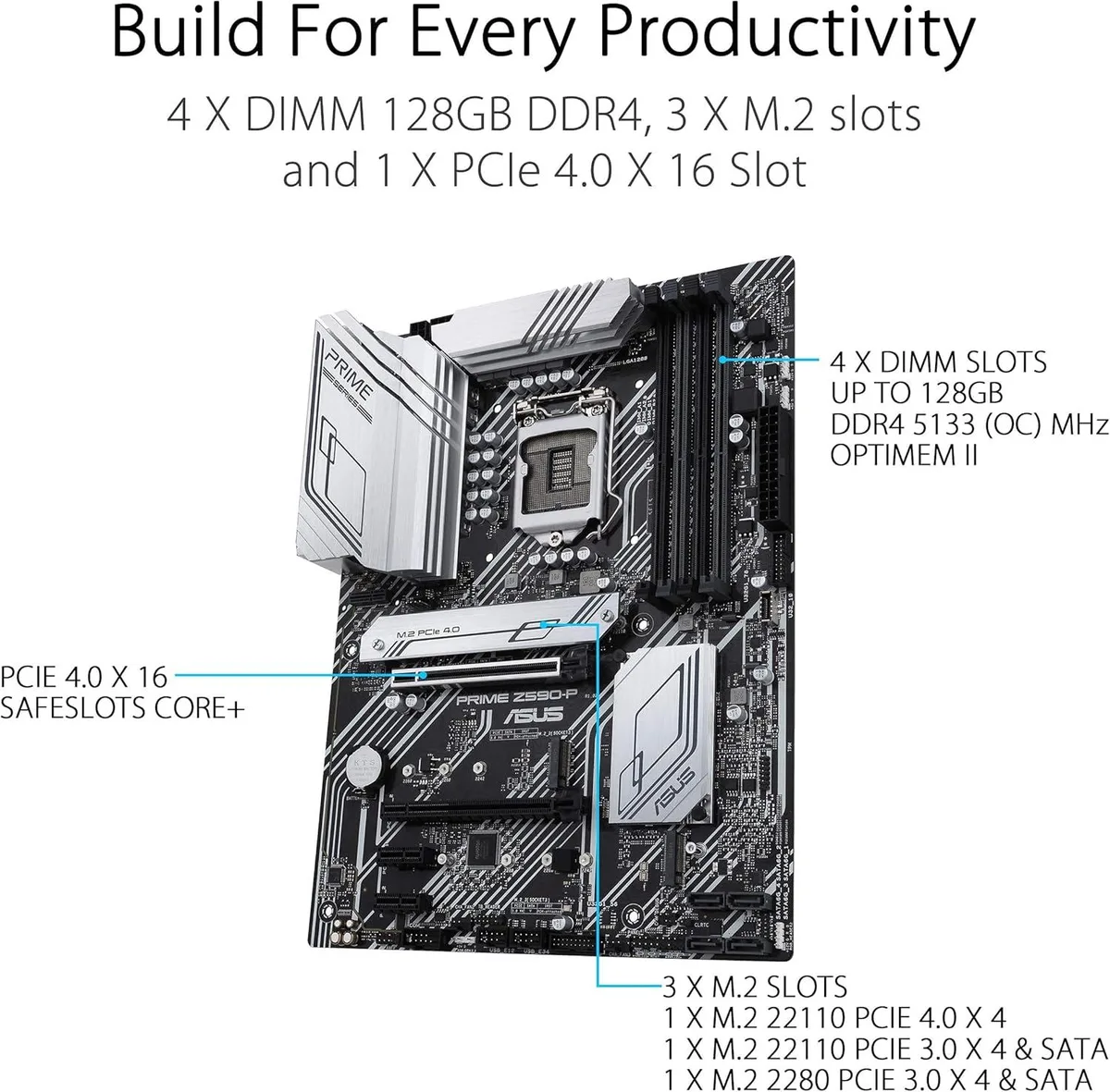
The ASUS Prime Z590-P uses the LGA 1200 socket with the Intel Z590 chipset. It supports 11th and 10th generation Intel Core processors along with Pentium Gold and Celeron models. Four DDR4 slots accept up to 128 GB of memory running at speeds from 2133 to 5133 MT/s when overclocked. Dual channel architecture is standard across the board.
A 10 plus 1 DrMOS power stage design feeds the CPU through ProCool sockets with alloy chokes and durable capacitors. Dedicated VRM and PCH heatsinks handle thermal load without active fans on the heatsinks themselves. Hybrid fan headers connect to the Fan Xpert 4 utility for automatic curve tuning based on system temperatures.
One PCIe 4.0 x16 slot and one PCIe 3.0 x16 slot serve graphics cards while two PCIe 3.0 x1 slots add peripheral cards. Three M.2 sockets support 2242 2260 2280 and 22110 form factors with the top slot wired for PCIe 4.0 x4 on 11th Gen CPUs. Four SATA 6 Gb/s ports 2.5 Gb Ethernet Realtek ALC897 7.1 audio front panel USB 3.2 Gen 2x2 Type C and Thunderbolt 4 header complete the I/O.
| Brand | ASUS |
|---|---|
| Model | PRIME Z590-P |
| CPU Socket Type | LGA 1200 |
| CPU Type | Intel Core 11th Gen (LGA 1200) |
| Supported CPU Technologies | Supports Intel Turbo Boost Technology 2.0 and Intel Turbo Boost Max Technology 3.0* * Intel Turbo Boost Max Technology 3.0 support depends on the CPU types. |
| Chipset | Intel Z590 |
| Onboard Video Chipset | Supported only by CPU with integrated graphic |
| Number of Memory Slots | 4x288pin (DDR4) |
| Memory Standard | DDR4 5133(OC) / 5000(OC) / 4800(OC) / 4700(OC) / 4600(OC) / 4500(OC) / 4400(OC) / 4266(OC) / 4133(OC) / 4000(OC) / 3866(OC) / 3733(OC) / 3600(OC) / 3466(OC) / 3400(OC) / 3333(OC) / 3200 / 3000 / 2933 / 2800 / 2666 / 2400 / 2133* * 10th Gen Intel Core i7 / i9 processors support 2933 / 2800 / 2666 / 2400 / 2133 natively, others will run at the maximum transfer rate of DDR4 2666MHz. * 11th Gen Intel processors support 3200 / 2933 / 2800 / 2666 / 2400 / 2133 natively. * Refer to www.asus.com for the Memory QVL (Qualified Vendors Lists), and memory frequency support depends on the CPU typ |
| Maximum Memory Supported | 128GB |
| Channel Supported | Dual Channel |
| PCI Express 4.0 x16 | 1 x PCIe 4.0/3.0 x16 slot * Actual support may vary by CPU. |
| PCI Express 3.0 x16 | 1 x PCI Express 3.0 x16 |
| PCI Express x1 | 2 x PCIe 3.0 x1 |
| Serial ATA (SATA) | 4 x SATA 6Gb/s |
| M.2 | Intel 11th Gen Processors: M.2_1 slot (Key M), type 2242/2260/2280/22110 - Only Intel 11th Gen processors support PCIe 4.0 x4 mode, this slot will be disabled for other CPUs Intel Z590 Chipset: M.2_2 slot (Key M), type 2242/2260/2280 (supports PCIe 3.0 x4 & SATA modes)* M.2_3 slot (Key M), type 2242/2260/2280/22110 (supports PCIe 3.0 x4 & SATA modes) * When a device in SATA mode is installed on the M.2_2 slot, SATA6G_2 port cannot be used. |
| Intel Optane Ready | Yes |
| Audio Chipset | Realtek ALC897 |
| Audio Channels | 7.1 Channels |
| LAN Chipset | Realtek 2.5Gb Ethernet |
| Max LAN Speed | 2.5Gbps |
| Back I/O Ports | 1 x USB 3.2 Gen 2x2 port (1 x USB Type-C) 1 x USB 3.2 Gen 2 port (1 x Type-A) 2 x USB 3.2 Gen 1 ports (2 x Type-A) 2 x USB 2.0 ports (2 x Type-A) 1 x DisplayPort 1 x HDMI port 1 x Realtek 2.5Gb Ethernet port 5 x Audio jacks 1 x Optical S/PDIF out port 1 x PS/2 Keyboard/Mouse combo port |
| Onboard USB | 1 x USB 3.2 Gen 1 connector (supports USB Type-C) 2 x USB 3.2 Gen 1 headers support additional 4 USB 3.2 Gen 1 ports 2 x USB 2.0 headers support additional 4 USB 2.0 ports |
| Other Connectors | Fan and Cooling related 1 x 4-pin CPU Fan header 1 x 4-pin AIO Pump header 3 x 4-pin Chassis Fan headers Miscellaneous 2 x AURA Addressable Gen 2 headers 2 x AURA RGB headers 1 x Clear CMOS header 1 x COM Port header 1 x Front Panel Audio header (AAFP) 1 x SPI TPM header (14-1pin) 1 x 20-5pin System Panel header 1 x Thunderbolt header |
| Windows 11 | Supported |
| Form Factor | ATX |
| LED Lighting | RGB |
| Dimensions (W x L) | 12.0" x 9.2" |
| Power Pin | 1 x 24-pin Main Power connector 1 x 8-pin +12V Power connector 1 x 4-pin +12V Power connector |
| Features | Special Features: ASUS 5X PROTECTION III - DIGI+ VRM (- Digital power design with DrMOS) - LANGuard - Overvoltage Protection - SafeSlot Core+ - Stainless-Steel Back I/O ASUS Q-Design - Q-DIMM - Q-Slot ASUS Thermal Solution - Flexible M.2 heatsink - VRM heatsink design ASUS EZ DIY - ProCool AURA Sync - AURA RGB headers - Addressable Gen 2 RGB headers Software Features: ASUS Exclusive Software Armoury Crate - AURA Sync AI Suite 3 - Performance And Power Saving Utility TurboV EVO EPU DIGI+ VRM Fan Xpert 4 - EZ update ASUS CPU-Z AI Charger DAEMON Tools Norton Anti-virus software (Free Tr |
| Package Contents | Accessories: Cables 2 x SATA 6Gb/s cables Miscellaneous 1 x I/O Shield 1 x M.2 Rubber Package 2 x M.2 SSD screw packages Installation Media 1 x Support DVD Documentation 1 x User manual |
Insert the drive at an angle into the Key M slot, secure it with the standoff screw for 2242, 2260, 2280 or 22110 lengths, then enable PCIe 4.0 x4 mode in BIOS — this slot only activates with an 11th Gen CPU.
The VRM heatsink relies on passive cooling and hybrid fan headers controlled by Fan Xpert 4; clean dust from the fins periodically and verify fan curves in BIOS if temperatures rise under sustained 10+1 DrMOS load.
The Realtek 2.5Gb Ethernet controller shares PCIe 3.0 bandwidth from the Z590 chipset, so sustained 2.5 Gb/s transfers can saturate the upstream link before the network itself becomes the bottleneck.
อื่น ๆ ในหมวดนี้
หมวดเดียวกัน การชำระเงินแบบเดียวกัน — แปดสกุลเงินคริปโตและอัตราแลกเปลี่ยนที่ล็อกไว้ 30 นาที
สิ่งที่คุณใช้ชำระ และสิ่งที่คุณใช้อ่านราคา
ส่งจากกระเป๋าเงินของคุณเมื่อชำระเงิน
แสดงผลเท่านั้น — แคตตาล็อกสินค้าตั้งราคาเป็นดอลลาร์สหรัฐ
ไม่พบสกุลเงินที่ตรงกัน
เลือกภาษาที่ต้องการให้เว็บไซต์แสดงผล
ไม่พบภาษาที่ตรงกัน
ยังไม่เคยใช้งานใช่ไหม
มีบัญชีอยู่แล้วใช่ไหม
ไม่มีการรีเซ็ตแบบอัตโนมัติ ร้านนี้ไม่ส่งอีเมลใด ๆ จึงไม่มีลิงก์ใช้ครั้งเดียวให้ขอ ปล่อยที่อยู่อีเมลนี้ไว้ในบัญชี แล้วเจ้าหน้าที่จะดำเนินการให้ด้วยตนเอง
รับคำขอแล้ว
ไม่มีอะไรถูกส่งไปยังกล่องจดหมายของคุณ — ร้านนี้ไม่ส่งอีเมลใด ๆ เลย มีคนดำเนินการเรื่องนี้ให้ด้วยมือ
นึกออกแล้วใช่ไหม



