ASUS
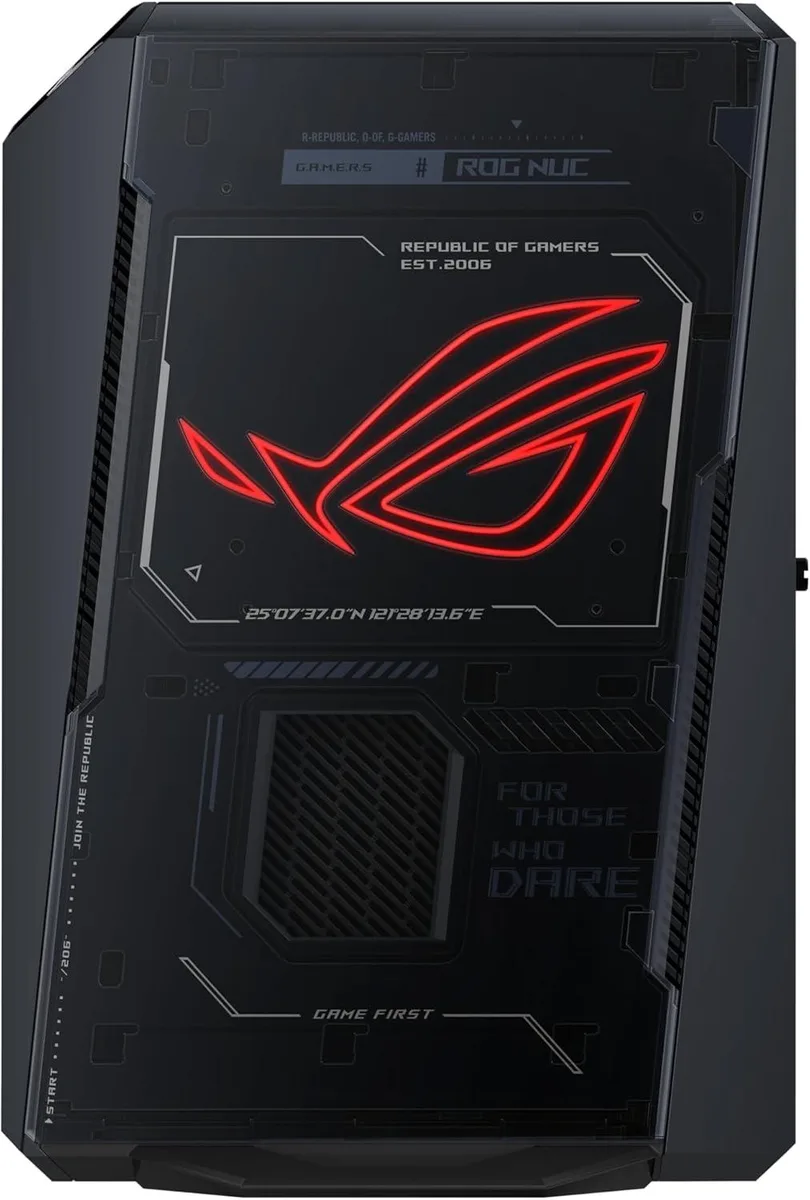
ASUS ROG NUC 2025 Ryzen 9 9955HX3D RTX 5070 32GB 2TB barebone mini PC
- AI Ready
- AMD Ryzen 9 9955HX3D
US$2,351.99
0.03010046BTC
มีสินค้าเรารับชำระด้วยคริปโต — เหรียญที่คุณถืออยู่จึงนำมาซื้อฮาร์ดแวร์ของจริงได้จ่ายด้วยคริปโต แล้วนำไปซื้อฮาร์ดแวร์ของจริง จัดส่งฟรีพร้อมประกันภัยทั่วโลก เมื่อสั่งซื้อเกิน US$399 กล่องพัสดุเรียบไม่มีตราสินค้า จัดส่งจากประเทศเยอรมนีจัดส่งฟรีพร้อมประกันภัย เมื่อสั่งซื้อเกิน US$399 อัตราแลกเปลี่ยนของคุณจะถูกล็อกไว้ 30 นาที ทันทีที่เปิดหน้าชำระเงินล็อกอัตราแลกเปลี่ยน 30 นาที สินค้าทุกชิ้นปิดผนึกจากโรงงาน ตรวจสอบหมายเลขซีเรียล และรับประกัน 24 เดือนปิดผนึกจากโรงงาน รับประกัน 24 เดือน


ASUS
A compact gaming barebone with a Ryzen 9 9955HX3D processor, RTX 5070 graphics, 32GB DDR5 and 1TB storage in a 2.5-litre chassis
Option 32GB DDR5 / 1TB SSD
The ASUS ROG NUC 2025 is a 3L barebone mini PC built around an AMD Ryzen 9 9955HX3D processor and an NVIDIA GeForce RTX 5070 Laptop GPU. It ships with 32GB of DDR5 6400 memory and a 1TB NVMe SSD. The system targets gamers and creators who want desktop-class performance in a footprint that fits behind a monitor or on a shelf.
This unit replaces a traditional mid-tower gaming desktop for users who prioritise space savings and quiet operation. The jump is worth it when you need the 2nd Gen AMD 3D V-Cache advantage and RTX 5070 mobile graphics without building a custom loop or sourcing a full-size chassis. Buyers who want more storage than the single installed drive or who plan to run multiple discrete add-in cards should look at larger platforms.
Connectivity centres on Thunderbolt 4 with DisplayPort 2.1, two HDMI 2.1 FRL ports and two DisplayPort 2.1 outputs for multi-display setups. The 2.5GbE LAN and Wi-Fi 7 wireless link handle high-throughput streaming and low-latency gaming, while Bluetooth 5.4 manages peripherals. Memory tops out at 96GB across two 288-pin DIMM slots, and the tool-free chassis allows straightforward DDR5 upgrades within that ceiling.
| Brand | ASUS |
|---|---|
| Series | ROG NUC |
| AI Features | AI Ready |
| CPU Type | AMD Ryzen 9 9955HX3D |
| Memory installed | 32GB |
| Memory slot | 2 x 288Pin DIMM |
| Memory Type Supported | DDR5 6400 |
| Max Memory Supported | 96GB |
| Dual Channel Memory Supported | Yes |
| Storage Installed | 1TB |
| Discrete Graphic Card | NVIDIA GeForce RTX 5070 Laptop GPU |
| LAN | 2.5Gbps |
| Max LAN Speed | 10/100/1000/2500Mbps |
| Wireless LAN | Intel Ethernet Controller E3100G, 2.5GbE LAN |
| WiFi Generation | Wi-Fi 7 |
| Bluetooth | Bluetooth 5.4 |
| Front USB | 1 x USB 3.2 Gen2 Type-C 2 x USB 3.2 Gen2 Type-A |
| Front Audio Ports | 1 x 3.5mm Headset Jack |
| HDMI | 2 x HDMI 2.1 FRL, 2 x DisplayPort 2.1 |
| Rear USB | 4 x USB 3.2 Gen2 Type-A (10Gbps) 1 x Thunderbolt 4 Type-C w/ DisplayPortTM 2.1 |
| Power Supply | 330W |
| Dimensions | 282.4 x 187.7 x 56.5mm |
| Weight | 5.68kg |
รุ่นอื่นในตระกูลเดียวกัน
ตระกูลเดียวกัน แต่หน่วยความจำ คูลเลอร์ หรือสัญญาณนาฬิกาต่างกัน — เปรียบเทียบก่อนตัดสินใจ
The 3L chassis uses a triple-fan design with dual Vapor Chamber technology; leave open space around the vents so airflow is not restricted.
Open the tool-free access panel, remove the two 288Pin DIMMs, and install a matched DDR5 6400 kit up to 96GB in dual-channel configuration.
Reapply thermal compound on the CPU and GPU vapor chambers if temperatures rise under sustained load after extended use.
อื่น ๆ ในหมวดนี้
หมวดเดียวกัน การชำระเงินแบบเดียวกัน — แปดสกุลเงินคริปโตและอัตราแลกเปลี่ยนที่ล็อกไว้ 30 นาที
สิ่งที่คุณใช้ชำระ และสิ่งที่คุณใช้อ่านราคา
ส่งจากกระเป๋าเงินของคุณเมื่อชำระเงิน
แสดงผลเท่านั้น — แคตตาล็อกสินค้าตั้งราคาเป็นดอลลาร์สหรัฐ
ไม่พบสกุลเงินที่ตรงกัน
เลือกภาษาที่ต้องการให้เว็บไซต์แสดงผล
ไม่พบภาษาที่ตรงกัน
ยังไม่เคยใช้งานใช่ไหม
มีบัญชีอยู่แล้วใช่ไหม
ไม่มีการรีเซ็ตแบบอัตโนมัติ ร้านนี้ไม่ส่งอีเมลใด ๆ จึงไม่มีลิงก์ใช้ครั้งเดียวให้ขอ ปล่อยที่อยู่อีเมลนี้ไว้ในบัญชี แล้วเจ้าหน้าที่จะดำเนินการให้ด้วยตนเอง
รับคำขอแล้ว
ไม่มีอะไรถูกส่งไปยังกล่องจดหมายของคุณ — ร้านนี้ไม่ส่งอีเมลใด ๆ เลย มีคนดำเนินการเรื่องนี้ให้ด้วยมือ
นึกออกแล้วใช่ไหม