

SanDisk
SanDisk Cruzer Blade 8 GB USB 2.0 USB flash drive Black SDCZ50-008G-B35
US$391.99
0.0050133BTC
มีสินค้าเรารับชำระด้วยคริปโต — เหรียญที่คุณถืออยู่จึงนำมาซื้อฮาร์ดแวร์ของจริงได้จ่ายด้วยคริปโต แล้วนำไปซื้อฮาร์ดแวร์ของจริง จัดส่งฟรีพร้อมประกันภัยทั่วโลก เมื่อสั่งซื้อเกิน US$399 กล่องพัสดุเรียบไม่มีตราสินค้า จัดส่งจากประเทศเยอรมนีจัดส่งฟรีพร้อมประกันภัย เมื่อสั่งซื้อเกิน US$399 อัตราแลกเปลี่ยนของคุณจะถูกล็อกไว้ 30 นาที ทันทีที่เปิดหน้าชำระเงินล็อกอัตราแลกเปลี่ยน 30 นาที สินค้าทุกชิ้นปิดผนึกจากโรงงาน ตรวจสอบหมายเลขซีเรียล และรับประกัน 24 เดือนปิดผนึกจากโรงงาน รับประกัน 24 เดือน


ASUS
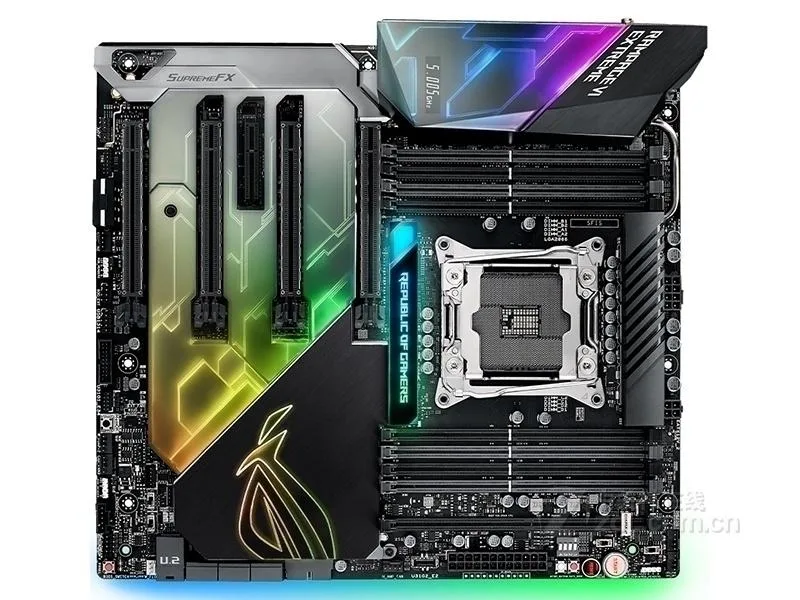
LGA 2066 Intel X299 board supports DDR4 up to 64 GB in E-ATX form factor
The ASUS ROG Rampage VI Extreme is an Intel X299 motherboard in an E-ATX form factor that supports DDR4 memory up to 64 GB. It targets enthusiasts building a high-end desktop around the LGA 2066 socket who need the chipset’s connectivity and expansion layout.
This board fits builders assembling a system on the X299 platform with one LGA 2066 processor and up to 64 GB of DDR4. It does not suit buyers who need a different socket, a smaller form factor, or integrated wireless connectivity that this model lacks.
The package supplies the motherboard, a chassis I/O back panel and a single SATA cable. No additional accessories, original packaging or extra cables are provided, so builders must source any further drives, brackets or mounting hardware separately.
| Brand | ASUS |
|---|---|
| Model | ASUS ROG Rampage VI Extreme |
| CPU Socket Type | LGA 2066 |
| Chipset | Intel X299 |
| Maximum Memory Supported | 64GB |
Yes, the motherboard uses the LGA 2066 socket so a compatible Intel CPU in that package is required for the board to function.
The board supports DDR4 up to 64 GB total capacity; any standard DDR4 DIMMs within that limit will operate normally.
Install the CPU, memory and the included SATA cable, connect power, then power on; a successful POST will show the firmware screen or beep code indicating the board is operational.
อื่น ๆ ในหมวดนี้
หมวดเดียวกัน การชำระเงินแบบเดียวกัน — แปดสกุลเงินคริปโตและอัตราแลกเปลี่ยนที่ล็อกไว้ 30 นาที
สิ่งที่คุณใช้ชำระ และสิ่งที่คุณใช้อ่านราคา
ส่งจากกระเป๋าเงินของคุณเมื่อชำระเงิน
แสดงผลเท่านั้น — แคตตาล็อกสินค้าตั้งราคาเป็นดอลลาร์สหรัฐ
ไม่พบสกุลเงินที่ตรงกัน
เลือกภาษาที่ต้องการให้เว็บไซต์แสดงผล
ไม่พบภาษาที่ตรงกัน
ยังไม่เคยใช้งานใช่ไหม
มีบัญชีอยู่แล้วใช่ไหม
ไม่มีการรีเซ็ตแบบอัตโนมัติ ร้านนี้ไม่ส่งอีเมลใด ๆ จึงไม่มีลิงก์ใช้ครั้งเดียวให้ขอ ปล่อยที่อยู่อีเมลนี้ไว้ในบัญชี แล้วเจ้าหน้าที่จะดำเนินการให้ด้วยตนเอง
รับคำขอแล้ว
ไม่มีอะไรถูกส่งไปยังกล่องจดหมายของคุณ — ร้านนี้ไม่ส่งอีเมลใด ๆ เลย มีคนดำเนินการเรื่องนี้ให้ด้วยมือ
นึกออกแล้วใช่ไหม



