

SanDisk
SanDisk Cruzer Blade 8 GB USB 2.0 USB flash drive Black SDCZ50-008G-B35
US$391.99
0.00502281BTC
มีสินค้าเรารับชำระด้วยคริปโต — เหรียญที่คุณถืออยู่จึงนำมาซื้อฮาร์ดแวร์ของจริงได้จ่ายด้วยคริปโต แล้วนำไปซื้อฮาร์ดแวร์ของจริง จัดส่งฟรีพร้อมประกันภัยทั่วโลก เมื่อสั่งซื้อเกิน US$399 กล่องพัสดุเรียบไม่มีตราสินค้า จัดส่งจากประเทศเยอรมนีจัดส่งฟรีพร้อมประกันภัย เมื่อสั่งซื้อเกิน US$399 อัตราแลกเปลี่ยนของคุณจะถูกล็อกไว้ 30 นาที ทันทีที่เปิดหน้าชำระเงินล็อกอัตราแลกเปลี่ยน 30 นาที สินค้าทุกชิ้นปิดผนึกจากโรงงาน ตรวจสอบหมายเลขซีเรียล และรับประกัน 24 เดือนปิดผนึกจากโรงงาน รับประกัน 24 เดือน
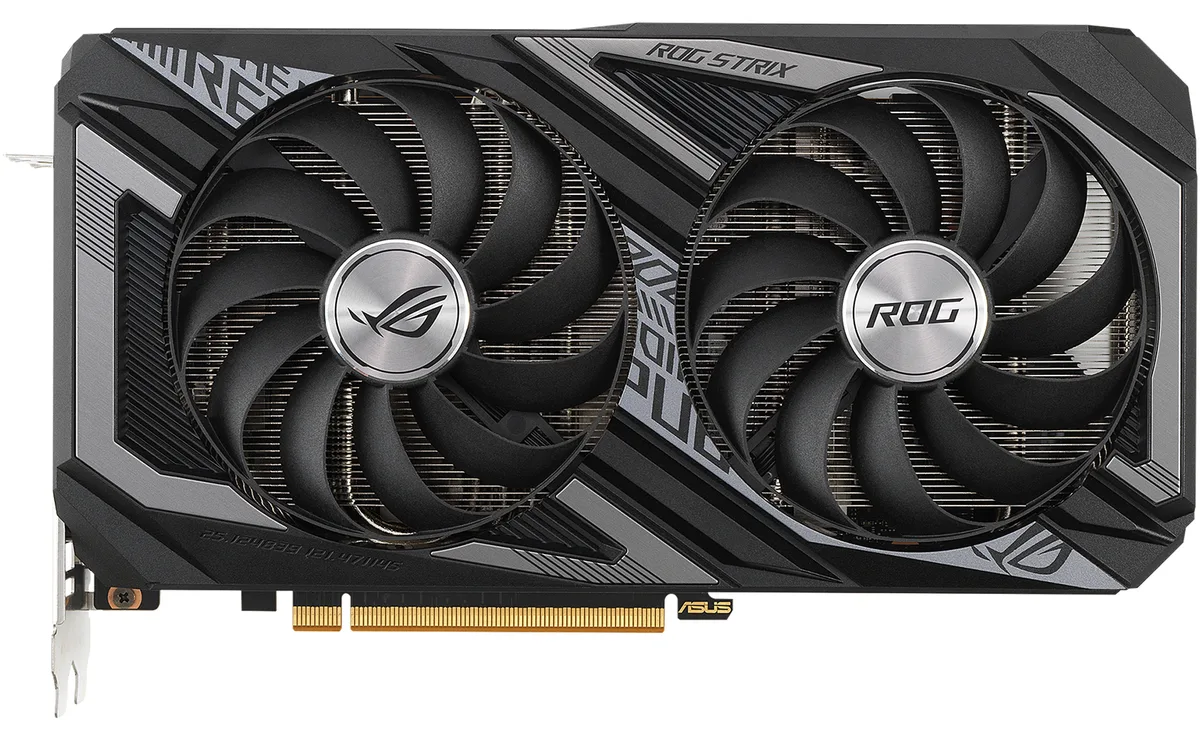


ASUS
Refurbished Radeon RX 6600 XT with 8 GB GDDR6, 2048 stream processors, 2607 MHz boost, PCIe 4.0, HDMI 2.1 and three DisplayPort 1.4a outputs
The ASUS ROG STRIX Radeon RX 6600 XT is a PCI Express 4.0 graphics card built on AMD RDNA 2 architecture. It delivers a 2607 MHz boost clock, 2048 stream processors and 8GB of GDDR6 memory on a 128-bit interface running at 16 Gbps. The card targets 1080p gaming and multi-monitor productivity with four display outputs.
Moving from a 6GB or 4GB board to this 8GB model removes a common VRAM bottleneck in modern titles at high texture settings. The RDNA 2 architecture adds DirectX 12 Ultimate support and hardware-accelerated ray tracing that earlier GCN-based cards lack. A 500W PSU and a single 8-pin connector make the swap straightforward for most mid-tower builds.
Axial-tech fans with dual ball bearings and a vented backplate exhaust heat away from the heatsink instead of recirculating it. Super Alloy Power II components and a 160W TDP keep power delivery stable during extended sessions. A hardware Dual BIOS switch lets you choose a quieter fan curve without software overhead.
| Brand | ASUS |
|---|---|
| Series | ROG STRIX |
| Model | ROG-STRIX-RX6600XT-O8G-GAMING |
| Interface | PCI Express 4.0 |
| Chipset Manufacturer | AMD |
| GPU Series | AMD Radeon RX 6000 Series |
| GPU | Radeon RX 6600 XT |
| Architecture | RDNA 2 |
| Boost Clock | 2607 MHz |
| Stream Processors | 2048 |
| Effective Memory Clock | 16 Gbps |
| Memory Size | 8GB |
| Memory Interface | 128-Bit |
| Memory Type | GDDR6 |
| DirectX | DirectX 12 Ultimate |
| OpenGL | OpenGL 4.6 |
| Multi-Monitor Support | 4 |
| HDMI | 1 x HDMI 2.1 |
| DisplayPort | 3 x DisplayPort 1.4a |
| Max Resolution | 7680 x 4320 |
| CrossFireX Support | Crossfire Support for DirecX 12 and Vulkan |
| Cooler | Double Fans |
| Thermal Design Power | 160W |
| Recommended PSU Wattage | 500W |
| Power Connector | 1 x 8-pin |
| HDCP Ready | 2.3 |
| Features | Axial-tech Fan Design features a smaller fan hub that facilitates longer blades and a barrier ring that increases downward air pressure. Dual ball fan bearings can last up to twice as long as sleeve bearing designs. Super Alloy Power II includes premium alloy chokes, solid polymer capacitors, and an array of high-current power stages. Dual BIOS switch lets you toggle between Quiet and Performance BIOS profiles sans software. Auto-Extreme Technology uses automation to enhance reliability. A vented backplate prevents hot air from recirculating through the cooling array. |
| Form Factor | ATX |
| Max GPU Length | 243 mm |
| Card Dimensions (L x H) | 9.60" x 5.30" |
| Slot Width | 2.6 Slot |
| น้ำหนักในการจัดส่ง | 1.36 kg |
| ขนาดบรรจุภัณฑ์ | 356 × 254 × 76 mm |
The card uses a PCI Express 4.0 x16 slot and a dual-slot axial-tech cooler with two fans; measure your case clearance against the length of a typical ROG Strix dual-fan design.
Connect one 8-pin PCIe cable from a 500 W or larger PSU, then leave the Dual BIOS switch in the default Performance position; flip to Quiet only if you prefer lower fan speeds.
Dual ball bearings are rated to last up to twice as long as sleeve designs, so fan replacement is rarely needed; repaste only if GPU temperatures rise noticeably after several years.
อื่น ๆ ในหมวดนี้
หมวดเดียวกัน การชำระเงินแบบเดียวกัน — แปดสกุลเงินคริปโตและอัตราแลกเปลี่ยนที่ล็อกไว้ 30 นาที
สิ่งที่คุณใช้ชำระ และสิ่งที่คุณใช้อ่านราคา
ส่งจากกระเป๋าเงินของคุณเมื่อชำระเงิน
แสดงผลเท่านั้น — แคตตาล็อกสินค้าตั้งราคาเป็นดอลลาร์สหรัฐ
ไม่พบสกุลเงินที่ตรงกัน
เลือกภาษาที่ต้องการให้เว็บไซต์แสดงผล
ไม่พบภาษาที่ตรงกัน
ยังไม่เคยใช้งานใช่ไหม
มีบัญชีอยู่แล้วใช่ไหม
ไม่มีการรีเซ็ตแบบอัตโนมัติ ร้านนี้ไม่ส่งอีเมลใด ๆ จึงไม่มีลิงก์ใช้ครั้งเดียวให้ขอ ปล่อยที่อยู่อีเมลนี้ไว้ในบัญชี แล้วเจ้าหน้าที่จะดำเนินการให้ด้วยตนเอง
รับคำขอแล้ว
ไม่มีอะไรถูกส่งไปยังกล่องจดหมายของคุณ — ร้านนี้ไม่ส่งอีเมลใด ๆ เลย มีคนดำเนินการเรื่องนี้ให้ด้วยมือ
นึกออกแล้วใช่ไหม



