DELL
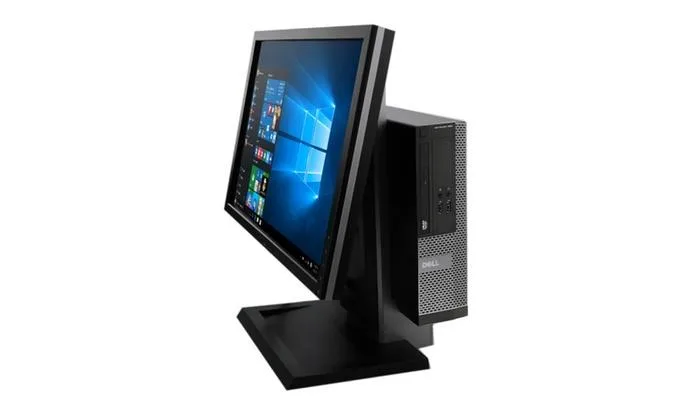
DELL OptiPlex 9010 SFF i5-3470 3.2GHz 32GB DDR3 256GB SSD Windows 10 Pro desktop PC
- Home / Office
- DIMM 240-pin
US$262.99
0.00334776BTC
มีสินค้าเรารับชำระด้วยคริปโต — เหรียญที่คุณถืออยู่จึงนำมาซื้อฮาร์ดแวร์ของจริงได้จ่ายด้วยคริปโต แล้วนำไปซื้อฮาร์ดแวร์ของจริง จัดส่งฟรีพร้อมประกันภัยทั่วโลก เมื่อสั่งซื้อเกิน US$399 กล่องพัสดุเรียบไม่มีตราสินค้า จัดส่งจากประเทศเยอรมนีจัดส่งฟรีพร้อมประกันภัย เมื่อสั่งซื้อเกิน US$399 อัตราแลกเปลี่ยนของคุณจะถูกล็อกไว้ 30 นาที ทันทีที่เปิดหน้าชำระเงินล็อกอัตราแลกเปลี่ยน 30 นาที สินค้าทุกชิ้นปิดผนึกจากโรงงาน ตรวจสอบหมายเลขซีเรียล และรับประกัน 24 เดือนปิดผนึกจากโรงงาน รับประกัน 24 เดือน

DELL
Slim all-in-one desktop with 22-inch 1920 x 1080 display, 3.2 GHz quad-core processor, 32 GB DDR3 memory and 256 GB SSD
Memory Capacity 32GB DDR3
The Dell OptiPlex 9010 SFF combines a 22-inch 1920 x 1080 display with the compute module in a single slim chassis. A 3rd Gen Intel Core i5-3470 running at 3.20 GHz with four threads and 3.60 GHz turbo handles everyday business applications. Thirty-two gigabytes of DDR3 memory and a 256 GB solid-state drive provide responsive multitasking and fast boot times. Windows 10 Pro 64-bit is pre-installed alongside a USB keyboard and mouse.
The small-form-factor design uses an integrated thermal solution that keeps the quad-core processor cool during typical office workloads without generating disruptive fan noise. Power consumption remains modest thanks to the efficient 3.20 GHz CPU and solid-state storage, which eliminates the mechanical drive activity found in older systems. The all-in-one layout reduces cable clutter and the number of separate power adapters required on the desk.
This unit consolidates a traditional desktop tower and separate display into one footprint, freeing valuable surface area in cubicles, reception areas or home offices. The jump is worthwhile when deployment simplicity matters more than component-level upgrades, since the sealed chassis limits future memory or storage expansion. Buyers who need discrete graphics performance, additional drive bays or user-serviceable parts should consider a conventional tower configuration instead.
| Brand | DELL |
|---|---|
| Series | OptiPlex |
| Model | 9010 |
| Part Number | 9010 |
| Type | All-in-One PC |
| Form Factor | Slim/Small Form Factor |
| Usage | Consumer |
| Color | Black/Silver |
| Processor | 3rd Gen Intel Quad Core i5-3470 3.20 GHz |
| Memory | 32 GB DDR3 Desktop RAM |
| Ethernet | Ethernet |
| Wireless Card | USB WiFI |
| Monitor | Monitor included |
| Keyboard | USB |
| Mouse | USB |
| Operating System | Windows 10 Pro |
| Software Included | Windows 10 Pro Installed |
| Chipset | Intel Q77 |
| CPU Type | Intel Core i5 3rd Gen |
| Installed Qty | 1 |
| Max Supported Qty | 1 |
| CPU Name | Intel Core i5-3470 |
| GPU/VGA Type | Intel HD Graphics 4000 |
| Graphics Interface | Integrated video |
| Memory Capacity | 32GB DDR3 |
| Memory Speed | DDR3 |
| Memory Spec | 8 GB x 4 |
| Memory Slot (Total) | 4 |
| Memory Slot (Available) | SATA |
| Memory Slots (Available/Total) | 0/4 |
| Maximum Memory Supported | 32 GB |
| SSD | 256GB |
| HDD | No |
| HDD Interface | SATA |
| Storage Spec | 2.5" 256 GB Solid State Drive |
| Optical Drive Type | DVD±RW |
| Screen Size | 22" |
| Screen Resolution | 1920 x 1080 |
| Touchscreen | No |
| Screen Type | Non-Touch Screen |
| Display Feature | FHD Monitor |
| LAN Chipset | Integrated |
| LAN Speed | 10/100/1000Mbps |
| Bluetooth | Yes |
| Front USB | 4 |
| Front Audio Ports | 1 |
| COM | 4 |
| PS/2 | 1 |
| Video Ports | 1 VGA, 2 Display Ports |
| Rear USB | 6 |
| RJ45 | 1 port |
| Rear Audio Ports | 1 port |
| Mouse Type | USB Mouse |
| Keyboard Type | USB Keyboard |
| Weight | 12 Lbs |
รุ่นอื่นในตระกูลเดียวกัน
ตระกูลเดียวกัน แต่หน่วยความจำ คูลเลอร์ หรือสัญญาณนาฬิกาต่างกัน — เปรียบเทียบก่อนตัดสินใจ
Plug the supplied USB WiFi adapter into any free USB 2.0 port on the AIO base; the system will recognise it automatically and install the driver under Windows 10 Pro.
The SSD has no moving parts and requires no routine service; DDR3 modules are soldered or slotted but non‑volatile, so only a future capacity upgrade would involve opening the chassis.
The panel is fixed at 60 Hz refresh and 1080p resolution, so sustained gaming or video playback cannot exceed that frame rate or pixel count.
อื่น ๆ ในหมวดนี้
หมวดเดียวกัน การชำระเงินแบบเดียวกัน — แปดสกุลเงินคริปโตและอัตราแลกเปลี่ยนที่ล็อกไว้ 30 นาที
สิ่งที่คุณใช้ชำระ และสิ่งที่คุณใช้อ่านราคา
ส่งจากกระเป๋าเงินของคุณเมื่อชำระเงิน
แสดงผลเท่านั้น — แคตตาล็อกสินค้าตั้งราคาเป็นดอลลาร์สหรัฐ
ไม่พบสกุลเงินที่ตรงกัน
เลือกภาษาที่ต้องการให้เว็บไซต์แสดงผล
ไม่พบภาษาที่ตรงกัน
ยังไม่เคยใช้งานใช่ไหม
มีบัญชีอยู่แล้วใช่ไหม
ไม่มีการรีเซ็ตแบบอัตโนมัติ ร้านนี้ไม่ส่งอีเมลใด ๆ จึงไม่มีลิงก์ใช้ครั้งเดียวให้ขอ ปล่อยที่อยู่อีเมลนี้ไว้ในบัญชี แล้วเจ้าหน้าที่จะดำเนินการให้ด้วยตนเอง
รับคำขอแล้ว
ไม่มีอะไรถูกส่งไปยังกล่องจดหมายของคุณ — ร้านนี้ไม่ส่งอีเมลใด ๆ เลย มีคนดำเนินการเรื่องนี้ให้ด้วยมือ
นึกออกแล้วใช่ไหม