

SanDisk
SanDisk Cruzer Blade 8 GB USB 2.0 USB flash drive Black SDCZ50-008G-B35
US$391.99
0.00501023BTC
มีสินค้าเรารับชำระด้วยคริปโต — เหรียญที่คุณถืออยู่จึงนำมาซื้อฮาร์ดแวร์ของจริงได้จ่ายด้วยคริปโต แล้วนำไปซื้อฮาร์ดแวร์ของจริง จัดส่งฟรีพร้อมประกันภัยทั่วโลก เมื่อสั่งซื้อเกิน US$399 กล่องพัสดุเรียบไม่มีตราสินค้า จัดส่งจากประเทศเยอรมนีจัดส่งฟรีพร้อมประกันภัย เมื่อสั่งซื้อเกิน US$399 อัตราแลกเปลี่ยนของคุณจะถูกล็อกไว้ 30 นาที ทันทีที่เปิดหน้าชำระเงินล็อกอัตราแลกเปลี่ยน 30 นาที สินค้าทุกชิ้นปิดผนึกจากโรงงาน ตรวจสอบหมายเลขซีเรียล และรับประกัน 24 เดือนปิดผนึกจากโรงงาน รับประกัน 24 เดือน
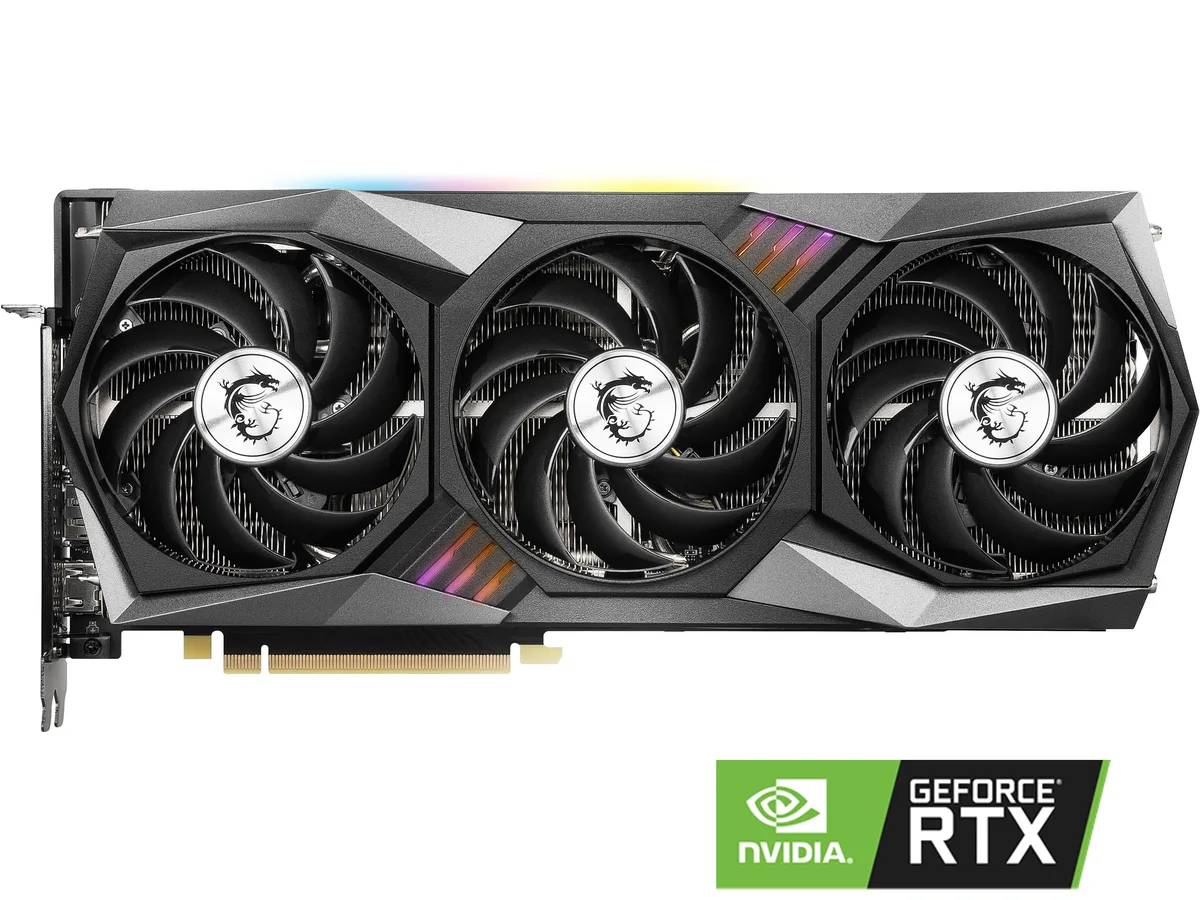


MSI
Refurbished GeForce RTX 3070 with 8 GB GDDR6 memory, 5888 CUDA cores, 1830 MHz boost clock, triple-fan cooling and HDMI 2.1 plus three DisplayPort 1.4a outputs
The card delivers a 1830 MHz boost clock with 5888 CUDA cores and 8GB of GDDR6 memory on a 256-bit bus. It targets gamers and creators who need strong 1440p performance and VR readiness. The PCI Express 4.0 interface and triple-fan thermal design suit mid-tower builds with a 650W power supply. Refurbished condition offers a lower entry point.
The HDMI 2.1 port and three DisplayPort 1.4a outputs drive up to four monitors at 7680 x 4320 resolution. DirectX 12 and OpenGL 4.6 support cover modern titles and professional apps. Buyers needing more than 8GB VRAM for 4K ultra textures or compute workloads should consider higher-tier models. The 240W TDP requires two 8-pin connectors.
The 8GB GDDR6 frame buffer is the single figure that determines suitability. It handles current 1440p gaming and VR titles comfortably but can limit 4K ultra settings or heavy creative workloads. If your target resolution and texture quality fit within 8GB, the card matches the requirement; otherwise, a larger memory model is needed.
| Brand | MSI |
|---|---|
| Series | Gaming |
| Model | RTX 3070 GAMING X TRIO |
| Interface | PCI Express 4.0 |
| Chipset Manufacturer | NVIDIA |
| GPU Series | NVIDIA GeForce RTX 30 Series |
| GPU | GeForce RTX 3070 |
| Boost Clock | 1830 MHz |
| CUDA Cores | 5888 |
| Effective Memory Clock | 14 Gbps |
| Memory Size | 8GB |
| Memory Interface | 256-Bit |
| Memory Type | GDDR6 |
| DirectX | DirectX 12 |
| OpenGL | OpenGL 4.6 |
| Multi-Monitor Support | 4 |
| HDMI | 1 x HDMI 2.1 |
| DisplayPort | 3 x DisplayPort 1.4a |
| Max Resolution | 7680 x 4320 |
| Virtual Reality Ready | Yes |
| Cooler | Triple Fans |
| Thermal Design Power | 240W |
| Recommended PSU Wattage | 650W |
| Power Connector | 2 x 8-Pin |
| HDCP Ready | Yes |
| Features | TRI FROZR 2 Thermal Design TORX Fan 4.0: A masterpiece of teamwork, fan blades work in pairs to create unprecedented levels of focused air pressure. Core Pipe: Precision-crafted heat pipes ensure max contact to the GPU and spread heat along the full length of the heatsink. Airflow Control: Don't sweat it, Airflow Control guides the air to exactly where it needs to be for maximum cooling. RGB Mystic Light Mystic Light gives you complete control of the RGB lighting for MSI devices and compatible RGB products. Dragon Center MSI's exclusive Dragon Center software lets you monitor, tweak |
| Max GPU Length | 323 mm |
| Card Dimensions (L x H) | 12.72" x 5.51" |
| น้ำหนักในการจัดส่ง | 2.29 kg |
| ขนาดบรรจุภัณฑ์ | 406 × 298 × 89 mm |
The card uses a triple-fan TRI FROZR 2 thermal design with TORX Fan 4.0 blades and core pipes; measure your case length and height against the three-fan shroud before buying.
Connect both 8-pin PCIe connectors from the PSU; the common error is using a single daisy-chained cable instead of two separate runs from the power supply.
Re-paste if GPU temperatures climb noticeably above stock levels after a few years; the core pipes and heatsink stay in place while only the paste layer is refreshed.
อื่น ๆ ในหมวดนี้
หมวดเดียวกัน การชำระเงินแบบเดียวกัน — แปดสกุลเงินคริปโตและอัตราแลกเปลี่ยนที่ล็อกไว้ 30 นาที
สิ่งที่คุณใช้ชำระ และสิ่งที่คุณใช้อ่านราคา
ส่งจากกระเป๋าเงินของคุณเมื่อชำระเงิน
แสดงผลเท่านั้น — แคตตาล็อกสินค้าตั้งราคาเป็นดอลลาร์สหรัฐ
ไม่พบสกุลเงินที่ตรงกัน
เลือกภาษาที่ต้องการให้เว็บไซต์แสดงผล
ไม่พบภาษาที่ตรงกัน
ยังไม่เคยใช้งานใช่ไหม
มีบัญชีอยู่แล้วใช่ไหม
ไม่มีการรีเซ็ตแบบอัตโนมัติ ร้านนี้ไม่ส่งอีเมลใด ๆ จึงไม่มีลิงก์ใช้ครั้งเดียวให้ขอ ปล่อยที่อยู่อีเมลนี้ไว้ในบัญชี แล้วเจ้าหน้าที่จะดำเนินการให้ด้วยตนเอง
รับคำขอแล้ว
ไม่มีอะไรถูกส่งไปยังกล่องจดหมายของคุณ — ร้านนี้ไม่ส่งอีเมลใด ๆ เลย มีคนดำเนินการเรื่องนี้ให้ด้วยมือ
นึกออกแล้วใช่ไหม



