


DELL
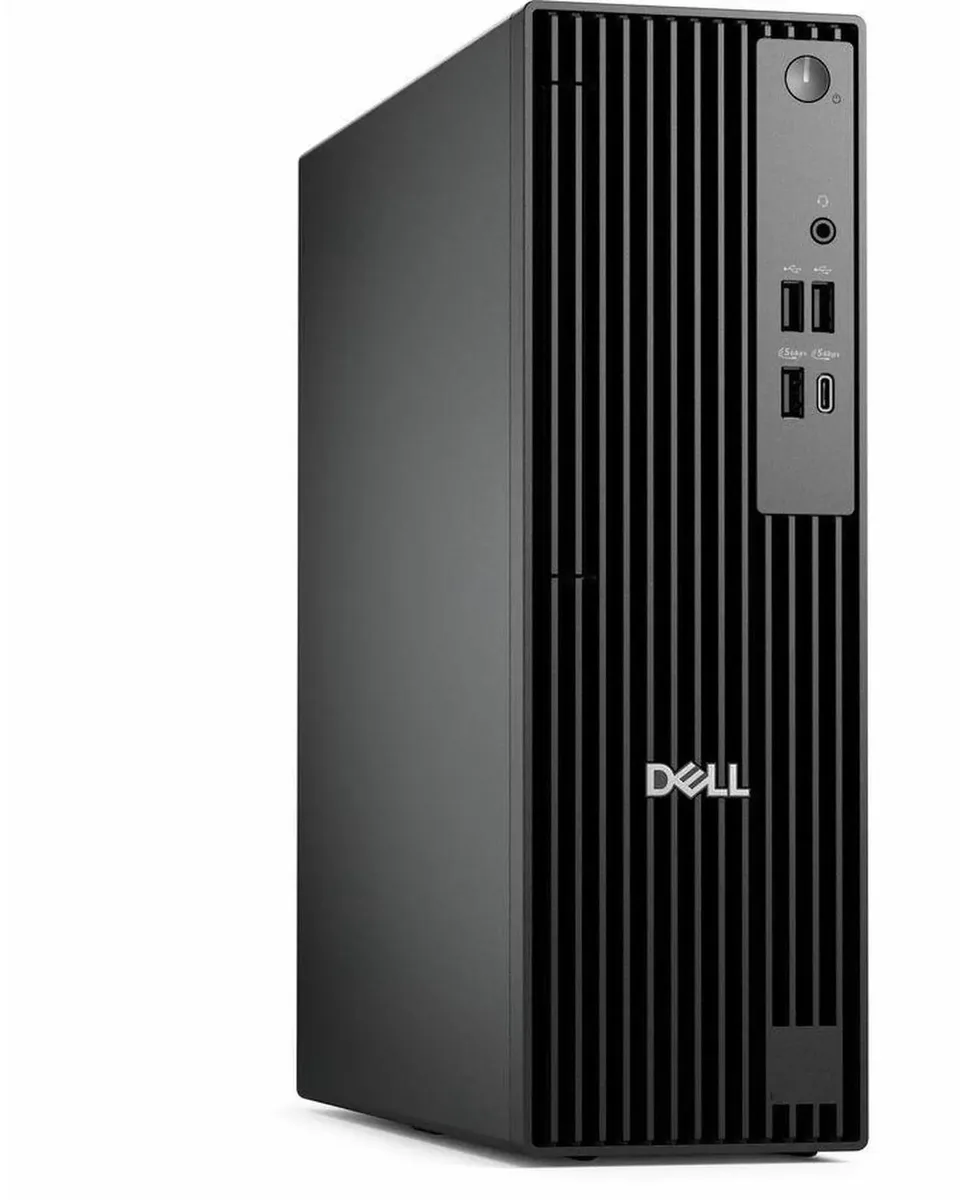
DELL Pro Slim QCS1250 desktop PC i5-14500 8GB DDR5 256GB SSD
A small-form-factor business desktop with a 14-core Intel i5-14500, 8GB DDR5, 256GB SSD, dual-monitor graphics, and Windows 11 Pro
- TypeBusiness Desktops & Workstations
- Form FactorSmall Form Factor
- UsageBusiness
- Processor14th Generation Intel Core i5-14500 14-Core Processor 2.60GH
- Processor Main Features64 bit 14-Core Processor
- Cache Per Processor24MB Intel Smart Cache
- 14-core i5-14500 handles heavy multitasking with 5.00GHz boost
- 8GB DDR5 memory accelerates data access for responsive workflows
- 256GB SSD delivers fast boot and application load times
- Intel HD Graphics drives two displays via DisplayPort and HDMI
- 180W power supply and compact chassis fit tight workspaces
Dell Pro Slim QCS1250 Business Desktop
The Dell Pro Slim QCS1250 is a new small-form-factor desktop built around a 14-core Intel Core i5-14500 processor running at 2.60 GHz up to 5.00 GHz. It ships with 8 GB of DDR5 memory, a 256 GB SSD and Windows 11 Pro, and includes a Dell USB keyboard and mouse. The 180 W power supply drives the system in a compact chassis designed for business environments.
Ideal for office workers needing dual-display
This desktop suits professionals who rely on two monitors via DisplayPort and HDMI for multitasking, trading or general office workloads. Integrated Intel HD Graphics handles everyday business applications without a discrete card. Buyers who need more than 8 GB of memory, larger storage capacity or a dedicated graphics processor for 3D work should consider other configurations.
14-core Intel Core i5-14500 with DDR5
The 14-core processor with 24 MB Intel Smart Cache and DDR5 memory is the specification that determines whether this system meets your performance baseline. If your workloads demand higher core counts, faster memory bandwidth or discrete graphics, this platform will not satisfy those requirements.
أبرز المميزات
- 14-core i5-14500 handles heavy multitasking with 5.00GHz boost
- 8GB DDR5 memory accelerates data access for responsive workflows
- 256GB SSD delivers fast boot and application load times
- Intel HD Graphics drives two displays via DisplayPort and HDMI
- 180W power supply and compact chassis fit tight workspaces
المواصفات
| Brand | DELL |
|---|---|
| Series | Dell Pro |
| Model | QCS1250 |
| Type | Business Desktops & Workstations |
| Form Factor | Small Form Factor |
| Usage | Business |
| Processor | 14th Generation Intel Core i5-14500 14-Core Processor 2.60GHz Up to 5.00GHz |
| Processor Main Features | 64 bit 14-Core Processor |
| Cache Per Processor | 24MB Intel Smart Cache |
| Memory | 8GB DDR5 |
| Storage | 256GB SSD |
| Optical Drive | No |
| Optical Drive 2 | No |
| Graphics | Intel HD Graphics |
| Ethernet | Gigabit Ethernet |
| Power Supply | 180W |
| Monitor | Monitor not included |
| Keyboard | Dell USB keyboard |
| Mouse | Dell USB Mouse |
| Operating System | Windows 11 Pro |
| CPU Type | Intel Core i5 14th Gen |
| L3 Cache Per CPU | 24MB Intel Smart Cache |
| CPU Main Features | 64 bit 14-Core Processor |
| GPU/VGA Type | Intel HD Graphics |
| Graphics Card | Intel HD Graphics |
| Graphics Interface | Integrated |
| Memory Capacity | 8GB DDR5 |
| Memory Speed | DDR5 |
| Memory Spec | 8GB DDR5 |
| SSD | 256 GB |
| HDD | No |
| Storage Spec | 256GB SSD |
| Optical Drive Type | No |
| Screen Size | No Screen |
| Display Feature | Dual Monitor Capable |
| LAN Speed | 10/100/1000Mbps |
| WLAN | Wifi-AX |
| Front USB | 2 x USB 2.0,1 x USB 3.2, 1 x USB Type-C 3.2 |
| Front Audio Ports | 1 x Headphone Jack |
| Card Reader | No |
| Video Ports | HDMI,DisplayPort |
| Rear USB | 2 x USB 3.2, 2 x USB 2.0 |
| RJ45 | 1 port |
| Keyboard Type | Dell Keyboard |
| Mouse Type | Dell Mouse |
| Dimensions (H x W x D) | 18 x 16 x 14 |
| Weight | 15 |
| Package Type | Dell Brown Box |
| Package Contents | Small Form Factor PC, Power cord |
أسئلة حول هذا المنتج
How much space does the Small Form Factor QCS1250 chassis need on a desk?
The Small Form Factor chassis is designed for tight spaces; allow a few centimetres clearance around the 180W power supply vents for airflow.
What is the correct order to connect the Dell USB keyboard, Dell USB Mouse and dual monitors during first boot?
Plug the keyboard and mouse into the USB 2.0 ports, connect one monitor to DisplayPort and the second to HDMI, then press the power button.
When will the 8GB DDR5 memory need to be upgraded for heavier workloads?
The single 8GB DDR5 module handles typical business tasks; add a second matching DDR5 stick when multitasking regularly exceeds available memory.
أيضًا في هذا القسم
عملاء قارنوا هذه المنتجات
نفس القسم، ونفس صفحة الدفع — ثماني عملات رقمية وقفل سعر لمدة 30 دقيقة.



Higole
Higole 11.6" Touch All-in-One PC Celeron N5095 8GB 128GB
- 11.6"
- 1366 x 768
307.99 US$
0.00389742BTC
متوفر
Toemaagic
Toemaagic All-in-One PC 24" FHD i7 4.0GHz 16GB 512GB White
- Toemaagic
- 16 GB
318.99 US$
0.00403662BTC
متوفر
Lenovo
Lenovo A100 23.8" FHD All-in-One PC Intel N100 32GB DDR4 2TB SSD 1TB Dock Windows 11 Pro White
- All-in-One PC
- All-in-One
930.99 US$
0.0117811BTC
متوفر