

SanDisk
SanDisk Cruzer Blade 8 GB USB 2.0 USB flash drive Black SDCZ50-008G-B35
391.99 US$
0.00501664BTC
متوفرنقبل الدفع بالعملة المشفرة — لذلك يمكن للعملات الرقمية التي تملكها أن تشتري أجهزة حقيقية.ادفع بالعملة المشفرة، وأنفقها على أجهزة حقيقية. شحن مؤمن مجانا إلى كل أنحاء العالم لما يتجاوز 399 US$. صناديق شحن بسيطة بلا علامة تجارية، ترسل من ألمانيا.شحن مؤمن مجانا لما يتجاوز 399 US$. يُقفل سعرك لمدة 30 دقيقة بمجرد فتح صفحة الدفع.السعر مقفل لمدة 30 دقيقة. كل قطعة مختومة، ورقمها التسلسلي متحقق منه، ومشمولة بضمان 24 شهرا.مختوم، وبضمان 24 شهرا.
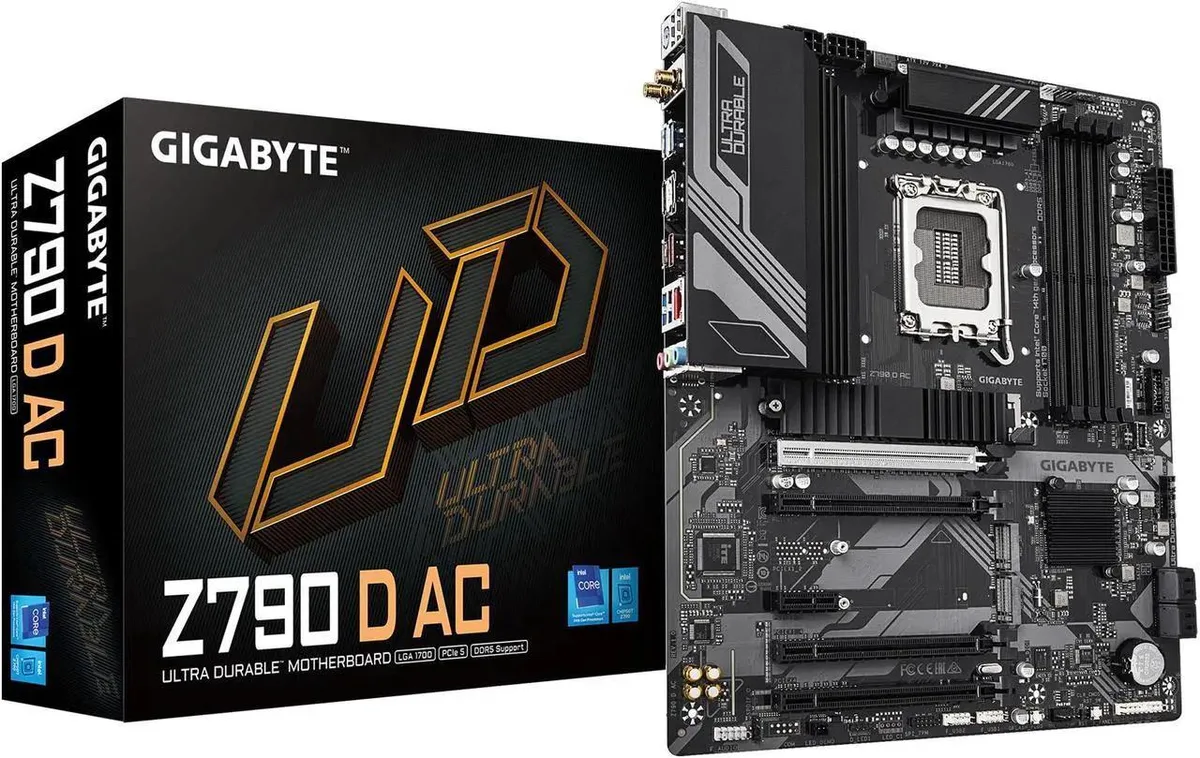


GIGABYTE
ATX Intel Z790 board for 12th to 14th Gen Core CPUs with DDR5 to 7600 MT/s, PCIe 5.0 x16, triple M.2 slots, 2.5GbE LAN and USB 3.2 Gen2x2 Type‑C
The GIGABYTE Z790 D AC uses the LGA 1700 socket and Intel Z790 chipset to support 12th, 13th and 14th Generation Intel Core, Pentium Gold and Celeron processors. Four 288-pin DDR5 slots accept up to 192 GB in dual-channel mode with speeds ranging from 5200 to 7600 MT/s when overclocked. The board targets builders who want current-generation Intel performance on a standard ATX platform.
A twin 12+1+1 phase digital VRM is cooled by fully covered MOSFET heatsinks, while an M.2 Thermal Guard protects the primary SSD from throttle-inducing heat. The 6-layer PCB uses 2X copper for lower resistance and better heat spreading. Smart Fan 6 provides multiple temperature headers and hybrid fan-pump control so cooling stays proportional to load without unnecessary noise.
The top PCIe 5.0 x16 slot takes full-bandwidth graphics cards, while the chipset adds one PCIe 4.0 x4 slot, two PCIe 3.0 x1 slots and one PCIe 3.0 x1 slot. Three M.2 sockets — one CPU-attached PCIe 4.0 x4, two chipset-attached PCIe 4.0 x4 — support 2280 and 22110 NVMe SSDs. Rear I/O includes USB 3.2 Gen2x2 Type-C at 20 Gbps and 2.5 GbE LAN driven by a Realtek controller. Q-Flash Plus updates BIOS without a CPU or memory installed.
| Brand | GIGABYTE |
|---|---|
| Model | Z790 D AC |
| CPU Socket Type | LGA 1700 |
| CPU Type | Support for the 14th, 13th, and 12th Generation Intel Core, Pentium Gold and Celeron Processors (Go to GIGABYTE's website for the latest CPU support list.) L3 cache varies with CPU |
| Chipset | Intel Z790 |
| Number of Memory Slots | 4x288pin (DDR5) |
| Memory Standard | 14th and 13th Generation Intel Core i9/i7 Processors: - Support for DDR5 7600(O.C.) /7400(O.C.) /7200(O.C.) /7000(O.C.) /6800(O.C.) /6600(O.C.) / 6400(O.C.) / 6200(O.C.) / 6000(O.C.) / 5800(O.C.) / 5600 / 5400 / 5200/ 4800/4400 MT/s memory modules 13th Generation Intel Core i5/i3 and 12th Generation Intel Core, Pentium Gold and Celeron Processors: - Support for DDR5 4800/4400 MT/s memory modules |
| Maximum Memory Supported | 192GB |
| Channel Supported | Dual Channel |
| Memory Feature | Dual channel memory architecture Support for ECC Un-buffered DIMM 1Rx8/2Rx8 memory modules (operate in non-ECC mode) Support for non-ECC Un-buffered DIMM 1Rx8/2Rx8/1Rx16 memory modules Support for Extreme Memory Profile (XMP) memory modules (The CPU and memory configuration may affect the supported memory types, data rate (speed), and number of DRAM modules, please refer to "Memory Support List" on GIGABYTE's website for more information.) |
| PCI Express 5.0 x16 | CPU: - 1 x PCI Express x16 slot, supporting PCIe 5.0 and running at x16 (PCIEX16) * For optimum performance, if only one PCI Express graphics card is to be installed, be sure to install it in the PCIEX16 slot. |
| PCI Express 4.0 x16 | Chipset: - 1 x PCI Express x16 slot, supporting PCIe 4.0 and running at x4 (PCIEX4) |
| PCI Express 3.0 x16 | Chipset: - 2 x PCI Express x16 slots, supporting PCIe 3.0 and running at x1 (PCIEX1_1, PCIEX1_4) |
| PCI Express x1 | Chipset: - 1 x PCI Express x1 slot, supporting PCIe 3.0 and running at x1 (PCIEX1_3) |
| Serial ATA (SATA) | 4 x SATA 6Gb/s |
| M.2 | CPU: - 1 x M.2 connector (Socket 3, M key, type 22110/2280 PCIe 4.0 x4/x2 SSD support) (M2A_CPU) Chipset: - 1 x M.2 connectors (Socket 3, M key, type 2280 PCIe 4.0 x4/x2 SSD support) (M2P_SB) - 1 x M.2 connectors (Socket 3, M key, type 2280 SATA and PCIe 4.0 x4/x2 SSD support) (M2M_SB) |
| SATA RAID | RAID 0, RAID 1, RAID 5, and RAID 10 support for NVMe SSD storage devices RAID 0, RAID 1, RAID 5, and RAID 10 support for SATA storage devices |
| Audio Chipset | Realtek Audio CODEC High Definition Audio 2/4/5.1/7.1-channel * You can change the functionality of an audio jack using the audio software. To configure 7.1-channel audio, access the audio software for audio settings. Support for S/PDIF Out |
| Audio Channels | 7.1 Channels |
| LAN Chipset | Realtek 2.5GbE LAN chip (2.5 Gbps/1 Gbps/100 Mbps) |
| Max LAN Speed | 2.5Gbps |
| Wireless LAN | Intel Wireless-AC 9560 (PCB rev. 1.0) - WIFI 802.11 a, b, g, n, ac, supporting 2.4/5 GHz Dual-Band - Support 11ac 160MHz wireless standard (Actual data rate may vary depending on environment and equipment.) |
| Bluetooth | BLUETOOTH 5.1 |
| Back I/O Ports | 1 x PS/2 keyboard/mouse port 1 x USB Type-C port, with USB 3.2 Gen 2 support 1 x USB 3.2 Gen 2 Type-A port (red) 4 x USB 3.2 Gen 1 ports 2 x USB 2.0/1.1 ports 2 x SMA antenna connectors (2T2R) 1 x HDMI port 1 x DisplayPort 1 x RJ-45 port 3 x audio jacks |
| Onboard USB | 1 x USB Type-C header, with USB 3.2 Gen 1 support 1 x USB 3.2 Gen 1 header 2 x USB 2.0/1.1 headers |
| Other Connectors | 1 x CPU fan header 1 x CPU fan/water cooling pump header 3 x system fan headers 1 x system fan/water cooling pump header 2 x addressable LED strip headers 3 x M.2 Socket 3 connectors 4 x SATA 6Gb/s connectors 1 x front panel header 1 x front panel audio header 1 x S/PDIF Out header 2 x Thunderbolt add-in card connectors 1 x Trusted Platform Module header (For the GC-TPM2.0 SPI/GC-TPM2.0 SPI 2.0/GC-TPM2.0 SPI V2 module only) 1 x reset button 1 x Q-Flash Plus button 1 x reset jumper 1 x Clear CMOS jumper |
| Windows 11 | Supported |
| Form Factor | ATX |
| Dimensions (W x L) | 12.0" x 9.6" |
| Power Pin | 1 x 24-pin ATX main power connector 2 x 8-pin ATX 12V power connectors |
| Features | Support for GIGABYTE Control Center (GCC) * Available applications in GCC may vary by motherboard model. Supported functions of each application may also vary depending on motherboard specifications. Support for Q-Flash Support for Q-Flash Plus Support for Smart Backup |
Mount the ATX board using standard standoffs, connect the 24-pin and 12V power cables, then install the graphics card in the top PCIEX16 slot running at PCIe 5.0 x16; the step people miss is forgetting to engage the PCIe EZ-Latch release before pulling the card out later.
The fully covered MOSFET heatsinks and M.2 Thermal Guard are passive; periodically blow dust from the fins and check that the thermal pads on the three M.2 slots remain seated when swapping drives.
The 14+1+1 phase digital VRM is rated for high current; under sustained heavy load the first limit is typically VRM temperature, so ensure case airflow reaches the heatsink array and adjust Smart Fan 6 curves if needed.
أيضًا في هذا القسم
نفس القسم، ونفس صفحة الدفع — ثماني عملات رقمية وقفل سعر لمدة 30 دقيقة.
ما تدفعه، وما تُعرض به الأسعار.
يُرسَل من محفظتك عند إتمام الطلب
للعرض فقط — أسعار الكتالوج بالدولار الأمريكي
لا توجد عملة مطابقة.
اختر اللغة التي يخاطبك بها الموقع.
لا توجد لغة مطابقة.
هل أنت جديد هنا؟
لديك حساب بالفعل؟
لا توجد إعادة تعيين تلقائية: هذا المتجر لا يُرسل أي بريد، فلا يوجد رابط لمرة واحدة يمكن طلبه. اترك العنوان في الحساب، وسيُعالَج الأمر يدويًا.
تم تسجيل الطلب
لا شيء في طريقه إلى بريدك الوارد — هذا المتجر لا يُرسل أي بريد إطلاقًا. يتولّى أحدهم معالجة هذه الطلبات يدويًا.
تذكّرتها؟



