

EVESKY
EVESKY MW4500 Wireless Vertical Ergonomic Mouse 1200 DPI 6 Buttons
157,99 $
0.00196319BTC
Auf LagerWir akzeptieren Kryptowährungen — so können die Coins, die Sie besitzen, echte Hardware kaufen.Zahlen Sie mit Krypto, geben Sie sie für echte Hardware aus. Weltweit kostenloser versicherter Versand ab 399 $. Neutrale Kartons ohne Markenaufdruck, versendet aus Deutschland.Kostenloser versicherter Versand ab 399 $. Ihr Kurs wird 30 Minuten lang gesperrt, sobald die Kasse geöffnet wird.Kurs 30 Minuten gesperrt. Jeder Artikel ist versiegelt, die Seriennummer wird geprüft, und es gilt eine Garantie von 24 Monaten.Versiegelt, 24 Monate Garantie.
ASUS
Tri-mode wireless gaming mouse with a 16,000 dpi optical sensor, 79 gram honeycomb shell, hot-swappable switches and up to 78 hours battery life
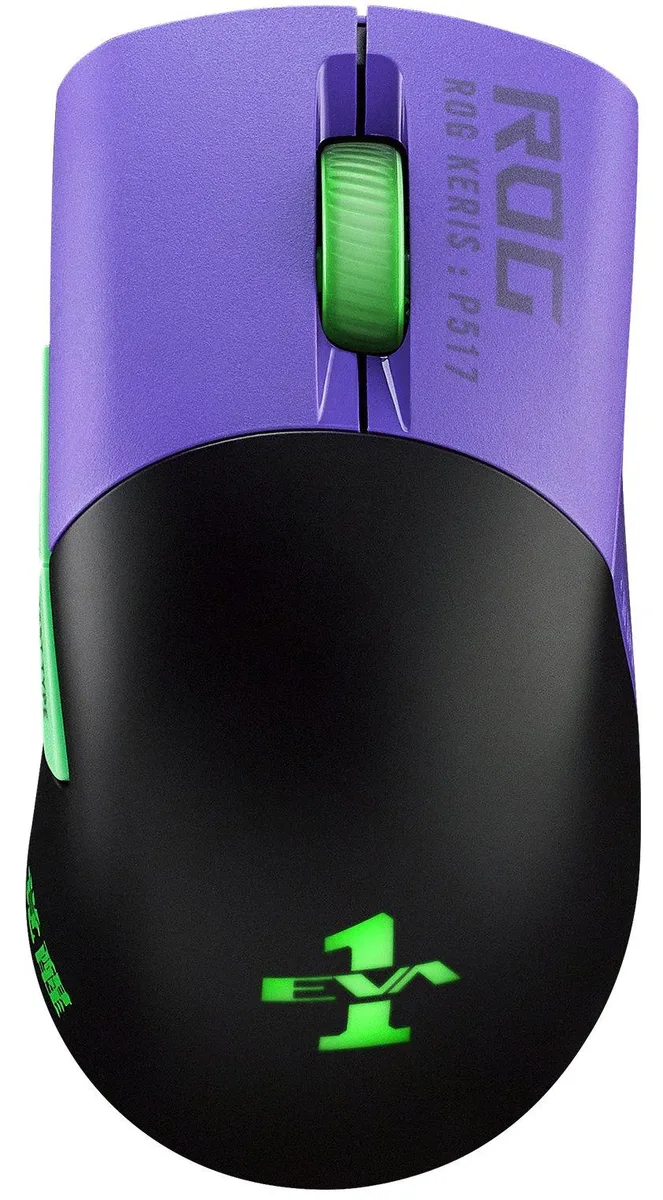
The ASUS ROG Keris Wireless EVA Edition is a right-handed optical mouse built for competitive shooters. It connects through 2.4 GHz wireless, Bluetooth LE or a wired USB cable. A specially tuned 16000 dpi sensor delivers 400 ips tracking at a 1000 Hz polling rate. The honeycomb inner structure keeps the weight to 79 gram.
Premium PBT polymer covers the primary buttons with a matte finish that resists wear. An exclusive push-fit socket lets you replace the supplied Omron micro switches to adjust click force or extend service life. The switches are rated for a 70-million-click lifespan. Two additional side buttons in different colours are included for layout changes.
A flexible ROG Paracord cable reduces drag during wired play. The internal battery lasts up to 78 hours, or 56 hours with RGB lighting active. Four sets of 100% PTFE rounded-edge mouse feet are bundled for a smooth glide. Armoury Crate software handles button mapping, DPI steps and lighting effects.
| Brand | ASUS |
|---|---|
| Name | ROG KERIS WIRELESS EVA EDITION |
| Model | 90MP02S0-BMAA00 |
| Type | Wired / Wireless |
| Interface | USB |
| Tracking Method | Optical |
| Resolution (DPI) | 16000 dpi |
| Hand Orientation | Right Hand |
| Color | Purple, Green, Black |
| Features | Tri-mode connectivity with dual-wireless 2.4 GHz and Bluetooth LE, plus wired USB. Specially tuned ROG 16,000 dpi, 400 ips optical sensor and 1000 Hz polling rate Optimized for FPS games, ergonomic design is based on input from esports pros ROG exclusive push-fit switch socket to vary click force and extend the lifespan of the mouse ROG Micro Switches for consistent click force and 70-million-click lifespan Honeycomb inner structure results in a lightweight 79 gram design Up to 78 hours of battery life, or 56 hours with RGB lighting on Premium PBT polymer L/R buttons with a durable m |
| Package Contents | 1 x ROG Optical Gaming Wireless Mouse 1 x Quick Start Guide 2 x swappable side buttons (different colors) 4 x mouse feet 2 x Omron 1M micro switch 1 x ROG Paracord 1 x ROG sticker 1 x Warranty Card |
The 2.4 GHz mode delivers a 1000 Hz polling rate, matching the wired USB connection for consistent 1 ms reporting.
The box contains two swappable side buttons in different colours and four replacement PTFE mouse feet for customised fit and glide.
Hold the pairing button until the indicator flashes, then add the device in the OS Bluetooth menu; skipping the button hold is the common mistake.
Ebenfalls in dieser Kategorie
Gleiche Abteilung, gleiche Kasse — acht Kryptowährungen und ein für 30 Minuten fixierter Kurs.
Womit Sie bezahlen und in welcher Währung Sie die Preise sehen.
Wird von Ihrem Wallet an der Kasse gesendet
Nur zur Anzeige — der Katalog ist in US-Dollar ausgezeichnet
Keine passende Währung gefunden.
Wählen Sie die Sprache, in der die Seite mit Ihnen spricht.
Neu hier?
Haben Sie bereits eins?
Es gibt keine automatische Zurücksetzung: Dieser Shop versendet keine E-Mails, daher gibt es auch keinen Einmal-Link, den Sie anfordern könnten. Lassen Sie die im Konto hinterlegte Adresse stehen, sie wird von Hand bearbeitet.
Anfrage vermerkt
Es ist nichts auf dem Weg in Ihr Postfach — dieser Shop versendet grundsätzlich keine E-Mails. Jemand bearbeitet diese Anfragen von Hand.
Wieder eingefallen?


