

ASUS
ASUS TM420IA-DB71T 2-in-1 laptop 14" FHD touch AMD Ryzen 7 4700U 8GB 512GB
- Bespoke Black
- Convertible
593,99 $
0.00744927BTC
Auf LagerWir akzeptieren Kryptowährungen — so können die Coins, die Sie besitzen, echte Hardware kaufen.Zahlen Sie mit Krypto, geben Sie sie für echte Hardware aus. Weltweit kostenloser versicherter Versand ab 399 $. Neutrale Kartons ohne Markenaufdruck, versendet aus Deutschland.Kostenloser versicherter Versand ab 399 $. Ihr Kurs wird 30 Minuten lang gesperrt, sobald die Kasse geöffnet wird.Kurs 30 Minuten gesperrt. Jeder Artikel ist versiegelt, die Seriennummer wird geprüft, und es gilt eine Garantie von 24 Monaten.Versiegelt, 24 Monate Garantie.


DELL
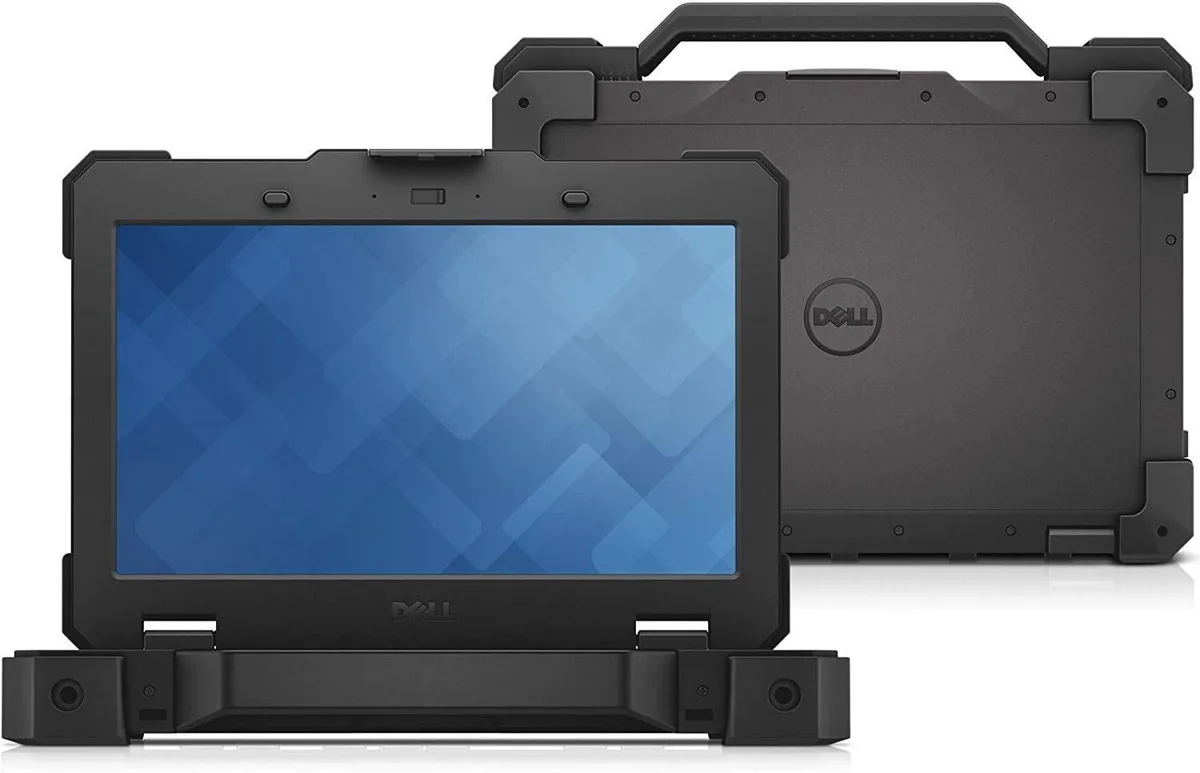
Rugged 14-inch touchscreen laptop with Intel Core i5-6300U, 32GB DDR4, 256GB SSD and Windows 10 Pro
The Dell Latitude 5414 is a 14-inch rugged laptop designed to withstand tough conditions. It runs Windows 10 Pro on a 6th-generation Intel Core i5-6300U processor with 3 MB cache and speeds up to 3.00 GHz. Integrated Intel HD Graphics 520 handles visual output on a 1366 x 768 HD touchscreen that supports 10-point input and works with gloves. The system includes 32 GB DDR4 memory and a 256 GB SSD.
This unit upgrades from conventional office laptops that lack reinforced chassis construction and sunlight-readable displays. The jump is worth it when work takes you into dust, vibration, extreme temperatures or direct outdoor light where consumer-grade hinges, screens and ports would fail. It also supersedes older rugged models limited to lower memory ceilings and slower wireless.
The chassis provides four USB ports (three 3.0, one 2.0), HDMI, VGA, RJ-45, an SD card reader and a DVD drive for legacy media. Wireless 802.11ac and Bluetooth4 keep data moving, while optional LTE and GPS extend reach beyond Wi-Fi. Hot-swappable 6- or 9-cell battery packs enable continuous operation without wall power, freeing users from fixed charging stations during full shifts.
| Brand | DELL |
|---|---|
| Series | Rugged 14 |
| Model | Latitude |
| Part Number | 5414 |
| Color | Black |
| Operating System | Windows 10 |
| CPU Type | Intel Core i5 6th Gen |
| Processor Name | Intel Core i5-6300U |
| CPU L2 Cache | 3MB |
| Screen Size | 14.0" |
| Touchscreen | Touch Screen |
| Display Type | HD |
| Resolution | 1366 x 768 |
| GPU/VPU | Intel HD Graphics 520 |
| Graphic Type | Integrated Card |
| SSD | 256GB |
| HDD | No |
| Storage Spec | 256 GB SSD |
| Memory | 32GB |
| Memory Speed | DDR4 |
| Memory Spec | 16 GB x 2 |
| Memory Slot (Total) | 2 |
| Memory Slot (Available) | 0 |
| Max Memory Supported | 32 GB |
| Optical Drive Type | DVD-ROM |
| LAN | 10/100/1000Mbps |
| WiFi Generation | Wi-Fi 4 and earlier generation |
| Bluetooth | Yes |
| USB | 2 x USB 3.0, USB 3.0 (PowerShare). 2 x USB 2.0 |
| Video Port | 1 x VGA, 1 x HDMI |
| HDMI | 1 x HDMI |
| Audio Ports | 1 x Microphone Jack, 1 x Headphone Jack |
| Audio | Integrated Sound card |
| Speaker | Internal Speakers |
| Touchpad | Yes |
| Keyboard | Standard |
| Webcam | No |
| Card Reader | Micro SD |
| Style | Standard |
| Type | Work / Business |
| Usage | Business |
| AC Adapter/Charger | 65-watt AC Adapter |
| Dimensions (W x D x H) | 13.7 x 9.6 x 1.7 |
| Weight | 6 - 6.9 lbs. |
The Latitude 5414 rugged chassis includes integrated mounting points compatible with Dell vehicle docks and desk stands, allowing secure installation without extra brackets.
Insert the bridge battery into the dedicated bay while the main battery remains seated; the step often missed is pressing the release latch fully until it clicks to enable hot-swap redundancy.
Purchase DDR4 SO-DIMM modules running at the system-supported speed; the laptop has two slots and currently uses 32 GB total, so match capacity per slot accordingly.
Ebenfalls in dieser Kategorie
Gleiche Abteilung, gleiche Kasse — acht Kryptowährungen und ein für 30 Minuten fixierter Kurs.
Womit Sie bezahlen und in welcher Währung Sie die Preise sehen.
Wird von Ihrem Wallet an der Kasse gesendet
Nur zur Anzeige — der Katalog ist in US-Dollar ausgezeichnet
Keine passende Währung gefunden.
Wählen Sie die Sprache, in der die Seite mit Ihnen spricht.
Neu hier?
Haben Sie bereits eins?
Es gibt keine automatische Zurücksetzung: Dieser Shop versendet keine E-Mails, daher gibt es auch keinen Einmal-Link, den Sie anfordern könnten. Lassen Sie die im Konto hinterlegte Adresse stehen, sie wird von Hand bearbeitet.
Anfrage vermerkt
Es ist nichts auf dem Weg in Ihr Postfach — dieser Shop versendet grundsätzlich keine E-Mails. Jemand bearbeitet diese Anfragen von Hand.
Wieder eingefallen?


