STARTECH
STARTECH CDP2HDMM1MB USB-C to HDMI Cable 1m 4K 30Hz
- USB to HDMI Adapters
- Black
33,99 $39,74 $−14%
0.00041724BTC
ΔιαθέσιμοΔεχόμαστε κρυπτονομίσματα — έτσι ώστε αυτά που κατέχετε να μπορούν να αγοράσουν πραγματικό εξοπλισμό.Πληρώστε σε κρυπτονομίσματα, ξοδέψτε τα σε πραγματικό εξοπλισμό. Δωρεάν ασφαλισμένη αποστολή παγκοσμίως άνω των 399 $. Ουδέτερες κούτες αποστολής, χωρίς σήμανση, από τη Γερμανία.Δωρεάν ασφαλισμένη αποστολή άνω των 399 $. Η ισοτιμία σας κλειδώνει για 30 λεπτά μόλις ανοίξει το ταμείο.Κλείδωμα ισοτιμίας 30 λεπτών. Κάθε προϊόν είναι σφραγισμένο, ελεγμένο ως προς τον σειριακό αριθμό του, και καλύπτεται από εγγύηση 24 μηνών.Σφραγισμένο, με εγγύηση 24 μηνών.


STARTECH
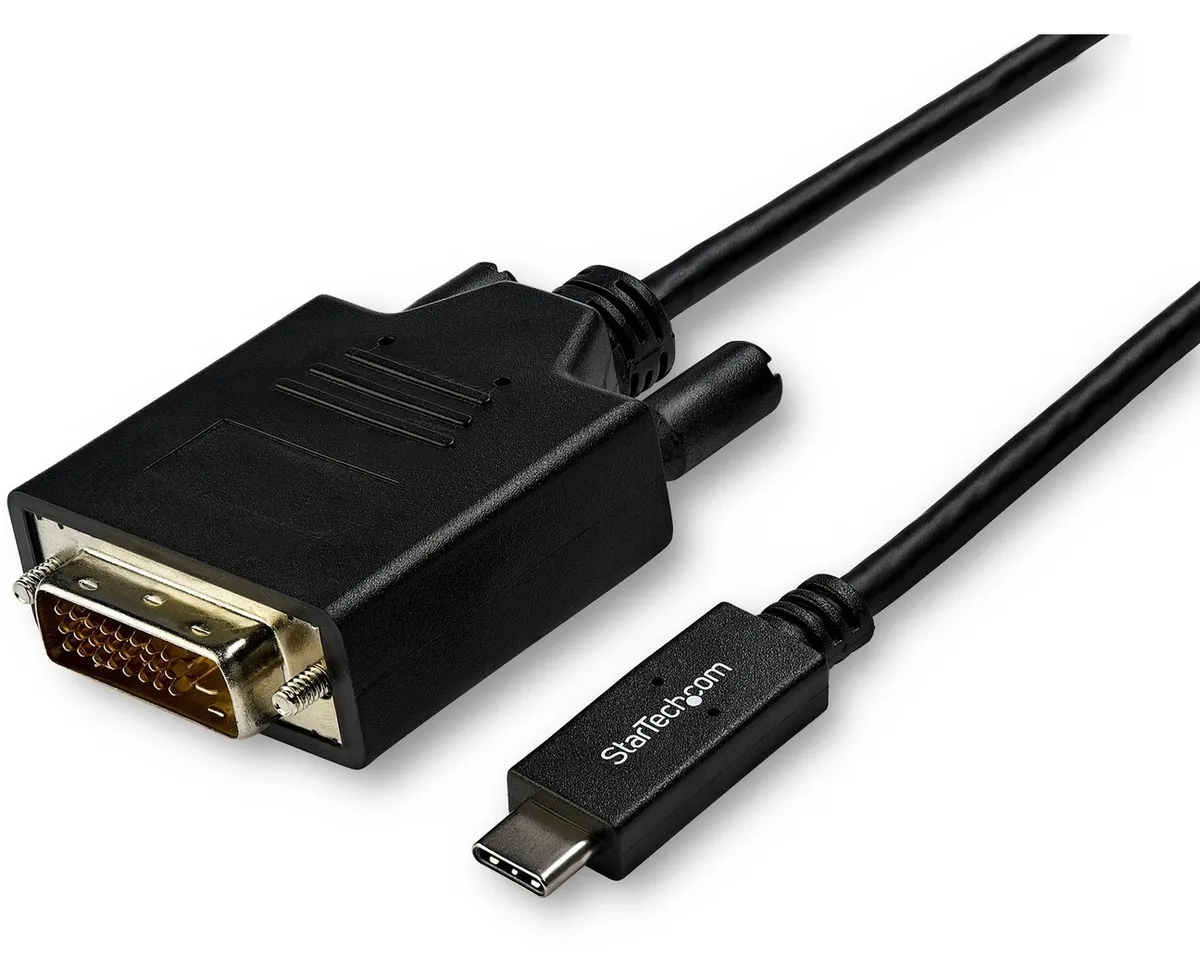
Connects a USB-C computer directly to a DVI display with a compact two-metre cable supporting up to 2560 x 1600 resolution
Model 6 ft. DVI
Οι διαγραμμένες εκδόσεις υπάρχουν, αλλά δεν είναι διαθέσιμες εδώ.
This 2 m adapter cable links a USB-C computer directly to a DVI-D display without extra adapters. The reversible USB-C plug simplifies insertion. It supports video resolutions up to 2560 x 1600 for a clear picture. Plug-and-play operation means no driver installation is required.
Users with a USB-C laptop or desktop who need to connect one DVI monitor will find this cable convenient. It suits offices and home workstations where a tidy, direct link is preferred. Builders requiring multiple display outputs or higher refresh rates should consider a dock or multi-port hub instead. The fixed cable length also limits placement flexibility for distant screens.
The integrated 2 m cable reduces clutter by replacing a separate adapter and cable pair. It draws video signal and power from the host USB-C port, freeing up other ports for peripherals. Ensure the host USB-C port supports DisplayPort Alternate Mode for video output. The DVI-D male connector mates with standard DVI-D or DVI-I monitor inputs.
| Brand | StarTech.com |
|---|---|
| Model | CDP2DVIMM2MB |
| Type | USB to DVI-D Adapters |
| Color | Black |
| Cable Length | 6 ft. |
| Specifications | Supported Resolutions: 1024 x 768 1280 x 720 (High-definition 720p) 1920 x 1080 (High-definition 1080p) 1920 x 1200 2560 x 1440 2560 x 1600 |
| Output Connector | 1 x DVI-D (25 pin) Male Output |
| Features | Reduce clutter with a compact 2 m (6 ft.) adapter cable Hassle-free connection with the reversible USB-C connector Crystal-clear picture quality with support for video resolutions up to 2560 x 1600 Plug-and-play installation No power adapter required Thunderbolt 3 port compatible |
| Weight | 0.20 lbs. |
| Package Contents | 1 x USB-C to DVI adapter cable |
| Βάρος αποστολής | 0.15 kg |
| Διαστάσεις συσκευασίας | 208 × 119 × 34 mm |
Άλλες εκδόσεις αυτού του μοντέλου
Ίδια οικογένεια, διαφορετική μνήμη, ψύκτρα ή συχνότητα — συγκρίνετε πριν αποφασίσετε.
Yes, the USB-C port on your computer must support DisplayPort Alternate Mode to carry video signals through this CDP2DVIMM2MB cable to a DVI display.
The adapter cable supports 1920 x 1200 natively, so a legacy DVI monitor at that resolution will display correctly without forced scaling.
Open your operating system display settings and confirm the external monitor shows 2560 x 1600 as the active resolution.
Επίσης σε αυτό το ράφι
Ίδιο ράφι, ίδιο ταμείο — οκτώ νομίσματα και κλείδωμα ισοτιμίας 30 λεπτών.
Το νόμισμα στο οποίο πληρώνετε, και αυτό στο οποίο βλέπετε τις τιμές.
Αποστέλλεται από το πορτοφόλι σας στο ταμείο
Μόνο για προβολή — ο κατάλογος αναγράφεται σε δολάρια
Κανένα νόμισμα δεν αντιστοιχεί.
Επιλέξτε τη γλώσσα στην οποία σας μιλάει ο ιστότοπος.
Καμία γλώσσα δεν ταιριάζει.
Πρώτη επίσκεψη;
Έχετε ήδη λογαριασμό;
Δεν υπάρχει αυτόματη επαναφορά κωδικού: αυτό το κατάστημα δεν στέλνει e-mail, άρα δεν υπάρχει σύνδεσμος μίας χρήσης να ζητήσετε. Αφήστε τη διεύθυνση στον λογαριασμό σας και κάποιος θα την επεξεργαστεί με το χέρι.
Το αίτημα καταχωρίστηκε
Δεν θα λάβετε τίποτα στα εισερχόμενά σας — το κατάστημα δεν στέλνει κανένα e-mail. Κάποιος το διαχειρίζεται με το χέρι.
Τον θυμηθήκατε;