STARTECH
STARTECH CDP2HDMM1MB USB-C to HDMI Cable 1m 4K 30Hz
- USB to HDMI Adapters
- Black
33,99 US$39,74 US$−14%
0.00041724BTC
På lagerVi tager imod kryptovaluta — så den krypto, du ejer, kan købe rigtig hardware.Betal med krypto, brug det på rigtig hardware. Gratis, forsikret levering til hele verden ved køb over 399 $. Neutrale, umærkede papkasser, sendt fra Tyskland.Gratis, forsikret levering over 399 $. Din kurs låses i 30 minutter, så snart kassen åbner.Kurs låst i 30 minutter. Hver vare er forseglet, har kontrolleret serienummer og er dækket af 24 måneders garanti.Forseglet, 24 måneders garanti.


STARTECH
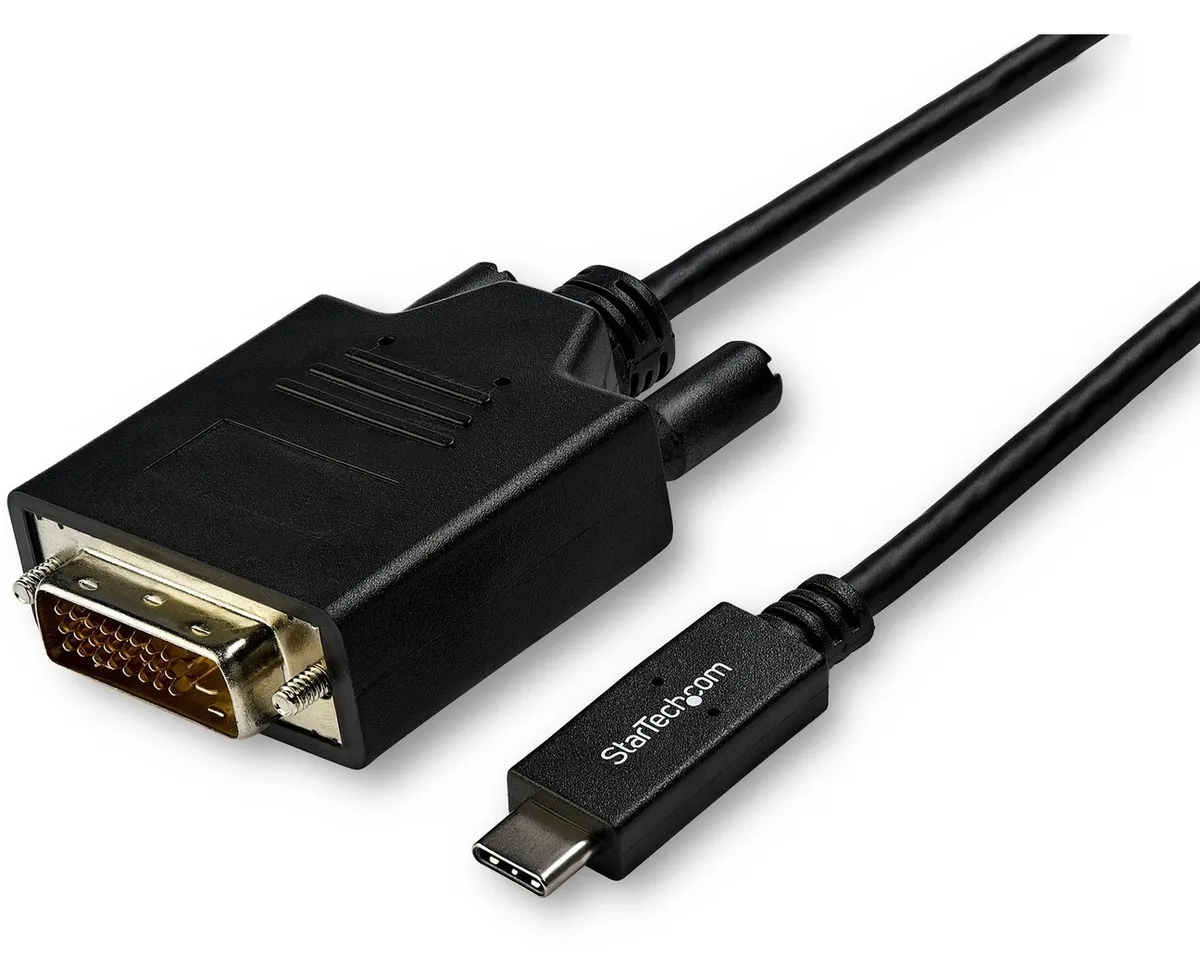
Connects a USB-C computer directly to a DVI display with a compact two-metre cable supporting up to 2560 x 1600 resolution
Model 6 ft. DVI
De overstregede versioner findes, men er ikke på lager her.
This 2 m adapter cable links a USB-C computer directly to a DVI-D display without extra adapters. The reversible USB-C plug simplifies insertion. It supports video resolutions up to 2560 x 1600 for a clear picture. Plug-and-play operation means no driver installation is required.
Users with a USB-C laptop or desktop who need to connect one DVI monitor will find this cable convenient. It suits offices and home workstations where a tidy, direct link is preferred. Builders requiring multiple display outputs or higher refresh rates should consider a dock or multi-port hub instead. The fixed cable length also limits placement flexibility for distant screens.
The integrated 2 m cable reduces clutter by replacing a separate adapter and cable pair. It draws video signal and power from the host USB-C port, freeing up other ports for peripherals. Ensure the host USB-C port supports DisplayPort Alternate Mode for video output. The DVI-D male connector mates with standard DVI-D or DVI-I monitor inputs.
| Brand | StarTech.com |
|---|---|
| Model | CDP2DVIMM2MB |
| Type | USB to DVI-D Adapters |
| Color | Black |
| Cable Length | 6 ft. |
| Specifications | Supported Resolutions: 1024 x 768 1280 x 720 (High-definition 720p) 1920 x 1080 (High-definition 1080p) 1920 x 1200 2560 x 1440 2560 x 1600 |
| Output Connector | 1 x DVI-D (25 pin) Male Output |
| Features | Reduce clutter with a compact 2 m (6 ft.) adapter cable Hassle-free connection with the reversible USB-C connector Crystal-clear picture quality with support for video resolutions up to 2560 x 1600 Plug-and-play installation No power adapter required Thunderbolt 3 port compatible |
| Weight | 0.20 lbs. |
| Package Contents | 1 x USB-C to DVI adapter cable |
| Forsendelsesvægt | 0.15 kg |
| Pakkestørrelse | 208 × 119 × 34 mm |
Andre versioner af denne model
Samme familie, men med anden hukommelse, køler eller clockfrekvens — sammenlign, før du bestemmer dig.
Yes, the USB-C port on your computer must support DisplayPort Alternate Mode to carry video signals through this CDP2DVIMM2MB cable to a DVI display.
The adapter cable supports 1920 x 1200 natively, so a legacy DVI monitor at that resolution will display correctly without forced scaling.
Open your operating system display settings and confirm the external monitor shows 2560 x 1600 as the active resolution.
Også på denne hylde
Samme hylde, samme kasse — otte mønter og 30 minutters kurslås.
Det du betaler med, og det du ser priserne i.
Sendes fra din tegnebog i kassen
Kun til visning — kataloget er prissat i USD
Ingen valuta matcher det.
Vælg det sprog, siden taler til dig på.
Ingen sprog matcher.
Ny her?
Har du allerede en?
Der findes ingen automatisk nulstilling: denne butik sender ingen e-mails, så der er intet engangslink at bede om. Efterlad adressen på kontoen, så bliver den behandlet manuelt.
Anmodning registreret
Der er intet på vej til din indbakke — denne butik sender slet ingen e-mails. Nogen behandler dem manuelt.
Kom du i tanke om den?