STARTECH
STARTECH CDP2HDMM1MB USB-C to HDMI Cable 1m 4K 30Hz
- USB to HDMI Adapters
- Black
33,99 USD39,74 USD−14%
0.00041724BTC
În stocAcceptăm criptomonede — astfel, criptomonedele pe care le dețineți pot cumpăra echipamente reale.Plătiți în cripto, cheltuiți-o pe echipamente reale. Livrare asigurată gratuită oriunde în lume peste 399 $. Cartoane neutre, fără marcă, expediate din Germania.Livrare asigurată gratuită peste 399 $. Cursul dumneavoastră este blocat timp de 30 de minute de la deschiderea paginii de plată.Curs blocat 30 de minute. Fiecare articol este sigilat, numărul de serie este verificat, iar produsul este acoperit de o garanție de 24 de luni.Sigilat, garantat 24 de luni.


STARTECH
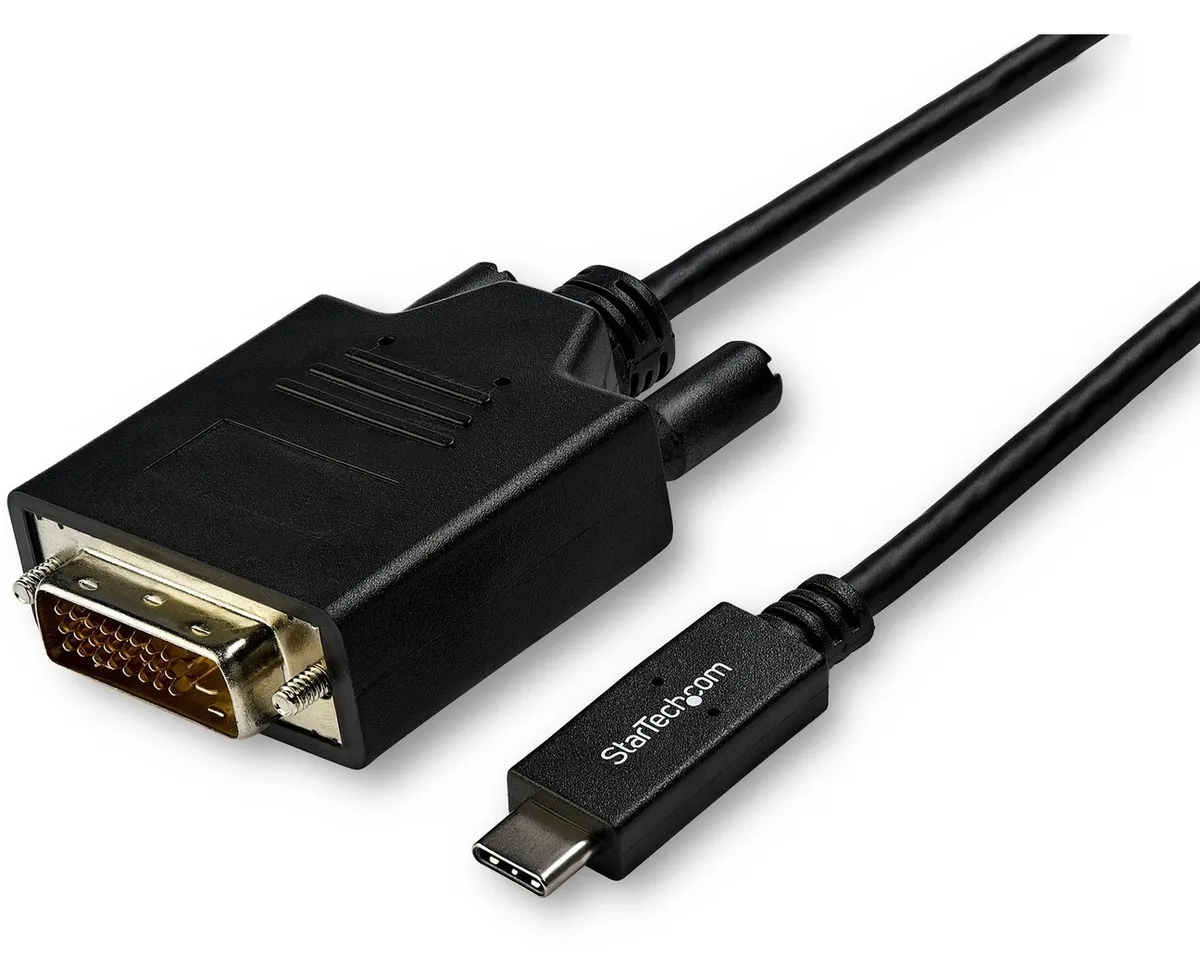
Connects a USB-C computer directly to a DVI display with a compact two-metre cable supporting up to 2560 x 1600 resolution
Model 6 ft. DVI
Versiunile tăiate există, dar nu sunt disponibile aici.
This 2 m adapter cable links a USB-C computer directly to a DVI-D display without extra adapters. The reversible USB-C plug simplifies insertion. It supports video resolutions up to 2560 x 1600 for a clear picture. Plug-and-play operation means no driver installation is required.
Users with a USB-C laptop or desktop who need to connect one DVI monitor will find this cable convenient. It suits offices and home workstations where a tidy, direct link is preferred. Builders requiring multiple display outputs or higher refresh rates should consider a dock or multi-port hub instead. The fixed cable length also limits placement flexibility for distant screens.
The integrated 2 m cable reduces clutter by replacing a separate adapter and cable pair. It draws video signal and power from the host USB-C port, freeing up other ports for peripherals. Ensure the host USB-C port supports DisplayPort Alternate Mode for video output. The DVI-D male connector mates with standard DVI-D or DVI-I monitor inputs.
| Brand | StarTech.com |
|---|---|
| Model | CDP2DVIMM2MB |
| Type | USB to DVI-D Adapters |
| Color | Black |
| Cable Length | 6 ft. |
| Specifications | Supported Resolutions: 1024 x 768 1280 x 720 (High-definition 720p) 1920 x 1080 (High-definition 1080p) 1920 x 1200 2560 x 1440 2560 x 1600 |
| Output Connector | 1 x DVI-D (25 pin) Male Output |
| Features | Reduce clutter with a compact 2 m (6 ft.) adapter cable Hassle-free connection with the reversible USB-C connector Crystal-clear picture quality with support for video resolutions up to 2560 x 1600 Plug-and-play installation No power adapter required Thunderbolt 3 port compatible |
| Weight | 0.20 lbs. |
| Package Contents | 1 x USB-C to DVI adapter cable |
| Greutate la expediere | 0.15 kg |
| Dimensiunile coletului | 208 × 119 × 34 mm |
Alte versiuni ale acestui model
Aceeași familie, memorie, radiator sau frecvență diferite — comparați înainte de a vă decide.
Yes, the USB-C port on your computer must support DisplayPort Alternate Mode to carry video signals through this CDP2DVIMM2MB cable to a DVI display.
The adapter cable supports 1920 x 1200 natively, so a legacy DVI monitor at that resolution will display correctly without forced scaling.
Open your operating system display settings and confirm the external monitor shows 2560 x 1600 as the active resolution.
Tot din acest raion
Același raion, aceeași finalizare a comenzii — opt monede și un curs blocat 30 de minute.
În ce monedă plătiți și în ce monedă citiți prețurile.
Trimis din portofelul dumneavoastră la finalizarea comenzii
Doar pentru afișare — catalogul este exprimat în dolari
Nicio monedă nu corespunde.
Alegeți limba în care vă vorbește site-ul.
Nicio limbă nu corespunde.
Prima vizită?
Aveți deja un cont?
Nu există o resetare automată: acest magazin nu trimite niciun e-mail, deci nu există niciun link de unică folosință de solicitat. Lăsați adresa în cont. Va fi tratată manual.
Cerere înregistrată
Nu veți primi nimic în căsuța de e-mail — acest magazin nu trimite niciun e-mail. Cineva se ocupă de asta manual.
V-ați amintit-o?