STARTECH
STARTECH CDP2HDMM1MB USB-C to HDMI Cable 1m 4K 30Hz
- USB to HDMI Adapters
- Black
33,99 $US39,74 $US−14%
0.00041724BTC
En stockNous acceptons la cryptomonnaie — les cryptos que vous détenez peuvent ainsi acheter du matériel réel.Payez en crypto, dépensez-la en matériel réel. Livraison assurée offerte partout dans le monde au-delà de 399 $. Cartons neutres, sans marque, expédiés depuis l’Allemagne.Livraison assurée offerte au-delà de 399 $. Votre taux est bloqué pendant 30 minutes dès l’ouverture de la caisse.Taux bloqué 30 minutes. Chaque article est scellé, son numéro de série est vérifié, et il est couvert par une garantie de 24 mois.Scellé, garanti 24 mois.


STARTECH
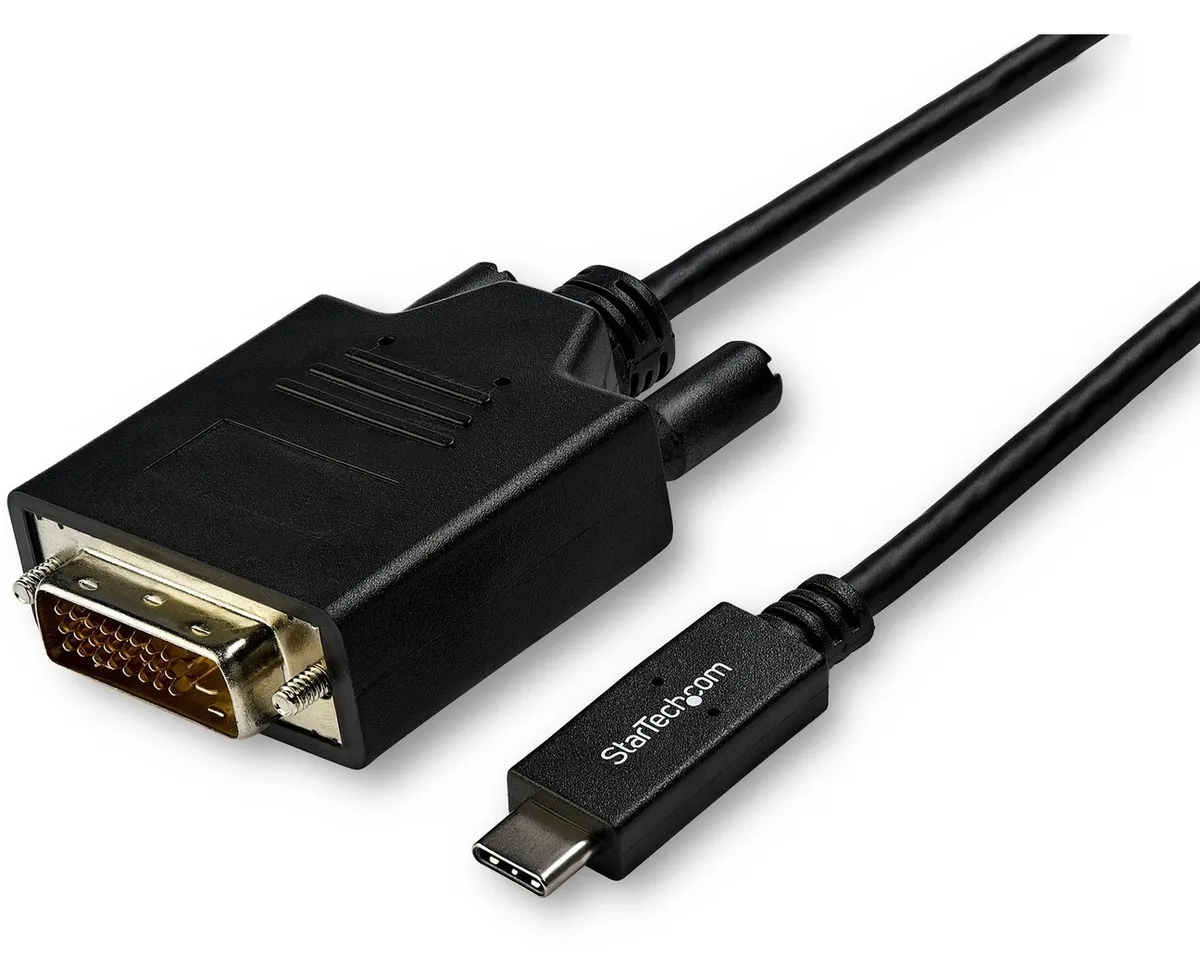
Connects a USB-C computer directly to a DVI display with a compact two-metre cable supporting up to 2560 x 1600 resolution
Model 6 ft. DVI
Les versions barrées existent, mais ne sont pas disponibles ici.
This 2 m adapter cable links a USB-C computer directly to a DVI-D display without extra adapters. The reversible USB-C plug simplifies insertion. It supports video resolutions up to 2560 x 1600 for a clear picture. Plug-and-play operation means no driver installation is required.
Users with a USB-C laptop or desktop who need to connect one DVI monitor will find this cable convenient. It suits offices and home workstations where a tidy, direct link is preferred. Builders requiring multiple display outputs or higher refresh rates should consider a dock or multi-port hub instead. The fixed cable length also limits placement flexibility for distant screens.
The integrated 2 m cable reduces clutter by replacing a separate adapter and cable pair. It draws video signal and power from the host USB-C port, freeing up other ports for peripherals. Ensure the host USB-C port supports DisplayPort Alternate Mode for video output. The DVI-D male connector mates with standard DVI-D or DVI-I monitor inputs.
| Brand | StarTech.com |
|---|---|
| Model | CDP2DVIMM2MB |
| Type | USB to DVI-D Adapters |
| Color | Black |
| Cable Length | 6 ft. |
| Specifications | Supported Resolutions: 1024 x 768 1280 x 720 (High-definition 720p) 1920 x 1080 (High-definition 1080p) 1920 x 1200 2560 x 1440 2560 x 1600 |
| Output Connector | 1 x DVI-D (25 pin) Male Output |
| Features | Reduce clutter with a compact 2 m (6 ft.) adapter cable Hassle-free connection with the reversible USB-C connector Crystal-clear picture quality with support for video resolutions up to 2560 x 1600 Plug-and-play installation No power adapter required Thunderbolt 3 port compatible |
| Weight | 0.20 lbs. |
| Package Contents | 1 x USB-C to DVI adapter cable |
| Poids d’expédition | 0.15 kg |
| Dimensions du colis | 208 × 119 × 34 mm |
Autres versions de ce modèle
Même famille, mémoire, ventirad ou fréquence différents — comparez avant de vous décider.
Yes, the USB-C port on your computer must support DisplayPort Alternate Mode to carry video signals through this CDP2DVIMM2MB cable to a DVI display.
The adapter cable supports 1920 x 1200 natively, so a legacy DVI monitor at that resolution will display correctly without forced scaling.
Open your operating system display settings and confirm the external monitor shows 2560 x 1600 as the active resolution.
Également dans ce rayon
Même rayon, même caisse — huit monnaies et un taux bloqué 30 minutes.
Ce que vous envoyez, et ce dans quoi vous lisez les prix.
Envoyé depuis votre portefeuille à la caisse
Affichage seul — le catalogue est libellé en dollars
Aucune monnaie ne correspond.
Choisissez la langue dans laquelle le site vous parle.
Aucune langue ne correspond.
Première visite ?
Vous avez déjà un compte ?
Il n’y a pas de réinitialisation automatique : cette boutique n’envoie aucun e-mail, il n’existe donc aucun lien à usage unique à demander. Laissez l’adresse sur le compte, elle sera traitée à la main.
Demande enregistrée
Rien n’arrivera dans votre boîte de réception — cette boutique n’envoie aucun e-mail. Quelqu’un s’en occupe à la main.
Vous l’avez retrouvé ?